Airline Commander - A real flight experience for PC

Airline Commander - A real flight experience for PC

Published by RORTOS

Updated October 22, 2025

Conquer routes worldwide, fly amid real traffic and build your fleet!

What's New

Version2.6.7
Size536.4 MB
What's NewWhat’s new in Airline Commander? • Improvements have been made to enhance the overall gameplay experience. • Adjustments and optimizations implemented for better performance. • Minor fixes applied to ensure smoother operation across all devices. Wishing you safe travels and smooth landings, Commanders!

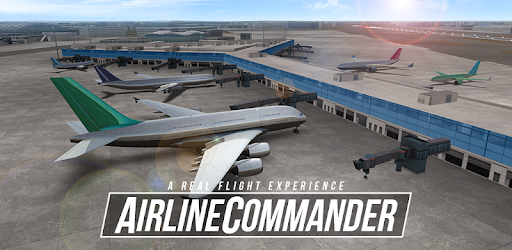
Airline Commander - A real flight experience Screenshots

Airline Commander - A real flight experience PC screenshot

About Airline Commander - A real flight experience For PC

Airline Commander - A real flight experience is an Android app developed and published by RORTOS at Google Play Store on Jul 26, 2018 for Android users. Airline Commander - A real flight experience is so popular that it has gained 1000000 installs so far and growing.

Airline Commander - A Real Flight Experience

Ever wondered how it feels to be a pilot soaring through the skies? Look no further than "Airline Commander - A real flight experience." This flight simulator game offers an exceptionally realistic piloting adventure that can quickly turn any beginner into a pro.

Engaging Gameplay with Realistic Graphics

One of the standout features of Airline Commander is its stunning graphics. The airplane visuals are highly detailed, offering an immersive experience that appeals to both kids and adults alike. Although the landscape, such as the ocean and map, could use some enhancements, the overall graphical quality is impressive.

Patiently Progress Without Spending Money

Airline Commander promotes a balanced experience by offering a great gameplay experience without compelling players to spend money. However, patience is key. The game does a fantastic job of making players feel rewarded even if they choose not to purchase any in-game items or features. For those willing to dedicate time, this game offers the thrill of unlocking new levels and progressing through various challenges.

In-Game Ads: A Mixed Bag

While the game is enjoyable, ads are a point of contention. Ideally, ads should be limited to reward-based scenarios rather than interrupting gameplay. Removing ads altogether would elevate the experience even further for users, maintaining the game’s engagement without disruptions.

Flight Variety and Challenges

Airline Commander excels in offering a variety of flight experiences. From short routes to long-haul flights like from Canada to Poland, the game keeps players engaged with multiple challenges and flight paths. The diverse range ensures that every flight feels fresh and exciting.

Perfect for Aspiring Pilots and Aviation Lovers

If you love planes and dream of a career in aviation, Airline Commander is the game for you. It serves as a wonderful introduction to the world of piloting, giving you a feel of what it’s like to command an aircraft. This makes it a top choice for those passionate about aviation and looking to take their first virtual flight.

Opportunities for Improvement

While Airline Commander is generally well-received, there are areas that could benefit from improvements. For instance, the virtual joystick could be more responsive, thus enhancing the control mechanics. Additionally, implementing a progress tracker for downloads would make the game's initial setup less frustrating.

Community and Multiplayer Features

Airline Commander could greatly benefit from adding multiplayer features. Imagine chatting and flying with fellow aviation enthusiasts around the globe! This addition would make the game not only a solo adventure but also a community experience, enriching it even further.

Available Anytime, Anywhere

One request from users is the ability to play offline. If implemented, this feature would make Airline Commander even more accessible, allowing you to enjoy your flights without needing an internet connection. Imagine flying high even while you're traveling to remote destinations!

A Game Worth Sharing

Many players find Airline Commander so enjoyable that they recommend it to friends, family, and even relatives. This alone speaks volumes about how engaging and entertaining the game is. It's not just a game; it's an experience worth sharing with everyone you know.

In summary, Airline Commander - A real flight experience is a fantastic flight simulator that brings the thrill and realism of piloting to your fingertips. With its stunning graphics, varied gameplay, and the promise of new adventures with every flight, it's a game that promises endless enjoyment.

Can I run Airline Commander - A real flight experience on PC?

Yes, you can run Airline Commander - A real flight experience on PC, but first, you will need emulator software installed on your Windows or MAC, which you can download for free. In the below video, you will find Airline Commander - A real flight experience in action. Before you install the emulator, check out the minimum and recommended system requirements to run it seamlessly. They may change depending on which version of the emulator you choose. Therefore, we recommend you download the latest version of the emulator. Below you will find three free Android emulators that we have shortlisted based on their popularity:

How to Install Airline Commander - A real flight experience on Windows PC

BlueStacks

Minimum
  • OS: Microsoft Windows 7 and above.
  • Processor: Intel or AMD Processor.
  • RAM: Your PC must have at least 4GB of RAM. (Note that having 4GB or more disk space is not a substitute for RAM)
  • Storage: 5GB Free Disk Space.
  • You must be an Administrator on your PC.
Recommended:
  • OS: Microsoft Windows 10
  • Processor: Intel or AMD Multi-Core Processor with Single Thread benchmark score > 1000.
  • Graphics: Intel/Nvidia/ATI, Onboard or Discrete controller with benchmark score >= 750.
  • Please ensure Virtualization is enabled on your PC/Laptop.
  • RAM: 8GB or higher
  • Storage: SSD (or Fusion/Hybrid Drives)
  • Internet: Broadband connection to access games, accounts and related content.

Up to date graphics drivers from Microsoft or the chipset vendor.

  • To start with, download Bluestacks from its official website. The latest version of BluesStacks is v 5, and it is around 400 MB.
  • Once the download is done, click on the Bluestacks set up file to install it on your Windows PC. Follow the on-screen instructions and install it accordingly.
  • The next step is to launch the emulator using the desktop shortcut and sign in using your Google account.
  • Now, head over to Bluestacks home screen and click on the Google Play Store icon.
  • Hit the search bar in Google Play and search for Airline Commander - A real flight experience.
  • Install Airline Commander - A real flight experience from the Play Store by clicking the Install option, which completes downloading of Airline Commander - A real flight experience on PC.

NoxPlayer

Minimum
  • Operating System: Windows XP SP3, Windows Vista, Windows 7, Windows 8, Windows 10, and DirectX 9.0c
  • Processor: At least dual-core processor, both Intel, and AMD are OK
  • Video: Supports Open GL 2.0 or above
  • Memory: 1.5 GB RAM
Recommended
  • Operating System: Windows 7, Windows 8, Windows 10
  • Processor: Multiple core processors which support VT-x or AMB-V Virtualization Technology, better performance with this function enabled
  • Video: The higher performance, the better
  • Memory: 4 GB RAM

Storage: 1 GB available under installation path, 1.5GB available hard drive space

Internet: Broadband Internet connection

  • Download NoxPlayer from the official website. The latest version of NoxPlayer is v 3, and it is around 600 MB.
  • Now install the emulator using the downloaded setup file. Just go through the on-screen instructions and install NoxPlayer on your computer or laptop.
  • After the installation process, launch the Nox Android emulator and log in using your Google account when it asks you.
  • Click on the Google Play Store icon and head over to the search bar to search Airline Commander - A real flight experience. Once found, click on the Install button to install Airline Commander - A real flight experience for PC.
  • If you do not find Airline Commander - A real flight experience on Google Play Store or if you want to skip logging in to Google, you can sideload APK (download the .APK file from this page and open it with NoxPlayer).
  • Launch Airline Commander - A real flight experience from home-screen and start playing it on PC right away!

MEmu

Minimum
  • 2 cores x86/x86_64 Processor (Intel or AMD CPU)
  • WinXP SP3 / Win7 / Win8 / Win10 (Not recommended to run on Server/Enterprise)
  • Latest Windows DirectX 11 / Graphics driver with OpenGL 2.0
  • Hardware Virtualization Technology (Intel VT-x/AMD-V) shall be enabled in BIOS
  • 2GB of RAM (4GB for x64 system)
  • 5GB of hard disk free space
Recommended
  • OS: Microsoft Windows 10 with VT Enabled
  • CPU: Single Thread PassMark score > 1500 (Intel/AMD Multi-Core).
  • Graphics: Intel/Nvidia/ATI, Onboard or Discrete controller with PassMark score > 750.
  • Latest Windows DirectX 11 / Graphics driver with OpenGL 4.5 or higher
  • RAM: 8GB or higher
  • HDD: SSD, 10GB of hard disk free space
  • Internet: Broadband connection with low latency for FPS games
  • Download MEmu Play from the official website. The latest version of NoxPlayer is v 7.5.
  • When the download is completed, install the MEmu emulator on your PC. Follow the on-screen instructions and keep on clicking the Next button until the final step.
  • Now, using the desktop shortcut, look for the MEmu Play emulator and launch it. Once done, it will ask you to log in using your Google account, proceed with the same.
  • MEmu Play will ask you to log in using your Google account. When you log in, it will sync your Google account to MEmu Play. Launch the Google Play Store by clicking on the icon and search for Airline Commander - A real flight experience.
  • Click on the Install button once you find Airline Commander - A real flight experience from the search results. You can also sideload APK (download the .APK file from this page and open it with MEmu) if you want to skip above step.
  • After the installation of Airline Commander - A real flight experience, you're all set to use the app on PC!

Regardless of which Android emulator you install, the steps to install, configure, and running the Airline Commander - A real flight experience app on PC are the same.

Download Airline Commander - A real flight experience For PC