Published by Maleo
Updated August 9, 2025
Bus simulator game with highly realistic 3D Indonesian environment and busses!
| Version | 4.5.2 |
| Size | 887.0 MB |
| What's New | 4.5.2 - Driver hands on steering wheel - Various bug fixes |
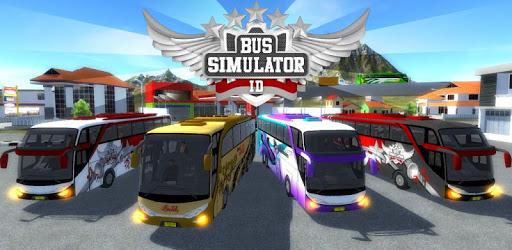
Bus Simulator Indonesia is an Android app developed and published by Maleo at Google Play Store on Mar 27, 2017 for Android users. Bus Simulator Indonesia is so popular that it has gained 225381081 installs so far and growing.
Bus Simulator Indonesia, commonly known as BUSSID, offers a unique and realistic bus driving experience. The game allows players to fully immerse themselves in the life of a bus driver in Indonesia. With its impressive 3D environment and Indonesian buses, BUSSID has become a popular choice for both casual players and bus-driving enthusiasts.
The standout feature of Bus Simulator Indonesia is its authentic Indonesian environment. From bustling city streets to serene off-road landscapes, the game captures the essence of bus driving in Indonesia. Players are able to enjoy beautiful scenery that includes mountains, off-road areas, and dynamic weather conditions.
The game also includes various Indonesian buses, each with its own unique design and features. Players have the ability to customize their buses with different liveries, adding a personal touch to their vehicles. The control system is user-friendly and intuitive, making it easy for players of all skill levels to enjoy the game.
Bus Simulator Indonesia stands out with its customizable features. Players can design their own liveries, which allows for a unique visual experience. Whether you want a traditional look or something more modern, the game provides options to match your preferences.
Inside the bus, the game also allows for improvements in graphics and interior realism. Small details like the ability to open or close the driver’s door, add lights inside the bus, and include a conductor enhance the overall gaming experience.
One of the highlights of BUSSID is its interactive gameplay. Players are not only responsible for driving but also for the overall bus operations. This includes picking up passengers, navigating through traffic, and even taking breaks to manage the driver's well-being.
The game includes various weather conditions that can be adjusted according to the player’s preference. This adds another layer of realism and challenge. Whether it's a sunny day or a rainy night, the driving experience changes, making the game even more engaging.
Bus Simulator Indonesia offers social gameplay options where players can interact with friends and other players. The multiplayer feature allows for a shared driving experience, though some players may experience connectivity issues. Regardless, the option to drive with friends adds a collaborative aspect that many players appreciate.
While Bus Simulator Indonesia provides an immersive and enjoyable experience, there are areas for improvement. The game could benefit from optimized performance for lower-range devices to reduce lag. Additionally, fixing minor glitches, like unrewarding bridges in specific locations, would enhance the player experience.
Overall, Bus Simulator Indonesia continues to receive accolades for its authentic environment and engaging gameplay. Despite some areas for improvement, the game remains a favorite among bus driving enthusiasts who enjoy a mixture of realism and customization.
Yes, you can run Bus Simulator Indonesia on PC, but first, you will need emulator software installed on your Windows or MAC, which you can download for free. In the below video, you will find Bus Simulator Indonesia in action. Before you install the emulator, check out the minimum and recommended system requirements to run it seamlessly. They may change depending on which version of the emulator you choose. Therefore, we recommend you download the latest version of the emulator. Below you will find three free Android emulators that we have shortlisted based on their popularity:
Up to date graphics drivers from Microsoft or the chipset vendor.
Storage: 1 GB available under installation path, 1.5GB available hard drive space
Internet: Broadband Internet connection
Regardless of which Android emulator you install, the steps to install, configure, and running the Bus Simulator Indonesia app on PC are the same.