Grand Truck Simulator for PC

Grand Truck Simulator for PC

Published by Pulsar Gamesoft

Updated November 10, 2025

This is the truck sim for mobile devices

What's New

Version1.13
Size49.7 MB
What's Newnew multiplayer pc serverfixed multiplayer bugsenabled glasses truck modenabled map skins modenabled city names mod

Grand Truck Simulator Screenshots

Grand Truck Simulator PC screenshot

About Grand Truck Simulator For PC

Grand Truck Simulator is an Android app developed and published by Pulsar Gamesoft at Google Play Store on Oct 9, 2015 for Android users. Grand Truck Simulator is so popular that it has gained 10000000 installs so far and growing.

Grand Truck Simulator: An Engaging Truck-Driving Experience

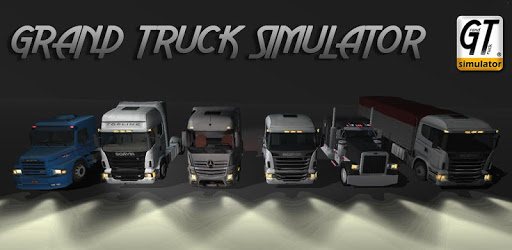
Grand Truck Simulator is a game that has captured the hearts of many truck simulation enthusiasts. The game's realistic graphics and challenging driving mechanics make it an exciting choice for anyone interested in truck driving. Whether you are a seasoned driver or just starting, there is something for everyone in this immersive simulator.

Stunning Graphics and Realism

One of the standout features of Grand Truck Simulator is its impressive graphics. The game offers visually pleasing trucks and environments, making you feel like you're actually behind the wheel. The realistic details, from the paint on the trucks to the dirt roads, add a touch of authenticity that enhances the overall experience.

Variety of Trucks

The game provides a wide selection of trucks for players to choose from. You can buy different models, including popular brands like Volvo. This variety adds an extra layer of enjoyment as you can switch between different trucks based on your preferences. Each truck comes with its own unique handling characteristics, keeping the gameplay fresh and exciting.

Expansive Maps and New Towns

Grand Truck Simulator features several cities and towns to navigate, although players have expressed a desire for more locations. More cities and diverse routes would certainly add to the game's appeal. Imagine cruising through new towns, exploring scenic routes, and taking on new challenges in unfamiliar territory.

Weather and Atmospheric Conditions

In addition to its realistic graphics, the game could be even more engaging with varying weather conditions. Imagine driving through foggy mornings, rainy afternoons, or clear starry nights. Such atmospheric changes could elevate the driving experience, making each trip unique and challenging.

Customization Options

Grand Truck Simulator offers some customization options, but there is always room for more. Enhanced customization features would enable players to tweak their trucks to their liking. From engine modifications to tire upgrades, more options would allow for a more personalized driving experience.

Interactive Gameplay Elements

Another exciting addition would be more interactive gameplay elements. For example, adding the ability to step out of your truck to pump gas or perform oil changes would make the game more immersive. Such features would make Grand Truck Simulator a more comprehensive and engaging simulation experience.

Improved Multiplayer Mode

Multiplayer functionality is another crucial area for improvement. The excitement of driving with or against friends adds a layer of competition and cooperation that is hard to replicate. Improved connectivity and smoother multiplayer interactions would make the game even more enjoyable.

Job Options On the Go

Currently, players can take on various driving jobs, but the process could be streamlined. Being able to accept jobs while on the road would save time and make the gameplay flow more effortlessly. This change would keep players engaged and reduce downtime between missions.

Traffic and AI Enhancements

The traffic system and AI are already quite engaging, but there is always room for improvement. Adding smarter AI and more dynamic traffic patterns could make the game more challenging and realistic. Imagine navigating through a bustling city with well-behaved or even unpredictable traffic; the experience would certainly be more thrilling.

Expansion Packs and Future Updates

The developers are continually working to improve Grand Truck Simulator. Future updates could bring about many of the enhancements mentioned, providing an even richer experience for players. New trucks, more cities, and improved gameplay mechanics are all exciting possibilities that fans are eagerly awaiting.

Overall, Grand Truck Simulator offers an immersive and engaging truck-driving experience. With its realistic graphics, variety of trucks, and challenging gameplay, it remains a favorite among truck simulation enthusiasts. Future updates and expansions promise to make it even better, keeping players coming back for more.

Can I run Grand Truck Simulator on PC?

Yes, you can run Grand Truck Simulator on PC, but first, you will need emulator software installed on your Windows or MAC, which you can download for free. In the below video, you will find Grand Truck Simulator in action. Before you install the emulator, check out the minimum and recommended system requirements to run it seamlessly. They may change depending on which version of the emulator you choose. Therefore, we recommend you download the latest version of the emulator. Below you will find three free Android emulators that we have shortlisted based on their popularity:

How to Install Grand Truck Simulator on Windows PC

BlueStacks

Minimum
  • OS: Microsoft Windows 7 and above.
  • Processor: Intel or AMD Processor.
  • RAM: Your PC must have at least 4GB of RAM. (Note that having 4GB or more disk space is not a substitute for RAM)
  • Storage: 5GB Free Disk Space.
  • You must be an Administrator on your PC.
Recommended:
  • OS: Microsoft Windows 10
  • Processor: Intel or AMD Multi-Core Processor with Single Thread benchmark score > 1000.
  • Graphics: Intel/Nvidia/ATI, Onboard or Discrete controller with benchmark score >= 750.
  • Please ensure Virtualization is enabled on your PC/Laptop.
  • RAM: 8GB or higher
  • Storage: SSD (or Fusion/Hybrid Drives)
  • Internet: Broadband connection to access games, accounts and related content.

Up to date graphics drivers from Microsoft or the chipset vendor.

  • To start with, download Bluestacks from its official website. The latest version of BluesStacks is v 5, and it is around 400 MB.
  • Once the download is done, click on the Bluestacks set up file to install it on your Windows PC. Follow the on-screen instructions and install it accordingly.
  • The next step is to launch the emulator using the desktop shortcut and sign in using your Google account.
  • Now, head over to Bluestacks home screen and click on the Google Play Store icon.
  • Hit the search bar in Google Play and search for Grand Truck Simulator.
  • Install Grand Truck Simulator from the Play Store by clicking the Install option, which completes downloading of Grand Truck Simulator on PC.

NoxPlayer

Minimum
  • Operating System: Windows XP SP3, Windows Vista, Windows 7, Windows 8, Windows 10, and DirectX 9.0c
  • Processor: At least dual-core processor, both Intel, and AMD are OK
  • Video: Supports Open GL 2.0 or above
  • Memory: 1.5 GB RAM
Recommended
  • Operating System: Windows 7, Windows 8, Windows 10
  • Processor: Multiple core processors which support VT-x or AMB-V Virtualization Technology, better performance with this function enabled
  • Video: The higher performance, the better
  • Memory: 4 GB RAM

Storage: 1 GB available under installation path, 1.5GB available hard drive space

Internet: Broadband Internet connection

  • Download NoxPlayer from the official website. The latest version of NoxPlayer is v 3, and it is around 600 MB.
  • Now install the emulator using the downloaded setup file. Just go through the on-screen instructions and install NoxPlayer on your computer or laptop.
  • After the installation process, launch the Nox Android emulator and log in using your Google account when it asks you.
  • Click on the Google Play Store icon and head over to the search bar to search Grand Truck Simulator. Once found, click on the Install button to install Grand Truck Simulator for PC.
  • If you do not find Grand Truck Simulator on Google Play Store or if you want to skip logging in to Google, you can sideload APK (download the .APK file from this page and open it with NoxPlayer).
  • Launch Grand Truck Simulator from home-screen and start playing it on PC right away!

MEmu

Minimum
  • 2 cores x86/x86_64 Processor (Intel or AMD CPU)
  • WinXP SP3 / Win7 / Win8 / Win10 (Not recommended to run on Server/Enterprise)
  • Latest Windows DirectX 11 / Graphics driver with OpenGL 2.0
  • Hardware Virtualization Technology (Intel VT-x/AMD-V) shall be enabled in BIOS
  • 2GB of RAM (4GB for x64 system)
  • 5GB of hard disk free space
Recommended
  • OS: Microsoft Windows 10 with VT Enabled
  • CPU: Single Thread PassMark score > 1500 (Intel/AMD Multi-Core).
  • Graphics: Intel/Nvidia/ATI, Onboard or Discrete controller with PassMark score > 750.
  • Latest Windows DirectX 11 / Graphics driver with OpenGL 4.5 or higher
  • RAM: 8GB or higher
  • HDD: SSD, 10GB of hard disk free space
  • Internet: Broadband connection with low latency for FPS games
  • Download MEmu Play from the official website. The latest version of NoxPlayer is v 7.5.
  • When the download is completed, install the MEmu emulator on your PC. Follow the on-screen instructions and keep on clicking the Next button until the final step.
  • Now, using the desktop shortcut, look for the MEmu Play emulator and launch it. Once done, it will ask you to log in using your Google account, proceed with the same.
  • MEmu Play will ask you to log in using your Google account. When you log in, it will sync your Google account to MEmu Play. Launch the Google Play Store by clicking on the icon and search for Grand Truck Simulator.
  • Click on the Install button once you find Grand Truck Simulator from the search results. You can also sideload APK (download the .APK file from this page and open it with MEmu) if you want to skip above step.
  • After the installation of Grand Truck Simulator, you're all set to use the app on PC!

Regardless of which Android emulator you install, the steps to install, configure, and running the Grand Truck Simulator app on PC are the same.
Download Grand Truck Simulator For PC