X-Plane 10 Flight Simulator for PC

X-Plane 10 Flight Simulator for PC

Published by Laminar Research

Updated September 2, 2025

It's not a game, it's a simulator. Come experience why real pilots fly X-Plane.

What's New

Version12.3.6
Size1.3 GB
What's NewNew HD badges for our high-quality aircraftBug fixes and improvements.

X-Plane 10 Flight Simulator Screenshots

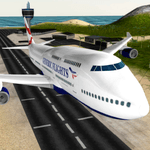
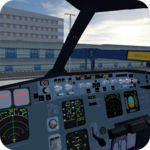
X-Plane 10 Flight Simulator PC screenshot

About X-Plane 10 Flight Simulator For PC

X-Plane 10 Flight Simulator is an Android app developed and published by Laminar Research at Google Play Store on Sep 29, 2015 for Android users. X-Plane 10 Flight Simulator is so popular that it has gained 1000000 installs so far and growing.

X-Plane 10 Flight Simulator: A Realistic Flying Experience

X-Plane 10 Flight Simulator stands out as one of the most realistic and engaging flight simulators available on mobile devices. This is not just a game, but a full-fledged simulator that offers a unique and detailed flying experience. Whether you're a seasoned pilot or a curious beginner, X-Plane 10 Flight Simulator has something to offer for everyone.

Realism at Its Best

One of the key highlights of X-Plane 10 Flight Simulator is its remarkable realism. Every button in the cockpit works just like in a real airplane, particularly in the Boeing 737-800. This attention to detail sets it apart from other mobile simulators. Users can engage with various switches and systems, giving a true-to-life feel of piloting an aircraft.

Additionally, the simulator introduces random malfunctions, such as stuck power levers or faulty fuel systems, adding another layer of realism. These simulated emergencies keep players on their toes, offering opportunities to practice emergency procedures and land at alternate airports. This unpredictability translates into a dynamic and educational flying experience.

Stress Relief and Enjoyment

X-Plane 10 Flight Simulator is also highly praised for its ability to provide a relaxed and enjoyable flying experience. There are no ads to interrupt the serene journey through the skies, making it an excellent choice for stress relief. The intuitive controls and immersive graphics allow players to lose themselves in the simulation, finding relaxation and fun.

Graphics and Performance

While the graphics of X-Plane 10 Flight Simulator might not be on par with some desktop flight simulators, they are still exceptional for a mobile platform. Players have the option to adjust the graphics settings to suit their device's capabilities. High-end devices can handle the game at high settings, showcasing the intricate details and smooth visuals the simulator has to offer.

This flexibility ensures that a wide range of devices can run X-Plane 10 Flight Simulator efficiently. Whether you have a high-tech phone or a more basic model, you can enjoy the game by tweaking the settings accordingly.

Aircraft and Add-Ons

X-Plane 10 Flight Simulator comes with a variety of aircraft options, from smaller planes like Cessnas to larger ones like the Boeing 737. While the base game offers a decent selection, some users wish for more aircraft, especially models like the Boeing 747, Boeing 787, or Airbus A350. The global scenery may be considered a premium feature, but the package provides enough content to keep aviation enthusiasts engaged.

Quality and Reliability

The history of X-Plane as a flight simulator is notable. The commitment to realistic simulation is evident in every aspect of X-Plane 10 Flight Simulator. The game's creator has maintained a high standard of quality, evident in the ongoing availability and popularity of the game. Players can appreciate the extensive work and expertise that has gone into developing such a polished simulator.

In conclusion, X-Plane 10 Flight Simulator is an outstanding choice for those looking to experience the thrill and intricacies of flying. Its realistic controls, absence of ads, and wide aircraft selection make it a standout simulator for mobile devices. Whether you're looking to relax or hone your piloting skills, X-Plane 10 Flight Simulator is sure to provide hours of engaging and immersive fun.

Can I run X-Plane 10 Flight Simulator on PC?

Yes, you can run X-Plane 10 Flight Simulator on PC, but first, you will need emulator software installed on your Windows or MAC, which you can download for free. In the below video, you will find X-Plane 10 Flight Simulator in action. Before you install the emulator, check out the minimum and recommended system requirements to run it seamlessly. They may change depending on which version of the emulator you choose. Therefore, we recommend you download the latest version of the emulator. Below you will find three free Android emulators that we have shortlisted based on their popularity:

How to Install X-Plane 10 Flight Simulator on Windows PC

BlueStacks

Minimum
  • OS: Microsoft Windows 7 and above.
  • Processor: Intel or AMD Processor.
  • RAM: Your PC must have at least 4GB of RAM. (Note that having 4GB or more disk space is not a substitute for RAM)
  • Storage: 5GB Free Disk Space.
  • You must be an Administrator on your PC.
Recommended:
  • OS: Microsoft Windows 10
  • Processor: Intel or AMD Multi-Core Processor with Single Thread benchmark score > 1000.
  • Graphics: Intel/Nvidia/ATI, Onboard or Discrete controller with benchmark score >= 750.
  • Please ensure Virtualization is enabled on your PC/Laptop.
  • RAM: 8GB or higher
  • Storage: SSD (or Fusion/Hybrid Drives)
  • Internet: Broadband connection to access games, accounts and related content.

Up to date graphics drivers from Microsoft or the chipset vendor.

  • To start with, download Bluestacks from its official website. The latest version of BluesStacks is v 5, and it is around 400 MB.
  • Once the download is done, click on the Bluestacks set up file to install it on your Windows PC. Follow the on-screen instructions and install it accordingly.
  • The next step is to launch the emulator using the desktop shortcut and sign in using your Google account.
  • Now, head over to Bluestacks home screen and click on the Google Play Store icon.
  • Hit the search bar in Google Play and search for X-Plane 10 Flight Simulator.
  • Install X-Plane 10 Flight Simulator from the Play Store by clicking the Install option, which completes downloading of X-Plane 10 Flight Simulator on PC.

NoxPlayer

Minimum
  • Operating System: Windows XP SP3, Windows Vista, Windows 7, Windows 8, Windows 10, and DirectX 9.0c
  • Processor: At least dual-core processor, both Intel, and AMD are OK
  • Video: Supports Open GL 2.0 or above
  • Memory: 1.5 GB RAM
Recommended
  • Operating System: Windows 7, Windows 8, Windows 10
  • Processor: Multiple core processors which support VT-x or AMB-V Virtualization Technology, better performance with this function enabled
  • Video: The higher performance, the better
  • Memory: 4 GB RAM

Storage: 1 GB available under installation path, 1.5GB available hard drive space

Internet: Broadband Internet connection

  • Download NoxPlayer from the official website. The latest version of NoxPlayer is v 3, and it is around 600 MB.
  • Now install the emulator using the downloaded setup file. Just go through the on-screen instructions and install NoxPlayer on your computer or laptop.
  • After the installation process, launch the Nox Android emulator and log in using your Google account when it asks you.
  • Click on the Google Play Store icon and head over to the search bar to search X-Plane 10 Flight Simulator. Once found, click on the Install button to install X-Plane 10 Flight Simulator for PC.
  • If you do not find X-Plane 10 Flight Simulator on Google Play Store or if you want to skip logging in to Google, you can sideload APK (download the .APK file from this page and open it with NoxPlayer).
  • Launch X-Plane 10 Flight Simulator from home-screen and start playing it on PC right away!

MEmu

Minimum
  • 2 cores x86/x86_64 Processor (Intel or AMD CPU)
  • WinXP SP3 / Win7 / Win8 / Win10 (Not recommended to run on Server/Enterprise)
  • Latest Windows DirectX 11 / Graphics driver with OpenGL 2.0
  • Hardware Virtualization Technology (Intel VT-x/AMD-V) shall be enabled in BIOS
  • 2GB of RAM (4GB for x64 system)
  • 5GB of hard disk free space
Recommended
  • OS: Microsoft Windows 10 with VT Enabled
  • CPU: Single Thread PassMark score > 1500 (Intel/AMD Multi-Core).
  • Graphics: Intel/Nvidia/ATI, Onboard or Discrete controller with PassMark score > 750.
  • Latest Windows DirectX 11 / Graphics driver with OpenGL 4.5 or higher
  • RAM: 8GB or higher
  • HDD: SSD, 10GB of hard disk free space
  • Internet: Broadband connection with low latency for FPS games
  • Download MEmu Play from the official website. The latest version of NoxPlayer is v 7.5.
  • When the download is completed, install the MEmu emulator on your PC. Follow the on-screen instructions and keep on clicking the Next button until the final step.
  • Now, using the desktop shortcut, look for the MEmu Play emulator and launch it. Once done, it will ask you to log in using your Google account, proceed with the same.
  • MEmu Play will ask you to log in using your Google account. When you log in, it will sync your Google account to MEmu Play. Launch the Google Play Store by clicking on the icon and search for X-Plane 10 Flight Simulator.
  • Click on the Install button once you find X-Plane 10 Flight Simulator from the search results. You can also sideload APK (download the .APK file from this page and open it with MEmu) if you want to skip above step.
  • After the installation of X-Plane 10 Flight Simulator, you're all set to use the app on PC!

Regardless of which Android emulator you install, the steps to install, configure, and running the X-Plane 10 Flight Simulator app on PC are the same.

Download X-Plane 10 Flight Simulator For PC