Published by TeaPOT Games
Updated November 21, 2026
The most realistic V22 Osprey flight simulator [NOTE: This is NOT a ARCADE game]
| Version | 1.27 |
| Size | 28.8 MB |
| What's New | * game flow improved* new icon |
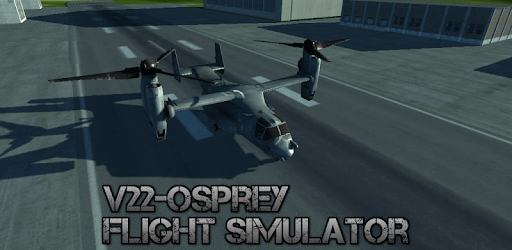
V22 Osprey Flight Simulator is an Android app developed and published by TeaPOT Games at Google Play Store on Jul 9, 2014 for Android users. V22 Osprey Flight Simulator is so popular that it has gained 1000000 installs so far and growing.
Adventure awaits in the skies with the V22 Osprey Flight Simulator, a captivating game that brings the experience of flying to your fingertips. If you're a fan of flight simulators, this is a game you'll want to explore. It perfectly balances realism and entertainment, making it easy for beginners to learn while still offering challenges for seasoned pilots.
At first glance, flying the V22 Osprey might seem daunting. However, with a little practice, you'll find it straightforward and rewarding. The game offers a variety of practice levels, helping you become more confident with each flight. It's designed in a way that ensures even those new to flight simulators can quickly pick up the basics and start enjoying the thrill of flight.
One of the standout features of the V22 Osprey Flight Simulator is its excellent graphics. The visual detail is impressive, making the flying experience feel lifelike. From the panoramic landscapes to the intricate details of the aircraft, everything is beautifully rendered. The sound effects complement the visuals perfectly, adding another layer of realism to your flights.
The game offers a variety of camera angles, providing an immersive flying experience. You can view your aircraft from different perspectives, making it easier to navigate through the skies. Although some might wish for a cockpit view, the multiple angles available still provide ample opportunities to enjoy the game fully.
The controls in V22 Osprey Flight Simulator are easy to handle and don't require extensive learning. While the game includes tutorials that help you master the controls, they're intuitive enough to get you flying in no time. The flight model strikes a balance between simplicity and realism, ensuring that your aircraft responds accurately to your inputs without making the game overly difficult.
If you love helicopter games, this simulator is a perfect fit. The V22 Osprey, with its unique tiltrotor, offers a different kind of flying experience that's both challenging and exciting. The controls are designed to offer a risk-free environment for practicing complex maneuvers while enjoying the game.
As great as the V22 Osprey Flight Simulator is, there are a few areas that could use enhancement. Some players have noted the need for better calibration options, especially when tilting their devices. Additionally, while the missions are exciting, they can be completed relatively quickly, leaving players wanting more.
While the game runs smoothly on most devices, some older models might struggle with performance. If you encounter any lag or issues, it's worth checking if the game is compatible with your device. For those who enjoy playing on a PC, there's hope that a version may be developed in the future, offering even more ways to experience this fantastic simulator.
Overall, V22 Osprey Flight Simulator offers hours of fun, bringing the joy of flying right to your device. Its combination of realistic graphics, engaging sound, and user-friendly controls make it a must-try for anyone interested in flight simulation. Download the game and soar through the skies—you won't be disappointed!
Yes, you can run V22 Osprey Flight Simulator on PC, but first, you will need emulator software installed on your Windows or MAC, which you can download for free. In the below video, you will find V22 Osprey Flight Simulator in action. Before you install the emulator, check out the minimum and recommended system requirements to run it seamlessly. They may change depending on which version of the emulator you choose. Therefore, we recommend you download the latest version of the emulator. Below you will find three free Android emulators that we have shortlisted based on their popularity:
Up to date graphics drivers from Microsoft or the chipset vendor.
Storage: 1 GB available under installation path, 1.5GB available hard drive space
Internet: Broadband Internet connection
Regardless of which Android emulator you install, the steps to install, configure, and running the V22 Osprey Flight Simulator app on PC are the same.