Published by Social Quantum Ltd
Updated October 11, 2025
Build the city of your dreams!
| Version | 14.3.0 |
| Size | 332.9 MB |
| What's New | Mayors, Christmas magic has come to Megapolis! We've added festive buildings to special sets to make your city sparkle with winter holiday lights. And along with them, New Year Project Passes are launching with exclusive themed rewards. We wish you a Merry Christmas and Happy New Year! May these holidays bring prosperity to your city, and joy and inspiration to you! |
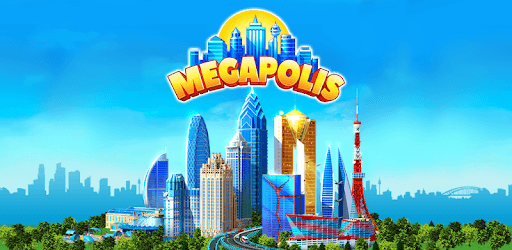
Megapolis is an Android app developed and published by Social Quantum Ltd at Google Play Store on Nov 30, 2012 for Android users. Megapolis is so popular that it has gained 114017428 installs so far and growing.
Megapolis, a highly engaging city-building game, has stood the test of time. Whether you're a newbie or a returning player, this game offers a captivating experience filled with endless possibilities. Let’s dive into what makes Megapolis so unique and enjoyable.
One of the most attractive features of Megapolis is the intricate city-building mechanics. From constructing towering skyscrapers to managing utilities, parks, and more, there's always something to keep you busy. The game demands patience as some buildings take time to complete, but the wait often adds to the satisfaction once they are done.
Megapolis operates on two main currencies: coins and megabucks. Coins can be earned relatively easily, but acquiring megabucks, the premium currency, can be more challenging. Premium items and speed-ups can be purchased using megabucks, though they are generally sold for real money at high prices. This system may slow down your progress if you prefer not to spend real money, but it doesn't diminish the fun of the game.
Megapolis frequently updates, adding new content and features. While these updates keep the game fresh, they may sometimes introduce glitches. Players have reported issues such as longer loading times and disappearing buildings after updates. However, these are usually temporary and are addressed in subsequent patches.
For long-time players, starting fresh in Megapolis can be a trip down memory lane. The game has evolved significantly over the years, incorporating new content and improved graphics. Whether you played years ago or are just getting started, the core gameplay remains as entertaining as ever.
The graphics in Megapolis are delightful, with a lot of attention to detail. Watching the tiny citizens bustling around their city can be oddly satisfying, almost like observing a bustling ant farm. These visual elements add to the overall immersive experience.
Megapolis not only entertains but also challenges your strategic thinking and patience. The game can be slow-paced, especially if you decide not to spend money. However, for many, this slower pace is one of the game's charms. It allows for thoughtful planning and the gradual growth of your virtual city.
Like many complex games, Megapolis isn't immune to bugs and glitches, especially after updates. These can range from minor annoyances like slower loading times, to more significant issues like disappearing buildings or game crashes. However, these problems are usually temporary and get resolved over time, so a little patience can go a long way.
Megapolis benefits from a strong community of dedicated players. Engaging with other players, sharing tips, and offering support can enhance your gaming experience. Many players find that the community helps them navigate challenges and discover exciting new aspects of the game.
The music and sound effects in Megapolis add an extra layer of immersion. Players may notice changes in the soundtrack with updates, and while this can be a mixed bag, overall, the audio complements the visual experience beautifully.
Megapolis is a building game that offers complexity and charm. With its detailed graphics, intricate city management mechanics, and a community to support you, it's no wonder this game has remained popular for so long. Dive into Megapolis and start building the city of your dreams.
Yes, you can run Megapolis on PC, but first, you will need emulator software installed on your Windows or MAC, which you can download for free. In the below video, you will find Megapolis in action. Before you install the emulator, check out the minimum and recommended system requirements to run it seamlessly. They may change depending on which version of the emulator you choose. Therefore, we recommend you download the latest version of the emulator. Below you will find three free Android emulators that we have shortlisted based on their popularity:
Up to date graphics drivers from Microsoft or the chipset vendor.
Storage: 1 GB available under installation path, 1.5GB available hard drive space
Internet: Broadband Internet connection
Regardless of which Android emulator you install, the steps to install, configure, and running the Megapolis app on PC are the same.