Rise of Civilizations for PC

Rise of Civilizations for PC

Published by Lilith Games

Updated April 1, 2026

Strategy Lives Here

What's New

Version1.1.3.18
Size1.3 GB
What's New1. Spring Festival Event Series2. Lost Kingdom and Season of Conquest Changes3. Control and Combat QoL Optimizations

Rise of Civilizations Screenshots

Rise of Civilizations PC screenshot

About Rise of Civilizations For PC

Rise of Civilizations is an Android app developed and published by Lilith Games at Google Play Store on May 24, 2018 for Android users. Rise of Civilizations is so popular that it has gained 5000000 installs so far and growing.

Rise of Civilizations: Exploring the Fascination

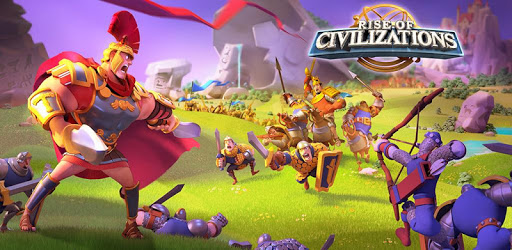
Embark on an epic journey with Rise of Civilizations, a game that allows players to delve into the fascinating world of historical imperiums and alliances. The game stands out for its rich maps, diverse heroes, and captivating player vs. player (PVP) dynamics.

A World Full of Adventures

When you step into the world of Rise of Civilizations, you are welcomed by an expansive map filled with endless possibilities. Each corner of the map holds potential for new challenges, alliances, and conquests. The detail and variety keep the gameplay exciting and engaging for all players.

Great Heroes to Lead Your Armies

One of the standout features of the game is its roster of heroes. Each hero brings unique abilities and strengths to the table, allowing players to strategize and select the perfect team. The fun lies in upgrading and powering up these heroes, making them unstoppable forces in battles.

Exciting PVP and Alliance Wars

The PVP (Player vs. Player) aspect adds a layer of thrill to Rise of Civilizations. Alliance wars encourage collaboration as players need to work together, plan strategies, and fight for dominance. This not only builds a sense of community but also makes each victory even sweeter.

A Name To Recommend

If you enjoy games that combine strategy, history, and dynamic gameplay, Rise of Civilizations is definitely worth a try. The game is particularly balanced between free-to-play (F2P) and pay-to-win (P2W) players. While free players may have to grind a bit harder, the overall gameplay remains fair and entertaining.

Incorporating Historical Civilizations

What's truly appealing is the way the game incorporates historical elements. The addition of Greek civilizations, for instance, brings stories of Sparta and Athens to life. Such features make the game not only fun but also educational, connecting players with the richness of history.

Beautiful Graphics and Updates

The visual appeal of the game cannot be overstated. The graphics are stunning and beautifully detailed, enhancing the overall gaming experience. Regular updates ensure that the game stays fresh and interesting, continually bringing in new content and features.

Keeping Players Engaged

Rise of Civilizations is designed to keep players engaged and invested. The game’s mechanics and features are so robust, you'll find yourself coming back for more, even after taking breaks. From participation in tournaments to daily quests, there’s always something to do.

Advanced Technology for Supreme Gameplay

The technology utilized in the game highlights its sophistication. The use of advanced algorithms and seamless interface makes the experience smooth and enjoyable. The commanders' skills, the strategic planning, and the immersive battles all contribute to an invigorating gaming session.

A Plan for Success

Success in Rise of Civilizations requires a good plan. Players need to focus on upgrading their heroes, collecting and utilizing keys, and selecting the right civilizations to maximize their potential. The complexity and depth of planning make the game challenging and rewarding.

Voice Acting and Aesthetics

The quality of voice acting adds another layer of immersion. Hearing well-accented voices enhances the storytelling and makes the gameplay even more engaging. The aesthetical choices are on point, making it a joy to explore and conquer new territories.

Play and Progress

Ultimately, Rise of Civilizations is more than just a game; it’s a continuous journey. With each passing day, unlocking new levels and achieving milestones becomes an intrinsic part of the experience. The game supports both short-term goals and long-term ambitions, fostering a fulfilling gaming environment.

In conclusion, Rise of Civilizations encapsulates everything you could want in a strategy game. Whether you are a history buff, a gaming enthusiast, or just someone looking for an engaging pastime, the game offers a rich blend of fun, strategy, and historical depth.

Can I run Rise of Civilizations on PC?

Yes, you can run Rise of Civilizations on PC, but first, you will need emulator software installed on your Windows or MAC, which you can download for free. In the below video, you will find Rise of Civilizations in action. Before you install the emulator, check out the minimum and recommended system requirements to run it seamlessly. They may change depending on which version of the emulator you choose. Therefore, we recommend you download the latest version of the emulator. Below you will find three free Android emulators that we have shortlisted based on their popularity:

How to Install Rise of Civilizations on Windows PC

BlueStacks

Minimum
  • OS: Microsoft Windows 7 and above.
  • Processor: Intel or AMD Processor.
  • RAM: Your PC must have at least 4GB of RAM. (Note that having 4GB or more disk space is not a substitute for RAM)
  • Storage: 5GB Free Disk Space.
  • You must be an Administrator on your PC.
Recommended:
  • OS: Microsoft Windows 10
  • Processor: Intel or AMD Multi-Core Processor with Single Thread benchmark score > 1000.
  • Graphics: Intel/Nvidia/ATI, Onboard or Discrete controller with benchmark score >= 750.
  • Please ensure Virtualization is enabled on your PC/Laptop.
  • RAM: 8GB or higher
  • Storage: SSD (or Fusion/Hybrid Drives)
  • Internet: Broadband connection to access games, accounts and related content.

Up to date graphics drivers from Microsoft or the chipset vendor.

  • To start with, download Bluestacks from its official website. The latest version of BluesStacks is v 5, and it is around 400 MB.
  • Once the download is done, click on the Bluestacks set up file to install it on your Windows PC. Follow the on-screen instructions and install it accordingly.
  • The next step is to launch the emulator using the desktop shortcut and sign in using your Google account.
  • Now, head over to Bluestacks home screen and click on the Google Play Store icon.
  • Hit the search bar in Google Play and search for Rise of Civilizations.
  • Install Rise of Civilizations from the Play Store by clicking the Install option, which completes downloading of Rise of Civilizations on PC.

NoxPlayer

Minimum
  • Operating System: Windows XP SP3, Windows Vista, Windows 7, Windows 8, Windows 10, and DirectX 9.0c
  • Processor: At least dual-core processor, both Intel, and AMD are OK
  • Video: Supports Open GL 2.0 or above
  • Memory: 1.5 GB RAM
Recommended
  • Operating System: Windows 7, Windows 8, Windows 10
  • Processor: Multiple core processors which support VT-x or AMB-V Virtualization Technology, better performance with this function enabled
  • Video: The higher performance, the better
  • Memory: 4 GB RAM

Storage: 1 GB available under installation path, 1.5GB available hard drive space

Internet: Broadband Internet connection

  • Download NoxPlayer from the official website. The latest version of NoxPlayer is v 3, and it is around 600 MB.
  • Now install the emulator using the downloaded setup file. Just go through the on-screen instructions and install NoxPlayer on your computer or laptop.
  • After the installation process, launch the Nox Android emulator and log in using your Google account when it asks you.
  • Click on the Google Play Store icon and head over to the search bar to search Rise of Civilizations. Once found, click on the Install button to install Rise of Civilizations for PC.
  • If you do not find Rise of Civilizations on Google Play Store or if you want to skip logging in to Google, you can sideload APK (download the .APK file from this page and open it with NoxPlayer).
  • Launch Rise of Civilizations from home-screen and start playing it on PC right away!

MEmu

Minimum
  • 2 cores x86/x86_64 Processor (Intel or AMD CPU)
  • WinXP SP3 / Win7 / Win8 / Win10 (Not recommended to run on Server/Enterprise)
  • Latest Windows DirectX 11 / Graphics driver with OpenGL 2.0
  • Hardware Virtualization Technology (Intel VT-x/AMD-V) shall be enabled in BIOS
  • 2GB of RAM (4GB for x64 system)
  • 5GB of hard disk free space
Recommended
  • OS: Microsoft Windows 10 with VT Enabled
  • CPU: Single Thread PassMark score > 1500 (Intel/AMD Multi-Core).
  • Graphics: Intel/Nvidia/ATI, Onboard or Discrete controller with PassMark score > 750.
  • Latest Windows DirectX 11 / Graphics driver with OpenGL 4.5 or higher
  • RAM: 8GB or higher
  • HDD: SSD, 10GB of hard disk free space
  • Internet: Broadband connection with low latency for FPS games
  • Download MEmu Play from the official website. The latest version of NoxPlayer is v 7.5.
  • When the download is completed, install the MEmu emulator on your PC. Follow the on-screen instructions and keep on clicking the Next button until the final step.
  • Now, using the desktop shortcut, look for the MEmu Play emulator and launch it. Once done, it will ask you to log in using your Google account, proceed with the same.
  • MEmu Play will ask you to log in using your Google account. When you log in, it will sync your Google account to MEmu Play. Launch the Google Play Store by clicking on the icon and search for Rise of Civilizations.
  • Click on the Install button once you find Rise of Civilizations from the search results. You can also sideload APK (download the .APK file from this page and open it with MEmu) if you want to skip above step.
  • After the installation of Rise of Civilizations, you're all set to use the app on PC!

Regardless of which Android emulator you install, the steps to install, configure, and running the Rise of Civilizations app on PC are the same.


Download Rise of Civilizations For PC