Published by ninja kiwi
Updated December 2, 2025
Defend Ooo from the Bloon invasion in this epic tower defense crossover.
| Version | 1.7.7 |
| Size | 93.4 MB |
| What's New | * Contains bugfixesUpdate 1.7 - Promcoming!It’ll take more than a Bloon invasion to stop Lumpy Space Princess attending the promcoming dance! Help her clear a path to the dance in an all new adventure set in a brand new kingdom: Lumpy Space! You can find the entrance to Lumpy Space in the forest south of Lemongrab.We've also adjusted the balance of a few characters to make the game more fun, plus fixed a whole bunch of pesky bugs. Have fun! |
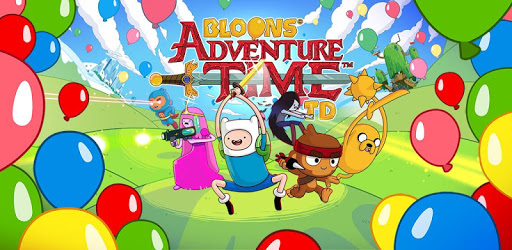
Bloons Adventure Time TD is an Android app developed and published by ninja kiwi at Google Play Store on Aug 28, 2018 for Android users. Bloons Adventure Time TD is so popular that it has gained 13316456 installs so far and growing.
Are you a fan of Adventure Time? If so, you're in for a treat with Bloons Adventure Time TD! This game combines the beloved characters from Adventure Time with the addictive gameplay of tower defense. Get ready to embark on an epic adventure in the Land of Ooo, where you'll face off against the evil Bloons and their devious plans.
One of the things that sets Bloons Adventure Time TD apart from other games is its simplicity. The gameplay is easy to pick up, but don't be fooled – it's also incredibly challenging. As you progress through the game, you'll encounter levels that will test your strategic skills and require precise timing. But fear not, because with practice and determination, you can overcome any obstacle that comes your way.
One of the standout features of this game is its stunning graphics. The developers have done an excellent job of capturing the vibrant and whimsical art style of Adventure Time. From Finn and Jake's treehouse to Ice King's palace, every detail is beautifully rendered, immersing you in the world of Ooo.
But what about the characters? Well, Bloons Adventure Time TD doesn't disappoint in that department either. While some players have expressed a desire for more main characters to be added, the game already offers a diverse roster of heroes to choose from. Each hero has their own unique abilities and playstyle, allowing you to find the perfect combination to suit your strategy.
Now, let's address a concern that some players have raised – the game's performance on lower-end smartphones. While it's true that Bloons Adventure Time TD may encounter occasional crashes on these devices, it's important to note that you can still complete all levels without spending any money. Yes, some levels may be challenging and require precise timing, but with dedication and the right trinkets, victory is within reach.
A: Yes, Bloons Adventure Time TD is free to play. However, there are in-game stores where you can make purchases if you choose to.
A: No, Bloons Adventure Time TD does not have intrusive ads. You can enjoy the game without interruptions.
A: Absolutely! Bloons Adventure Time TD allows you to progress and complete all levels without spending any money. It may require some grinding and strategic thinking, but it's definitely possible.
A: Yes, the developers have introduced new mechanics that surprisingly work well for a Bloons game with an Adventure Time theme. They have done a fantastic job of keeping the game fresh and exciting.
In conclusion, Bloons Adventure Time TD is a must-play game for Adventure Time fans and tower defense enthusiasts alike. With its engaging gameplay, stunning graphics, and a touch of nostalgia, it's no wonder why this game has become a favorite among players. So grab your friends, join Finn and Jake, and embark on an epic adventure in the Land of Ooo!
Yes, you can run Bloons Adventure Time TD on PC, but first, you will need emulator software installed on your Windows or MAC, which you can download for free. In the below video, you will find Bloons Adventure Time TD in action. Before you install the emulator, check out the minimum and recommended system requirements to run it seamlessly. They may change depending on which version of the emulator you choose. Therefore, we recommend you download the latest version of the emulator. Below you will find three free Android emulators that we have shortlisted based on their popularity:
Up to date graphics drivers from Microsoft or the chipset vendor.
Storage: 1 GB available under installation path, 1.5GB available hard drive space
Internet: Broadband Internet connection
Regardless of which Android emulator you install, the steps to install, configure, and running the Bloons Adventure Time TD app on PC are the same.