Published by Firecraft Studios
Updated March 28, 2026
Play this match-3 mansion makeover & home decor adventure game for matching fun!
| Version | 1.196.0 |
| Size | 471.5 MB |
| What's New | We’ve got some exciting new stories for you this month at Matchington! The team wraps up their work on the Japanese set by renovating a traditional snack bar. Buddie leads Gaspar and Tiffany as they recreate a romantic scene from Sylvia’s movie—but will sparks start flying between them? Join us to find out!-New Room: Japan P4-New Theme Season: Koala Season-New Merge Event: Bonjour Amour!-New Event: Enchanted Garden |
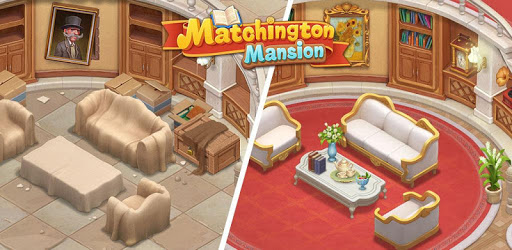
Matchington Mansion is an Android app developed and published by Firecraft Studios at Google Play Store on Oct 11, 2017 for Android users. Matchington Mansion is so popular that it has gained 172831905 installs so far and growing.
Matchington Mansion offers a delightful mix of puzzle-solving and home decoration. It's a game that captivates players with its over 12,000 engaging levels designed to test your mind. Players find endless enjoyment in making over an old mansion, transforming it room by room through a series of challenges.
Matchington Mansion begins with simpler levels that help you get the hang of the gameplay mechanics. As you advance, the game’s difficulty gradually increases, inviting you to stretch your problem-solving abilities further. This progression keeps the game fresh and exciting, ensuring you never feel like it’s getting too easy or repetitive.
A notable part of Matchington Mansion's appeal is its regular updates, which bring new stages and features. This ongoing evolution means that just when you think you’ve seen it all, the game introduces new surprises. Players find joy in discovering these updates and working through the new challenges they bring.
Although it’s possible to enjoy Matchington Mansion without spending money, the game offers numerous opportunities for in-app purchases. These can help you progress faster or unlock special features. There are always new special offers that provide bundles at a good value, catering to players who want a bit more from their gaming experience without breaking the bank.
One of the most endearing aspects of Matchington Mansion is the joy of rebuilding the mansion. Every successful level earns you rewards that you can use to spruce up your residence. This creative aspect allows players to express their individual tastes and preferences, resulting in a beautiful, personalized mansion.
Players appreciate that Matchington Mansion has a minimal ads policy. You won't be forced to watch ads to progress. Instead, you have the option to view ads voluntarily for extra rewards. This design choice enhances the gaming experience without interruptions, maintaining the game's addictive quality.
Matchington Mansion also fosters a sense of community through team features, allowing you to create or join teams like the "AMAZING STARS". Team members can share lives and work together towards common goals. This collaborative element enriches the experience, making the game not just about individual achievements but also about teamwork and camaraderie.
The game isn't just about the standard levels. There are special events and limited-time adventures that add dynamism to the gameplay. Participating in these events can earn you unique rewards and keeps the gameplay varied and enthralling.
Matchington Mansion’s levels are designed to be both challenging and fun. They often require strategic thinking and planning, offering a rewarding experience when you finally crack a particularly tricky level. This makes the game a real brain twister, perfect for those who love a good puzzle.
While most find the game runs smoothly, there are occasional issues like slow loading times or screen freezes. However, the maintenance team is known for being responsive and attentive to player feedback, consistently working to improve the gameplay experience.
Overall, Matchington Mansion is almost universally described as addictive and enjoyable. It's a game that you can easily get lost in, spending hours crafting your perfect mansion and challenging your mind. Time flies when you're immersed in this engaging world, making it a beloved pastime for many.
In conclusion, Matchington Mansion stands out for its blend of puzzle-solving, strategic gameplay, and creative freedom to decorate. With regular updates and a responsive support team, it continues to delight players old and new. Whether you’re looking for a casual game to relax with or a challenging puzzle to conquer, Matchington Mansion has something to offer everyone.
Yes, you can run Matchington Mansion on PC, but first, you will need emulator software installed on your Windows or MAC, which you can download for free. In the below video, you will find Matchington Mansion in action. Before you install the emulator, check out the minimum and recommended system requirements to run it seamlessly. They may change depending on which version of the emulator you choose. Therefore, we recommend you download the latest version of the emulator. Below you will find three free Android emulators that we have shortlisted based on their popularity:
Up to date graphics drivers from Microsoft or the chipset vendor.
Storage: 1 GB available under installation path, 1.5GB available hard drive space
Internet: Broadband Internet connection
Regardless of which Android emulator you install, the steps to install, configure, and running the Matchington Mansion app on PC are the same.