Published by Lonict - Apps for best sound quality on Android
Updated October 6, 2025
Improve your bass sound quality with Subwoofer Bass
| Version | 3.5.9 |
| Size | 13.9 MB |
| What's New | Version 3.4.8- Performance improvements- Android 11 Support** Please close any other sound effect applications before starting the Subwoofer BassVersion 3.0.7 💥Loudness Enhancer ⚡️Force Initialize FeatureV2.0.0 - Beta- Visualizer Frequency Graph - Optional Orange Theme!- Pulse featureV1.2.0- UI changes for material design- Extra frequency pitches: * Sub-Deep Bass * Deep Bass * Mid Bass * Upper Bass * Lower Mid * Upper Mid * High |
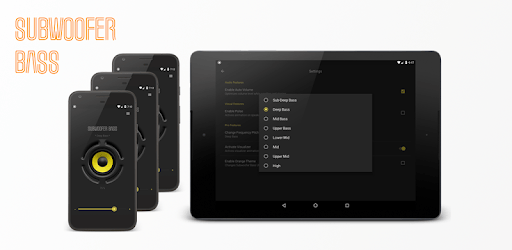
Subwoofer Bass is an Android app developed and published by Lonict - Apps for best sound quality on Android at Google Play Store on Jun 5, 2015 for Android users. Subwoofer Bass is so popular that it has gained 11699323 installs so far and growing.
If you're someone who loves music with a lot of bass, Subwoofer Bass is exactly what you need. This versatile app is designed to enhance your listening experience by boosting the bass, making your music sound richer and fuller.
Subwoofer Bass is incredibly versatile, working seamlessly across various devices. Whether you use a laptop, tablet, phone, airbuds, or headsets, this app can adapt to your needs. It even integrates perfectly with your home theater system, making it a go-to solution for all your bass-boosting needs.
One of the standout features of Subwoofer Bass is its ability to deliver exceptional performance. The app drastically improves the sound quality, removing any 'stains' that might have been plaguing your ears. The difference is like night and day, redefining how you experience your favorite tunes.
Using Subwoofer Bass transforms listening to music into an immersive experience. It turns even the simplest tunes into rich, deeply resonant tracks that you can feel. The app makes your music more engaging, which truly kicks up your listening experience a notch, leaving you awestruck.
Subwoofer Bass is highly recommended for anyone who loves deep, resonant bass. You can use it in various settings, including your car, where the app adds an impressive bass vibe that elevates your entire audio setup.
One of the best parts about Subwoofer Bass is that it is straightforward to use. You don’t have to be a tech guru to operate it. Plus, you can enjoy the majority of its features without needing to opt for premium services, although those are available if you choose. You get high-quality bass without any major hurdles.
Subwoofer Bass is easy to install and even easier to use. Turn it on, and your music gains an instant upgrade. You don’t need any special settings; just open the app and let it do its magic. This convenience makes it an ideal solution for anyone looking to enhance their audio experience without a lot of hassle.
In days when you just want to hear some great bass, Subwoofer Bass delivers exactly what you're craving. Give it a try and see how it transforms your musical experience. You'll soon find yourself based up and loving every moment of it.
Yes, you can run Subwoofer Bass on PC, but first, you will need emulator software installed on your Windows or MAC, which you can download for free. In the below video, you will find Subwoofer Bass in action. Before you install the emulator, check out the minimum and recommended system requirements to run it seamlessly. They may change depending on which version of the emulator you choose. Therefore, we recommend you download the latest version of the emulator. Below you will find three free Android emulators that we have shortlisted based on their popularity:
Up to date graphics drivers from Microsoft or the chipset vendor.
Storage: 1 GB available under installation path, 1.5GB available hard drive space
Internet: Broadband Internet connection
Regardless of which Android emulator you install, the steps to install, configure, and running the Subwoofer Bass app on PC are the same.










![Musicolet Music Player [Free, No ads] icon](https://cdn.desktoptwo.com/img/in.krosbits.musicolet-logo.png)