Published by Coocent
Updated August 21, 2025
Enhance the sound quality of your devices, listen to what you want
| Version | 1.9.4 |
| Size | 12.9 MB |
| What's New | * Performance optimized, more efficient |
Bass Booster & Equalizer is an Android app developed and published by Coocent at Google Play Store on for Android users. Bass Booster & Equalizer is so popular that it has gained 46075793 installs so far and growing.
Bass Booster & Equalizer is an exceptional tool designed to enhance your audio experience on electronic devices. This powerful equalizer provides a spectacular sound quality, taking audio to the next level with its unique features and user-friendly interface.
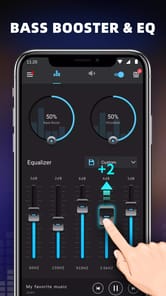
The appeal of Bass Booster & Equalizer lies in its stunning user interface (UI) and user experience (UX). The design is intuitive, allowing users to experiment with various levels and controls effortlessly. Whether you are a beginner or an experienced user, the interface makes it straightforward to adjust sound settings to your liking.
One of the standout features of Bass Booster & Equalizer is its ability to enhance audio quality significantly. Users will find that the equalizer supports a wide range of sound frequencies. This equalizer can produce rich bass, crystal-clear mids, and sharp highs, creating a comprehensive audio spectrum.
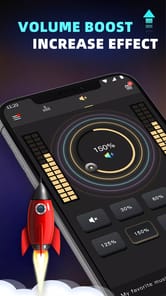
If you love deep bass, then Bass Booster & Equalizer is the perfect choice for you. The bass boost feature enhances the low-end frequencies, creating a profound and immersive audio experience. Just be careful to avoid damaging your speakers by overdriving the bass settings.
Bass Booster & Equalizer offers a range of customizable controls, allowing users to tailor the sound to their preferences. You can adjust each frequency band individually to match your desired sound profile. This feature is particularly beneficial for those who listen to various music genres and want to adjust the sound accordingly.
Whether you're listening through your phone, in your car, or on other electronic devices, Bass Booster & Equalizer ensures great sound quality. It integrates seamlessly with various platforms and devices, enhancing your audio experience wherever you go.
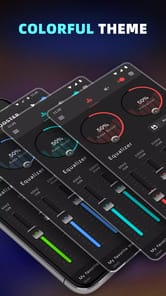
One of the cooler aspects of Bass Booster & Equalizer is its light feature, which adds a visual element to the audio experience. While this feature may not be fully functional in all applications, it does add a unique aesthetic when it works.
Bass Booster & Equalizer is remarkably easy to use. You can quickly learn to adjust sound settings, making it suitable even for those with limited experience in sound engineering. The app's simplicity does not compromise its powerful functionality, ensuring that users get the best of both worlds.
Whether you are using streaming services like Spotify or listening to music locally stored on your device, Bass Booster & Equalizer enhances the quality of your music effortlessly. It creates an enveloping sound experience, making it feel like you're in a different world.
The developers of Bass Booster & Equalizer continuously work on improving the app. They listen to feedback and make necessary adjustments, ensuring that the app remains robust and reliable. Regular updates enhance its features and fix any issues, improving the overall user experience.
If you are looking for an app to boost your audio experience, Bass Booster & Equalizer is highly recommended. Its top-notch equalizing capabilities, ease of use, and compatibility make it stand out. Try it out to discover how it can transform your listening experience.
Yes, you can run Bass Booster & Equalizer on PC, but first, you will need emulator software installed on your Windows or MAC, which you can download for free. In the below video, you will find Bass Booster & Equalizer in action. Before you install the emulator, check out the minimum and recommended system requirements to run it seamlessly. They may change depending on which version of the emulator you choose. Therefore, we recommend you download the latest version of the emulator. Below you will find three free Android emulators that we have shortlisted based on their popularity:
Up to date graphics drivers from Microsoft or the chipset vendor.
Storage: 1 GB available under installation path, 1.5GB available hard drive space
Internet: Broadband Internet connection
Regardless of which Android emulator you install, the steps to install, configure, and running the Bass Booster & Equalizer app on PC are the same.