

Published by 🌟100Pi Labs
Updated August 7, 2025
Best Music Player with Ringtone Cutter,Equalizer,Power Share,Audiobooks support
| Version | 3.2.0.0_release_2 |
| Size | 27.2 MB |
| What's New | Latest Version:🌟 Bug fixes and Performance improvementsPrevious Versions:🌟 Last visited home screen tab will be remembered🌟 Playlist Tab UI improvements🌟 Added option to Sort by "Date Added" in Tracks Tab🌟 GDPR Consent option for EEA and UK users🌟 Added battery permission request in order to minimise "music stopping" issue🌟 Toggle to expand/collapse sections in Search page🌟 YouTube Search has been discontinued from V3.1.5.0 because of latest Google policy changes |
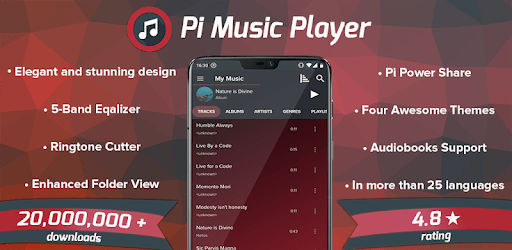
Pi Music Player - Mp3 Music Player is an Android app developed and published by 🌟100Pi Labs at Google Play Store on Dec 14, 2015 for Android users. Pi Music Player - Mp3 Music Player is so popular that it has gained 83663429 installs so far and growing.
Life can be stressful, but music has a magical way of making it better. If you're looking for a reliable and feature-rich music player for your Android device, Pi Music Player - Mp3 Music Player might just be what you need. This app is loved by many for its simplicity, efficiency, and fabulous features.
One of the standout features of Pi Music Player - Mp3 Music Player is its ability to customize the look and feel of the app. With various beautiful themes, you can make your music player as unique as your taste in music. Additionally, managing your playlists is incredibly intuitive. You can easily transfer playlists between devices, restore and backup your collections, ensuring your favorite tracks are always at your fingertips.
Whether you’re a casual listener or a music aficionado, Pi Music Player - Mp3 Music Player caters to your needs. With features like a powerful equalizer, reverb options, and bass boost, you can fine-tune your listening experience. It also supports multiple instances of the same MP3 file in a single playlist, a feature usually exclusive to desktop applications.
If you prefer offline music playback, Pi Music Player - Mp3 Music Player is ideal. It’s designed to work seamlessly without an Internet connection, making it perfect for long flights, commutes, or any situation where you want to save data. The app is also praised for its efficiency in finding and organizing all audio files on your device, so you can spend more time enjoying your music and less time managing your library.
One of the most appreciated aspects of Pi Music Player - Mp3 Music Player is its clean and easy-to-use interface. The app keeps your audio files in alphabetical order and doesn’t automatically categorize them based on albums or dates unless you want it to. This level of control means you can organize your music exactly how you like it.
Beyond its features on mobile devices, Pi Music Player - Mp3 Music Player also works great on Chromebooks, providing a consistent experience across different platforms. Users have lauded its ability to find transferred MP3 files quickly and effortlessly, eliminating the hassle of digging through folders. This app proves to be a dependable choice, whether on a phone, tablet, or Chromebook.
Pi Music Player – Mp3 Music Player goes a step further by allowing you to change a song’s album art directly from the app. This feature might seem small, but it adds a level of customization not found in many other music players. Moreover, the app allows for renaming or editing song titles, making it easier to manage your music library efficiently.
In today’s world, battery life is precious, and Pi Music Player – Mp3 Music Player understands that. The app functions well even when your device is in airplane mode, allowing you to enjoy longer battery life while listening to your favorite songs. Unlike many other apps, it doesn’t bombard you with ads, providing an uninterrupted and enjoyable listening experience. The premium version offers even more features but you won't feel forced into it.
It’s rare to find an app that consistently meets expectations over several years, but Pi Music Player - Mp3 Music Player does just that. People who have used the app for over four years still find it to be their go-to music player, of which bears testimony to its reliability and performance. Whether you’ve been using it for a few weeks or years, the app continues to deliver exceptional service.
In conclusion, Pi Music Player - Mp3 Music Player stands as one of the best music players for Android. It combines a user-friendly interface, powerful features, and reliable performance, making it a top choice for music lovers everywhere.
Yes, you can run Pi Music Player - Mp3 Music Player on PC, but first, you will need emulator software installed on your Windows or MAC, which you can download for free. In the below video, you will find Pi Music Player - Mp3 Music Player in action. Before you install the emulator, check out the minimum and recommended system requirements to run it seamlessly. They may change depending on which version of the emulator you choose. Therefore, we recommend you download the latest version of the emulator. Below you will find three free Android emulators that we have shortlisted based on their popularity:
Up to date graphics drivers from Microsoft or the chipset vendor.
Storage: 1 GB available under installation path, 1.5GB available hard drive space
Internet: Broadband Internet connection
Regardless of which Android emulator you install, the steps to install, configure, and running the Pi Music Player - Mp3 Music Player app on PC are the same.









![Musicolet Music Player [Free, No ads] icon](https://cdn.desktoptwo.com/img/in.krosbits.musicolet-logo.png)