Published by lfantasia
Updated September 11, 2025
Character planner chart development, character creator, RPG,Character story
| Version | 3.4.2 |
| Size | 4.9 MB |
| What's New | Minor bug fixes and improvements. Install or update to the newest version to check it out! |
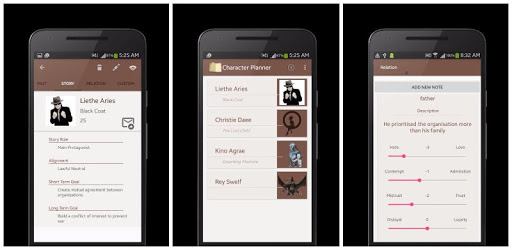
Character Story Planner is an Android app developed and published by lfantasia at Google Play Store on Feb 29, 2016 for Android users. Character Story Planner is so popular that it has gained 500000 installs so far and growing.
Imagine having a tool that brings your characters and stories to life, all in one neatly organized place. Character Story Planner does exactly that, offering a lengthy list of features that help authors and storytellers develop detailed characters, worlds, and relationships.
Character Story Planner stands out for its depth of detail, allowing you to craft characters with intricate backstories. The app prompts you with thought-provoking questions such as, “What is an important past event in your character's life?” Giving you ample opportunities to expand and refine your character’s profile.
A unique feature is the ability to add pictures to your character profiles. This visual aid makes it easier to visualize and remember each character, bringing an added layer of depth and involvement to the creative process.
One of the highlights that many find helpful is the section for custom traits. This feature offers writers the flexibility to add unique characteristics and personality traits, making their characters even more realistic. However, it’s worth noting that editing these custom notes can be a bit challenging. Taking screenshots and copying the text to make changes is a common workaround.
The app excels in organizing all your characters and story elements, making it simple to manage even the most complex of storylines. Different categories and sections are user-friendly and logically designed, making it easier to keep everything in one place.
Character Story Planner is not just limited to characters. It offers extensive features for world-building and scene planning, making it a go-to tool for authors. The categories are well-thought-out, ensuring you don’t miss any crucial detail in your story's world.
Another valuable aspect is the ability to document the relationships between characters. This not only helps in maintaining consistency but also adds more depth to your storylines. Understanding how each character relates to one another can be invaluable for any writer.
While the app excels in many areas, there are some features that users hope to see improved or added. Some have expressed a desire for a dialogue feature, which would enrich the character-development experience even further. Additionally, seamless data transfer between devices is another area that could enhance the overall experience.
For those looking to keep all their notes, tidbits, and story elements in one place, Character Story Planner is an excellent choice. Its clean user interface and well-structured categories make it one of the better writing aids available on the market.
The app is particularly popular among Wattpad users, who find it incredibly useful for organizing their stories and character details. Authors can seamlessly integrate their work on Character Story Planner with their stories on Wattpad, providing a streamlined writing process.
Whether you’re a seasoned author or just starting, Character Story Planner has something to offer. Its comprehensive features, user-friendly design, and depth make it an invaluable tool in any writer’s toolkit.
Yes, you can run Character Story Planner on PC, but first, you will need emulator software installed on your Windows or MAC, which you can download for free. In the below video, you will find Character Story Planner in action. Before you install the emulator, check out the minimum and recommended system requirements to run it seamlessly. They may change depending on which version of the emulator you choose. Therefore, we recommend you download the latest version of the emulator. Below you will find three free Android emulators that we have shortlisted based on their popularity:
Up to date graphics drivers from Microsoft or the chipset vendor.
Storage: 1 GB available under installation path, 1.5GB available hard drive space
Internet: Broadband Internet connection
Regardless of which Android emulator you install, the steps to install, configure, and running the Character Story Planner app on PC are the same.