Published by Delver Lab
Updated October 22, 2025
Scan, organize, share your MTG cards
| Version | 5.64 |
| Size | 133.5 MB |
| What's New | Minor bug fixes and improvements. Install or update to the newest version to check it out! |
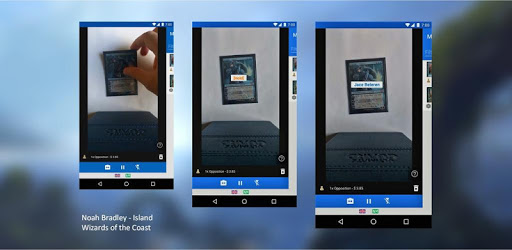
MTG Card Scanner Delver Lens is an Android app developed and published by Delver Lab at Google Play Store on Mar 29, 2016 for Android users. MTG Card Scanner Delver Lens is so popular that it has gained 100000 installs so far and growing.
Organizing and managing a Magic: The Gathering (MTG) collection can be daunting. That's where MTG Card Scanner Delver Lens steps in to make your life easier. This handy app allows you to scan, catalog, manage, and even playtest your decks, providing a seamless experience for any MTG enthusiast.
Manually entering cards into spreadsheets or lists can be time-consuming and frustrating. MTG Card Scanner Delver Lens revolutionizes this process by offering quick and easy scanning of your cards. With its accurate scanning capabilities, you can efficiently keep track of your collection without the hassle. Building decks becomes a straightforward task as you have a complete inventory at your fingertips.
MTG Card Scanner Delver Lens shines when it comes to deck building. You can create decks with actual pictures of the cards. The app helps you analyze deck stats, including the mana curve and other essential details. If you have deck ideas you want to try out, the app's playtest feature allows you to simulate gameplay on the go, making it easier to optimize your strategies.
One standout feature of MTG Card Scanner Delver Lens is its ability to track card prices. This function is incredibly useful if you're looking to buy, sell, or trade cards. By monitoring prices from top web sellers, the app ensures you get the best deals for your cards. This feature can be a game-changer for serious collectors and traders.
The app's interface is designed to be user-friendly, making it accessible to everyone, even those who are new to digital collection management. Scanning is not only accurate but also fast, meaning you can catalog hundreds of cards in just a few minutes. The ability to export your collection to CSV files is another helpful feature, allowing you to build decks with ease and share your lists with others.
For those with extensive collections, the paid version of MTG Card Scanner Delver Lens offers even more robust features. Subscription options are reasonably priced and well worth it for the added benefits. The app's continuous focus setting helps save time, cutting down on the need for constant re-focusing during scanning. This efficiency makes it invaluable for serious collectors.
If you've ever struggled with keeping track of your MTG cards or wished there was an easier way to manage your collection, MTG Card Scanner Delver Lens is the solution. The app has transformed how players approach deck building and collection management, making it simpler, faster, and more efficient than ever before. Whether you're a casual player or a dedicated collector, this app is an essential tool for your MTG journey.
Yes, you can run MTG Card Scanner Delver Lens on PC, but first, you will need emulator software installed on your Windows or MAC, which you can download for free. In the below video, you will find MTG Card Scanner Delver Lens in action. Before you install the emulator, check out the minimum and recommended system requirements to run it seamlessly. They may change depending on which version of the emulator you choose. Therefore, we recommend you download the latest version of the emulator. Below you will find three free Android emulators that we have shortlisted based on their popularity:
Up to date graphics drivers from Microsoft or the chipset vendor.
Storage: 1 GB available under installation path, 1.5GB available hard drive space
Internet: Broadband Internet connection
Regardless of which Android emulator you install, the steps to install, configure, and running the MTG Card Scanner Delver Lens app on PC are the same.