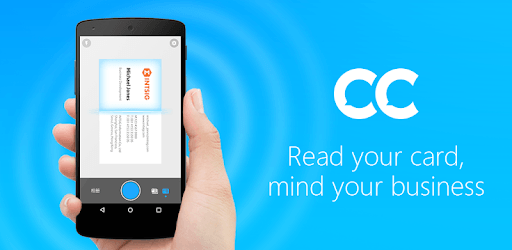
CamCard Free - Business Card R for PC

CamCard Free - Business Card R for PC

Published by INTSIG

Updated October 11, 2025

Read business cards accurately in 17 languages & used by 100 million users

What's New

Version7.86.8.20251229
Size165.7 MB
What's New1. Optimized language recognition for higher precision. Now supporting more global languages for seamless networking.

CamCard Free - Business Card R Screenshots

CamCard Free - Business Card R PC screenshot

About CamCard Free - Business Card R For PC

CamCard Free - Business Card R is an Android app developed and published by INTSIG at Google Play Store on Mar 2, 2010 for Android users. CamCard Free - Business Card R is so popular that it has gained 10000000 installs so far and growing.

CamCard Free - Business Card R: A Game-Changer for Managing Contacts

CamCard Free - Business Card R is an app that makes storing and organizing business cards a breeze. It's designed to quickly read and convert business card information into digital data, making it a useful tool for anyone who needs to manage multiple contacts. Whether you're a professional with many cards or simply looking to reduce clutter, this app offers a convenient solution.

Efficient Data Conversion

CamCard Free - Business Card R stands out for its ability to accurately read and convert card information into digital format. This feature is particularly useful for people who want to keep their contact details organized without manually entering each piece of information. The app's intelligent data reading capabilities ensure that even complex card layouts are accurately transformed into text, making it easy to retrieve details when needed.

Easy To Use

One of the greatest strengths of CamCard Free - Business Card R is its user-friendly design. You simply take a picture of a business card, and the app does the rest. It's quick and efficient, allowing you to store and access contacts in seconds. This ease of use makes it suitable for everyone, from busy professionals to retirees looking to simplify their contact management.

Convenient Cloud Backup

The app offers a seamless cloud backup feature, ensuring your contacts are safely stored and easily accessible. This means you can effortlessly switch devices without losing your valuable contacts. Simply log in with your email and password, and you can download your contacts to any new phone or device. This feature offers peace of mind, knowing that your contact data is secure and readily available.

Reduces Clutter

If you're tired of the clutter created by physical business cards, CamCard Free - Business Card R can be a real lifesaver. By digitizing your business cards, you can reduce the visual and physical clutter in your home or office. No more piles of cards waiting to be filed; with CamCard Free - Business Card R, all your contacts are neatly stored in one place.

Ideal for Retirees

CamCard Free - Business Card R isn't just for professionals. Retirees can also benefit from this app by keeping all their essential contacts – like doctors, repair companies, and more – organized and easily accessible. The ease of capturing, storing, and sorting business cards makes it a valuable tool for anyone looking to simplify their contact management.

A Reliable Tool for Professionals

For those who frequently network or attend meetings, CamCard Free - Business Card R is indispensable. It ensures that all business connections are stored safely and can be easily accessed when needed. This can be particularly beneficial for salespeople and business executives who rely on a vast network of contacts.

Helpful Customer Support

CamCard Free - Business Card R also offers robust customer support. Any issues can be swiftly resolved by contacting their support team, who are quick to respond and help users continue enjoying the app. This responsive customer service adds to the overall positive experience of using the app.

Additional Features with Upgrade

While the free version of CamCard Free - Business Card R is highly functional, there is also an option for a minimal payment upgrade. This upgraded version offers additional features for more convenient synchronization and people management. It's worth considering for those who require advanced functionalities for professional use.

Overall, CamCard Free - Business Card R is a versatile and reliable app that simplifies the process of managing business cards and contacts. Its ease of use, efficient data conversion, and convenient cloud backup make it a must-have tool for anyone looking to streamline their contact management.

Can I run CamCard Free - Business Card R on PC?

Yes, you can run CamCard Free - Business Card R on PC, but first, you will need emulator software installed on your Windows or MAC, which you can download for free. In the below video, you will find CamCard Free - Business Card R in action. Before you install the emulator, check out the minimum and recommended system requirements to run it seamlessly. They may change depending on which version of the emulator you choose. Therefore, we recommend you download the latest version of the emulator. Below you will find three free Android emulators that we have shortlisted based on their popularity:

How to Install CamCard Free - Business Card R on Windows PC

BlueStacks

Minimum
  • OS: Microsoft Windows 7 and above.
  • Processor: Intel or AMD Processor.
  • RAM: Your PC must have at least 4GB of RAM. (Note that having 4GB or more disk space is not a substitute for RAM)
  • Storage: 5GB Free Disk Space.
  • You must be an Administrator on your PC.
Recommended:
  • OS: Microsoft Windows 10
  • Processor: Intel or AMD Multi-Core Processor with Single Thread benchmark score > 1000.
  • Graphics: Intel/Nvidia/ATI, Onboard or Discrete controller with benchmark score >= 750.
  • Please ensure Virtualization is enabled on your PC/Laptop.
  • RAM: 8GB or higher
  • Storage: SSD (or Fusion/Hybrid Drives)
  • Internet: Broadband connection to access games, accounts and related content.

Up to date graphics drivers from Microsoft or the chipset vendor.

  • To start with, download Bluestacks from its official website. The latest version of BluesStacks is v 5, and it is around 400 MB.
  • Once the download is done, click on the Bluestacks set up file to install it on your Windows PC. Follow the on-screen instructions and install it accordingly.
  • The next step is to launch the emulator using the desktop shortcut and sign in using your Google account.
  • Now, head over to Bluestacks home screen and click on the Google Play Store icon.
  • Hit the search bar in Google Play and search for CamCard Free - Business Card R.
  • Install CamCard Free - Business Card R from the Play Store by clicking the Install option, which completes downloading of CamCard Free - Business Card R on PC.

NoxPlayer

Minimum
  • Operating System: Windows XP SP3, Windows Vista, Windows 7, Windows 8, Windows 10, and DirectX 9.0c
  • Processor: At least dual-core processor, both Intel, and AMD are OK
  • Video: Supports Open GL 2.0 or above
  • Memory: 1.5 GB RAM
Recommended
  • Operating System: Windows 7, Windows 8, Windows 10
  • Processor: Multiple core processors which support VT-x or AMB-V Virtualization Technology, better performance with this function enabled
  • Video: The higher performance, the better
  • Memory: 4 GB RAM

Storage: 1 GB available under installation path, 1.5GB available hard drive space

Internet: Broadband Internet connection

  • Download NoxPlayer from the official website. The latest version of NoxPlayer is v 3, and it is around 600 MB.
  • Now install the emulator using the downloaded setup file. Just go through the on-screen instructions and install NoxPlayer on your computer or laptop.
  • After the installation process, launch the Nox Android emulator and log in using your Google account when it asks you.
  • Click on the Google Play Store icon and head over to the search bar to search CamCard Free - Business Card R. Once found, click on the Install button to install CamCard Free - Business Card R for PC.
  • If you do not find CamCard Free - Business Card R on Google Play Store or if you want to skip logging in to Google, you can sideload APK (download the .APK file from this page and open it with NoxPlayer).
  • Launch CamCard Free - Business Card R from home-screen and start playing it on PC right away!

MEmu

Minimum
  • 2 cores x86/x86_64 Processor (Intel or AMD CPU)
  • WinXP SP3 / Win7 / Win8 / Win10 (Not recommended to run on Server/Enterprise)
  • Latest Windows DirectX 11 / Graphics driver with OpenGL 2.0
  • Hardware Virtualization Technology (Intel VT-x/AMD-V) shall be enabled in BIOS
  • 2GB of RAM (4GB for x64 system)
  • 5GB of hard disk free space
Recommended
  • OS: Microsoft Windows 10 with VT Enabled
  • CPU: Single Thread PassMark score > 1500 (Intel/AMD Multi-Core).
  • Graphics: Intel/Nvidia/ATI, Onboard or Discrete controller with PassMark score > 750.
  • Latest Windows DirectX 11 / Graphics driver with OpenGL 4.5 or higher
  • RAM: 8GB or higher
  • HDD: SSD, 10GB of hard disk free space
  • Internet: Broadband connection with low latency for FPS games
  • Download MEmu Play from the official website. The latest version of NoxPlayer is v 7.5.
  • When the download is completed, install the MEmu emulator on your PC. Follow the on-screen instructions and keep on clicking the Next button until the final step.
  • Now, using the desktop shortcut, look for the MEmu Play emulator and launch it. Once done, it will ask you to log in using your Google account, proceed with the same.
  • MEmu Play will ask you to log in using your Google account. When you log in, it will sync your Google account to MEmu Play. Launch the Google Play Store by clicking on the icon and search for CamCard Free - Business Card R.
  • Click on the Install button once you find CamCard Free - Business Card R from the search results. You can also sideload APK (download the .APK file from this page and open it with MEmu) if you want to skip above step.
  • After the installation of CamCard Free - Business Card R, you're all set to use the app on PC!

Regardless of which Android emulator you install, the steps to install, configure, and running the CamCard Free - Business Card R app on PC are the same.
Download CamCard Free - Business Card R For PC