Published by Sony Corporation
Updated November 20, 2025
The NFC Easy Connect allows your smartphone to connect easily with Sony devices.
| Version | 1.0.02 |
| Size | 1.8 MB |
| What's New | Minor bug fixes and improvements. Install or update to the newest version to check it out! |
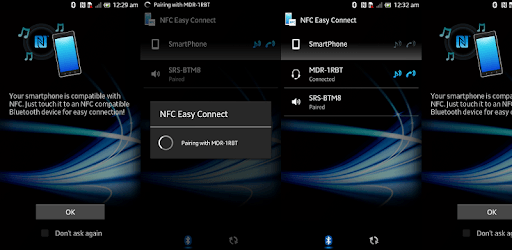
NFC Easy Connect is an Android app developed and published by Sony Corporation at Google Play Store on Sep 26, 2012 for Android users. NFC Easy Connect is so popular that it has gained 5000000 installs so far and growing.
NFC Easy Connect is a remarkable tool that simplifies pairing various devices with Near Field Communication (NFC). Have you ever struggled to connect your phone or other gadgets via Bluetooth or other means? This app steps in to make those connections hassle-free!
One of the standout features of NFC Easy Connect is how user-friendly it is. The app is designed to ensure that even those who aren't tech-savvy can easily pair their NFC-enabled devices. Whether you need to connect your headphones, like the Sony MDR-1RBT, or a smartphone, such as the HTC Butterfly S, the process is straightforward and quick.
When using NFC Easy Connect, you can trust that it will work seamlessly most of the time. It performs consistently well in pairing devices, making it a reliable tool in your digital toolkit. Users appreciate that the app does exactly what it's supposed to: enable easy NFC connections.
While NFC Easy Connect excels in many areas, there can be some minor hiccups. Sometimes, the Bluetooth feature may not turn on or off automatically when trying to connect through NFC. This is a small inconvenience considering the app's overall performance and functionality.
Using NFC Easy Connect brings a new level of compatibility to your devices. It works perfectly with a range of smartphones, including older models like the Galaxy S3. Modern devices, such as the newer Sony headphones, also benefit from this app, connecting seamlessly without any preliminary struggles.
Sharing files becomes easier with NFC Easy Connect. Suppose you want to send a photo or document to your friend's phone. With just a simple touch of the devices, the transfer is done in no time. This app turns potentially frustrating situations into convenient interactions.
It's crucial to note that NFC Easy Connect's primary function is pairing devices. While it does this exceptionally well, it's not designed for writing to NFC tags. Being aware of this can help set the right expectations from the app and avoid any misunderstandings.
NFC Easy Connect remains an invaluable tool for those who need to connect multiple devices quickly and efficiently. By simplifying the pairing process, it allows you to focus more on enjoying your gadgets with fewer connectivity issues.
Yes, you can run NFC Easy Connect on PC, but first, you will need emulator software installed on your Windows or MAC, which you can download for free. In the below video, you will find NFC Easy Connect in action. Before you install the emulator, check out the minimum and recommended system requirements to run it seamlessly. They may change depending on which version of the emulator you choose. Therefore, we recommend you download the latest version of the emulator. Below you will find three free Android emulators that we have shortlisted based on their popularity:
Up to date graphics drivers from Microsoft or the chipset vendor.
Storage: 1 GB available under installation path, 1.5GB available hard drive space
Internet: Broadband Internet connection
Regardless of which Android emulator you install, the steps to install, configure, and running the NFC Easy Connect app on PC are the same.