Published by Samsung Electronics Co., Ltd.
Updated April 4, 2026
Level U/U Pro/U Pro ANC, Box/Mini/Pro/Slim, On/On Pro, Over, Active, Flex
| Version | 5.3.03 |
| Size | 15.8 MB |
| What's New | bug-fix |
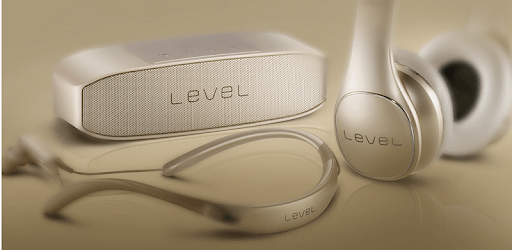
Samsung Level is an Android app developed and published by Samsung Electronics Co., Ltd. at Google Play Store on Apr 27, 2014 for Android users. Samsung Level is so popular that it has gained 5735800 installs so far and growing.
Samsung Level offers an abundant set of features and functionalities, making it a standout product for anyone who enjoys high-quality audio experiences. If you're using Samsung Level, you'll appreciate the exceptional sound quality and the convenience it brings. Here, we'll explore what makes Samsung Level such a must-have.
With Samsung Level, expect nothing less than top-notch sound quality. The app ensures that the headphones deliver crisp and clear audio, bringing every note to life. Whether you're listening to your favorite songs or making phone calls, the sound experience is unparalleled. There are few other headphones on the market that manage to hit this sweet spot of quality, making it a strong contender in the audio world.
One of the great features of Samsung Level is its compatibility. It works superbly with Samsung U Flex headsets, making it an ideal choice if you already own one. While the app is optimized for Samsung devices, many are hoping that it will soon offer the same delightful experience on other brands like Huawei. Expanding its compatibility will make this app even more amazing for a broader audience.
Samsung Level excels in offering a wide array of features that make using your headset more convenient and enjoyable. However, one area for improvement is the redial feature for the Level U pro. Users have pointed out that adding this feature would make the app even more complete, truly rounding out its functionality.
Additionally, the app could use some enhancement in delivering incoming call notifications. Currently, this feature works best with Samsung phones, but users would greatly benefit if it could perform similarly across other brands of smartphones.
Samsung Level comes with advanced noise cancellation. This feature helps reduce ambient noise, allowing you to focus entirely on your music or conversation. However, there are instances where the microphone struggles with external noise reduction, sometimes even amplifying it. Despite this, the overall performance in noise cancellation is still quite commendable and beneficial for most situations.
Keeping your devices up to date is crucial for optimal performance, and Samsung Level needs to continue improving with the support for firmware updates, especially for the Samsung Level U. This will ensure that users always have the latest enhancements and the best possible experience.
Samsung Level offers a rich mix of excellent sound quality, useful features, and sleek design. While there are areas for improvement, such as expanded compatibility and better noise management, it remains a highly appealing choice for anyone invested in enjoying high-quality audio through their Bluetooth headset. Exploring Samsung Level is definitely worth it, especially if you want superior sound and convenience in one reliable package.
Yes, you can run Samsung Level on PC, but first, you will need emulator software installed on your Windows or MAC, which you can download for free. In the below video, you will find Samsung Level in action. Before you install the emulator, check out the minimum and recommended system requirements to run it seamlessly. They may change depending on which version of the emulator you choose. Therefore, we recommend you download the latest version of the emulator. Below you will find three free Android emulators that we have shortlisted based on their popularity:
Up to date graphics drivers from Microsoft or the chipset vendor.
Storage: 1 GB available under installation path, 1.5GB available hard drive space
Internet: Broadband Internet connection
Regardless of which Android emulator you install, the steps to install, configure, and running the Samsung Level app on PC are the same.