Published by Samsung Electronics Co., Ltd.
Updated September 30, 2025
PENUP is a creative SNS based on Pen generated images.
| Version | 3.9.21.76 |
| Size | 124.1 MB |
| What's New | Minor bug fixes and improvements. Install or update to the newest version to check it out! |
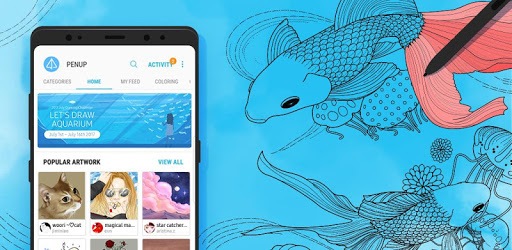
PENUP - Share your drawings is an Android app developed and published by Samsung Electronics Co., Ltd. at Google Play Store on Sep 7, 2013 for Android users. PENUP - Share your drawings is so popular that it has gained 50000000 installs so far and growing.
PENUP is a unique platform that offers a delightful way for artists of all levels to share and explore their creativity. It’s more than just an app; it’s a vibrant community filled with art, positivity, and countless features that cater to both amateur and professional artists. Whether you love coloring or crafting intricate designs, PENUP provides the tools and community support to help you thrive.
PENUP continually evolves with new updates and features. The addition of new drawing mediums and the ability to create custom brush strokes down to the tiniest details is a game-changer. These features allow artists to tailor their tools to their specific needs, making it easier to achieve desired effects and styles. The options are vast, ensuring that you can always find the right medium for your art project.
The app is not just about creating art; it’s also a fantastic way to unwind. Many users find it to be a great stress reliever where they can get lost in coloring or drawing. The app provides an ideal escape, allowing you to relax and focus on your art without any external pressures. It’s a fantastic way to spend your leisure time, providing a soothing experience with every stroke.
PENUP's vibrant community is one of its most appealing features. You can see art from people all over the world, providing inspiration and new ideas. The app also hosts contests that encourage participation and showcase incredible talent. These contests are not only fun but also provide a chance to improve your skills and gain recognition.
While PENUP works on various devices, it shines particularly on Samsung products, especially with the use of the S Pen. The S Pen provides precise control, making the drawing experience exceptionally smooth. Whether you're working on a Samsung S23 Ultra or a Galaxy Note with an S-Pen, the interaction feels natural and intuitive, enhancing your overall experience.
The developers are committed to making PENUP better with every update. Recent updates have reintroduced features like micro pens and brush previews, addressing user needs and enhancing usability. These updates ensure that the app remains at the forefront of digital art tools, continually improving and adding new features to keep users engaged.
PENUP offers endless possibilities for creativity, from simple coloring pages to complex, blended art pieces. The variety of tools available, such as pens and brushes, allows for a range of techniques and styles. It’s a pioneer in bringing stylus-to-screen art to various devices, making it accessible to a broader audience. Whatever your artistic needs, you’ll find the right tools and community support in PENUP.
One of PENUP's strengths is its user-friendly interface. The straightforward navigation ensures that you can focus more on creating and less on figuring out how the app works. However, there is always room for improvement, and suggestions like better menu navigation and the ability to rotate coloring pages are worth considering for future updates.
Being able to share your art and receive feedback is an integral part of the PENUP experience. The sharing feature allows users to connect, inspire, and be inspired. It opens up a world of possibilities for artists to showcase their work, learn from others, and grow their skills.
Overall, PENUP is a must-try for anyone interested in digital art, offering a unique and fulfilling way to express creativity. With its wide array of tools, supportive community, and continuous improvements, it’s a platform that stands out in the digital art world.
Yes, you can run PENUP - Share your drawings on PC, but first, you will need emulator software installed on your Windows or MAC, which you can download for free. In the below video, you will find PENUP - Share your drawings in action. Before you install the emulator, check out the minimum and recommended system requirements to run it seamlessly. They may change depending on which version of the emulator you choose. Therefore, we recommend you download the latest version of the emulator. Below you will find three free Android emulators that we have shortlisted based on their popularity:
Up to date graphics drivers from Microsoft or the chipset vendor.
Storage: 1 GB available under installation path, 1.5GB available hard drive space
Internet: Broadband Internet connection
Regardless of which Android emulator you install, the steps to install, configure, and running the PENUP - Share your drawings app on PC are the same.