Published by Sami4Apps
Updated June 22, 2026
Best Keyboard Instant translation and Decoration text while typing
| Version | 1.8.21 |
| Size | 22.7 MB |
| What's New | 1.8.16- Update emojis.- Update text decorations.1.8.14- Improve translation performance.- Improved user interface.1.8.13- You can now disable show the recent copied item through the clipboard settings.- You can now enable auto scroll to the same position after reopen the clipboard through the clipboard settings.- Bug fixes1.8.12 - Fixed the problem of not translating long texts, now you can translate any text.- Adding the last text copied at the beginning of the clipboard. |
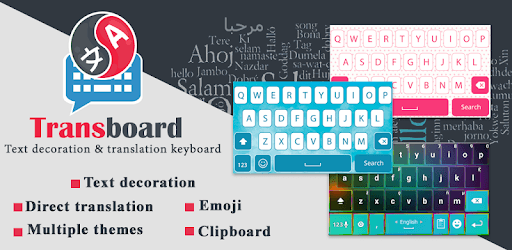
Transboard- Keyboard Translate is an Android app developed and published by Sami4Apps at Google Play Store on May 9, 2017 for Android users. Transboard- Keyboard Translate is so popular that it has gained 4971194 installs so far and growing.
Are you tired of struggling with language barriers? Do you wish there was an easy and efficient way to communicate with people from different cultures? Look no further, because Transboard- Keyboard Translate is here to revolutionize the way you translate and communicate!
Transboard- Keyboard Translate is the best translation app in the market, offering a seamless and user-friendly experience. With its amazing features and intuitive design, this app is a game-changer for anyone who needs quick and accurate translations.
Transboard- Keyboard Translate allows you to translate text in real-time, making communication with people from different languages a breeze. Whether you're traveling, working, or simply chatting with friends, this app will be your ultimate language companion.
With just a single press and hold, you can translate any text instantly. No more copy-pasting or switching between apps - Transboard- Keyboard Translate brings convenience right to your fingertips.
One of the standout features of Transboard- Keyboard Translate is its extensive language support. From Arabic to Telugu, this app has got you covered. Say goodbye to language barriers and hello to seamless communication.
But that's not all - Transboard- Keyboard Translate also allows you to switch between languages without having to go through complicated settings. It's as simple as a tap, making it even more convenient for you to express yourself in different languages.
Expressing yourself has never been easier with Transboard- Keyboard Translate. This app offers complete emoji support, allowing you to add a touch of personality to your messages. Whether you're happy, sad, or simply feeling playful, there's an emoji for every emotion.
And here's a little secret - Transboard- Keyboard Translate even has the same emojis as your iPhone! So, you can enjoy the full range of emojis without any limitations. It's time to let your creativity shine.
Transboard- Keyboard Translate prides itself on providing accurate translations. However, keep in mind that machine translations may not always capture the nuances of a language. It's always a good idea to double-check with a native speaker if you're unsure.
Unfortunately, Transboard- Keyboard Translate requires an internet connection to provide real-time translations. However, you can save your favorite translations for offline access.
While Transboard- Keyboard Translate is free to download and use, it may contain ads. These ads help support the development and maintenance of the app. If you prefer an ad-free experience, you can upgrade to the premium version.
Don't let language barriers hold you back - download Transboard- Keyboard Translate today and unlock a world of seamless communication!
Yes, you can run Transboard- Keyboard Translate on PC, but first, you will need emulator software installed on your Windows or MAC, which you can download for free. In the below video, you will find Transboard- Keyboard Translate in action. Before you install the emulator, check out the minimum and recommended system requirements to run it seamlessly. They may change depending on which version of the emulator you choose. Therefore, we recommend you download the latest version of the emulator. Below you will find three free Android emulators that we have shortlisted based on their popularity:
Up to date graphics drivers from Microsoft or the chipset vendor.
Storage: 1 GB available under installation path, 1.5GB available hard drive space
Internet: Broadband Internet connection
Regardless of which Android emulator you install, the steps to install, configure, and running the Transboard- Keyboard Translate app on PC are the same.