Published by Bruno Fargnoli
Updated September 19, 2026
Your New Civilization on Mobile
| Version | 1.27 |
| Size | 75.6 MB |
| What's New | Fixed: Random crashesUpdated: Barbarian creates less units but can create Spearman and Pikeman |
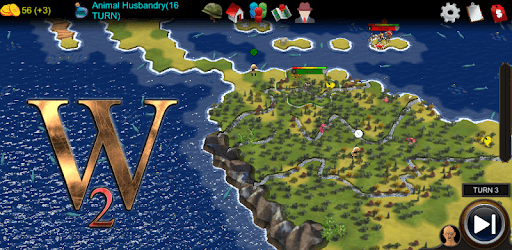
World of Empires 2 is an Android app developed and published by Bruno Fargnoli at Google Play Store on Jul 14, 2018 for Android users. World of Empires 2 is so popular that it has gained 10000 installs so far and growing.
Welcome to the world of World of Empires 2, a game that offers endless possibilities and hours of strategic gameplay. With its captivating concept and addictive features, this game has garnered praise from players all around the world. Let's dive into what makes this game so special and why it's a must-play for any strategy enthusiast.
One of the most requested features by players is the addition of more civilizations and a bigger Earth map. And the developers have listened! World of Empires 2 offers a vast array of civilizations to choose from, including fan favorites like Croatia and Australia. With each civilization having its own unique traits and abilities, you'll have a blast exploring different strategies and conquering the world.
When it comes to gameplay, World of Empires 2 doesn't disappoint. The AI, although not perfect, provides a challenging experience that keeps you on your toes. The only minor gripe some players have is the AI's tendency to mass troops in the north part of the map. However, this doesn't overshadow the overall greatness of the game.
With its intuitive controls and stunning graphics, World of Empires 2 offers a seamless gaming experience. Whether you're a seasoned civ/strategy fan or a newcomer to the genre, this game hits all the right buttons. It's easy to get lost in the world of World of Empires 2 and lose track of time as you build your empire and make strategic decisions.
World of Empires 2 not only allows you to play through pre-made scenarios but also gives you the power to create your own. The game's edit mode lets you design custom maps and even place civilizations in specific locations. This level of customization adds a whole new layer of excitement and personalization to the game.
Furthermore, the game's extensive tech tree and exclusive units for each nation provide a sense of depth and complexity. It's like having your own virtual sandbox where you can experiment with different strategies and see the consequences of your decisions unfold.
Yes, World of Empires 2 is available for mobile devices, making it convenient to play on the go.
The developers are constantly working on improving the game and adding new content. Stay tuned for future updates!
While there isn't a dedicated suggestion page within the game, you can reach out to the developers through their official channels to share your ideas and feedback.
Yes, World of Empires 2 is a free-to-play game. However, there may be optional in-app purchases available.
World of Empires 2 is available on both mobile devices and computers, allowing you to enjoy the game on your preferred platform.
Overall, World of Empires 2 is a game that delivers on its promise of providing an engaging and immersive strategy experience. With its expanding civilizations, seamless gameplay, and creative possibilities, this game is a true gem in the world of strategy gaming. So, what are you waiting for? Dive into the world of World of Empires 2 and start building your empire today!
Yes, you can run World of Empires 2 on PC, but first, you will need emulator software installed on your Windows or MAC, which you can download for free. In the below video, you will find World of Empires 2 in action. Before you install the emulator, check out the minimum and recommended system requirements to run it seamlessly. They may change depending on which version of the emulator you choose. Therefore, we recommend you download the latest version of the emulator. Below you will find three free Android emulators that we have shortlisted based on their popularity:
Up to date graphics drivers from Microsoft or the chipset vendor.
Storage: 1 GB available under installation path, 1.5GB available hard drive space
Internet: Broadband Internet connection
Regardless of which Android emulator you install, the steps to install, configure, and running the World of Empires 2 app on PC are the same.