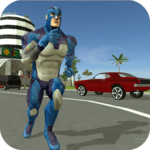
Rope Hero: Vice Town for PC

Rope Hero: Vice Town for PC

Published by Naxeex LLC

Updated August 12, 2025

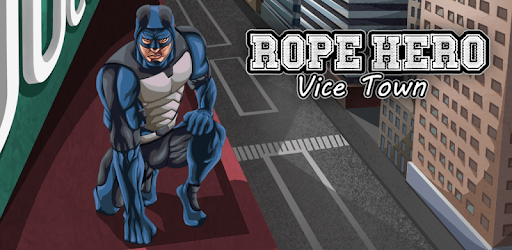
Action-packed adventures of Rope Hero in Vice Town.

What's New

Version7.0.2
Size167.3 MB
What's NewMinor bug fixes and improvements. Install or update to the newest version to check it out!

Rope Hero: Vice Town Screenshots

Rope Hero: Vice Town PC screenshot

About Rope Hero: Vice Town For PC

Rope Hero: Vice Town is an Android app developed and published by Naxeex LLC at Google Play Store on Jul 14, 2016 for Android users. Rope Hero: Vice Town is so popular that it has gained 10000000 installs so far and growing.

Discover the Thrilling Universe of Rope Hero: Vice Town

Welcome to the colorful and action-packed world of Rope Hero: Vice Town. This exciting game allows players to dive into an adventurous universe full of thrilling quests and vivid landscapes. If you are a lover of open-world action games, then Rope Hero: Vice Town offers an immersive experience that will keep you hooked for hours.

Breathtaking Adventures Await

In Rope Hero: Vice Town, you step into the shoes of a superhero equipped with a versatile rope. Your mission? To save the town from criminals and chaos while exploring a huge open world. The game showcases a broad range of activities, from battling fierce villains to participating in captivating side quests.

One of the most exhilarating aspects of the game is the freedom to roam. Whether you’re scaling towering buildings or speeding across the city, there’s always something new and exciting to uncover. The open-world design ensures that every turn holds a fresh adventure for you to explore.

Unique Customization and Modes

Customization is a feature you will undoubtedly enjoy in Rope Hero: Vice Town. The game allows players to personalize their hero with various outfits and gear, enhancing both appearance and capabilities. This unique aspect ensures that your superhero experience feels distinctively yours.

Moreover, the game offers several modes to keep players engaged. From classic battles to squad-based challenges, each mode brings its own set of excitement and difficulty. These diverse game modes provide a variety of experiences, ensuring that you’ll never get bored.

Challenges and Creativity

Not every adventure is without its hitches. Some players have noted issues like unexpected glitches, specifically around landing on the military base or peculiar behaviors involving equipment and star levels. However, the thrill of unpredictability can add an intriguing layer to your gaming experience.

Despite some minor glitches, the creative potential the game offers is immense. Engaging battles, dynamic missions, and the chance to outsmart foes keep the adrenaline pumping. The balance between strategic gameplay and wild, spontaneous actions provides a fun and challenging environment for all types of players.

Community and Social Features

One of the social highlights in Rope Hero: Vice Town is the ability to play with your friends. Although currently, the game does not support multiplayer features, it remains a highly requested addition. Imagine teaming up with your friends, strategizing your next mission, and exploring the massive open world together. It’s a feature that holds tremendous potential and can amplify the fun factor significantly.

The community aspect is further amplified with features like leaderboards and unique character abilities. Being able to compete, compare, and collaborate with others adds a rich layer to the overall game experience.

Stunning Graphics and Engaging Design

While some believe there is room for improvement in the graphics and physics, the game’s design still remains appealing. The vibrant world and engaging character designs contribute to an immersive experience. The development team continuously works on updates, so you can look forward to enhanced graphics and more sophisticated in-game mechanics.

Future Enhancements

The game’s developers are attentive to player feedback and suggestions. Gameplay is regularly updated to ensure the best experience. Future enhancements might include new modes, additional customization options, and features to make the game even more exciting and interactive.

In conclusion, if you’re looking for an adventure-filled game with boundless possibilities, extensive customization, and potential multiplayer options, Rope Hero: Vice Town is a must-try. Jump in and see where your rope will take you!

Can I run Rope Hero: Vice Town on PC?

Yes, you can run Rope Hero: Vice Town on PC, but first, you will need emulator software installed on your Windows or MAC, which you can download for free. In the below video, you will find Rope Hero: Vice Town in action. Before you install the emulator, check out the minimum and recommended system requirements to run it seamlessly. They may change depending on which version of the emulator you choose. Therefore, we recommend you download the latest version of the emulator. Below you will find three free Android emulators that we have shortlisted based on their popularity:

How to Install Rope Hero: Vice Town on Windows PC

BlueStacks

Minimum
  • OS: Microsoft Windows 7 and above.
  • Processor: Intel or AMD Processor.
  • RAM: Your PC must have at least 4GB of RAM. (Note that having 4GB or more disk space is not a substitute for RAM)
  • Storage: 5GB Free Disk Space.
  • You must be an Administrator on your PC.
Recommended:
  • OS: Microsoft Windows 10
  • Processor: Intel or AMD Multi-Core Processor with Single Thread benchmark score > 1000.
  • Graphics: Intel/Nvidia/ATI, Onboard or Discrete controller with benchmark score >= 750.
  • Please ensure Virtualization is enabled on your PC/Laptop.
  • RAM: 8GB or higher
  • Storage: SSD (or Fusion/Hybrid Drives)
  • Internet: Broadband connection to access games, accounts and related content.

Up to date graphics drivers from Microsoft or the chipset vendor.

  • To start with, download Bluestacks from its official website. The latest version of BluesStacks is v 5, and it is around 400 MB.
  • Once the download is done, click on the Bluestacks set up file to install it on your Windows PC. Follow the on-screen instructions and install it accordingly.
  • The next step is to launch the emulator using the desktop shortcut and sign in using your Google account.
  • Now, head over to Bluestacks home screen and click on the Google Play Store icon.
  • Hit the search bar in Google Play and search for Rope Hero: Vice Town.
  • Install Rope Hero: Vice Town from the Play Store by clicking the Install option, which completes downloading of Rope Hero: Vice Town on PC.

NoxPlayer

Minimum
  • Operating System: Windows XP SP3, Windows Vista, Windows 7, Windows 8, Windows 10, and DirectX 9.0c
  • Processor: At least dual-core processor, both Intel, and AMD are OK
  • Video: Supports Open GL 2.0 or above
  • Memory: 1.5 GB RAM
Recommended
  • Operating System: Windows 7, Windows 8, Windows 10
  • Processor: Multiple core processors which support VT-x or AMB-V Virtualization Technology, better performance with this function enabled
  • Video: The higher performance, the better
  • Memory: 4 GB RAM

Storage: 1 GB available under installation path, 1.5GB available hard drive space

Internet: Broadband Internet connection

  • Download NoxPlayer from the official website. The latest version of NoxPlayer is v 3, and it is around 600 MB.
  • Now install the emulator using the downloaded setup file. Just go through the on-screen instructions and install NoxPlayer on your computer or laptop.
  • After the installation process, launch the Nox Android emulator and log in using your Google account when it asks you.
  • Click on the Google Play Store icon and head over to the search bar to search Rope Hero: Vice Town. Once found, click on the Install button to install Rope Hero: Vice Town for PC.
  • If you do not find Rope Hero: Vice Town on Google Play Store or if you want to skip logging in to Google, you can sideload APK (download the .APK file from this page and open it with NoxPlayer).
  • Launch Rope Hero: Vice Town from home-screen and start playing it on PC right away!

MEmu

Minimum
  • 2 cores x86/x86_64 Processor (Intel or AMD CPU)
  • WinXP SP3 / Win7 / Win8 / Win10 (Not recommended to run on Server/Enterprise)
  • Latest Windows DirectX 11 / Graphics driver with OpenGL 2.0
  • Hardware Virtualization Technology (Intel VT-x/AMD-V) shall be enabled in BIOS
  • 2GB of RAM (4GB for x64 system)
  • 5GB of hard disk free space
Recommended
  • OS: Microsoft Windows 10 with VT Enabled
  • CPU: Single Thread PassMark score > 1500 (Intel/AMD Multi-Core).
  • Graphics: Intel/Nvidia/ATI, Onboard or Discrete controller with PassMark score > 750.
  • Latest Windows DirectX 11 / Graphics driver with OpenGL 4.5 or higher
  • RAM: 8GB or higher
  • HDD: SSD, 10GB of hard disk free space
  • Internet: Broadband connection with low latency for FPS games
  • Download MEmu Play from the official website. The latest version of NoxPlayer is v 7.5.
  • When the download is completed, install the MEmu emulator on your PC. Follow the on-screen instructions and keep on clicking the Next button until the final step.
  • Now, using the desktop shortcut, look for the MEmu Play emulator and launch it. Once done, it will ask you to log in using your Google account, proceed with the same.
  • MEmu Play will ask you to log in using your Google account. When you log in, it will sync your Google account to MEmu Play. Launch the Google Play Store by clicking on the icon and search for Rope Hero: Vice Town.
  • Click on the Install button once you find Rope Hero: Vice Town from the search results. You can also sideload APK (download the .APK file from this page and open it with MEmu) if you want to skip above step.
  • After the installation of Rope Hero: Vice Town, you're all set to use the app on PC!

Regardless of which Android emulator you install, the steps to install, configure, and running the Rope Hero: Vice Town app on PC are the same.


Download Rope Hero: Vice Town For PC