
Published by Indy Mobile App
Updated August 24, 2025
Scan images into PDF Documents using mobile camera with high quality
| Version | 10.2.18 |
| Size | 75.5 MB |
| What's New | - Updated the app to target Android 16 (API 36) to meet the latest Google Play requirements. - Updated core libraries for improved compatibility. - General UI improvements, performance enhancements, and stability fixes. |
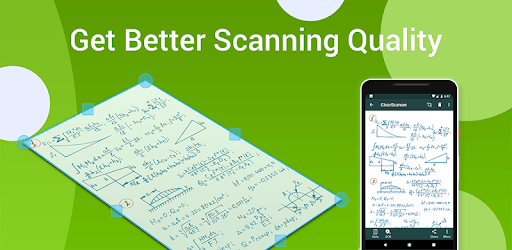
Clear Scan: Free Document Scanner App,PDF Scanning is an Android app developed and published by Indy Mobile App at Google Play Store on Jun 15, 2016 for Android users. Clear Scan: Free Document Scanner App,PDF Scanning is so popular that it has gained 46789700 installs so far and growing.
Clear Scan: Free Document Scanner App, PDF Scanning is a standout choice for anyone seeking a versatile and user-friendly tool to handle their document scanning needs. It's especially great for those who frequently need to digitize paperwork and manage PDFs directly from their mobile device.
Clear Scan offers a straightforward and intuitive interface, making it easy for users to scan documents. The app provides various options such as single, batch, ID, and passport scans. This flexibility ensures that all your scanning requirements are met, whether you are digitizing a single page or processing multiple documents at once.
The quality of the scans produced by Clear Scan is exceptional. The app’s auto document framing is fairly accurate, which helps in getting clear and well-aligned scans every time. Additionally, you can easily adjust elements such as contrast and brightness, ensuring that your document scans are legible and professional-looking.
One of the standout features of Clear Scan is its Optical Character Recognition (OCR) functionality. This allows the app to convert scanned text into editable and searchable text within PDF files. This feature is incredibly helpful for anyone who needs to extract text from physical documents quickly and accurately.
Clear Scan provides a secure experience, making it a trustworthy option for managing sensitive documents. The app includes syncing features that work well with Google Drive, ensuring your documents are readily accessible and safely backed up. Although the sync feature needs to be enabled manually, it functions smoothly once set up.
While Clear Scan is free to use, it features ads that are notably unobtrusive. These ads do not interfere with the user experience, making it practical to use the app without interruptions. However, for those who prefer an ad-free experience, there is an affordable option to remove ads for a small fee of $5, which also supports the developers.
The app also excels in its editing capabilities. Users can easily add or edit pages, adjust the layout, or customize the contrast and brightness of their scans. It supports PDF creation with over 100 pages in the free version, showcasing its robust functionality. There’s always room for improvement, such as better edge detection and more flexibility in aspect ratio adjustments, but overall, the app performs exceptionally well in its current state.
Clear Scan: Free Document Scanner App, PDF Scanning comes highly recommended. Its ease of use, reliability, and extensive features make it an essential tool for both personal and professional use. Whether you need to scan a simple document or create a multi-page PDF, Clear Scan has got you covered.
Yes, you can run Clear Scan: Free Document Scanner App,PDF Scanning on PC, but first, you will need emulator software installed on your Windows or MAC, which you can download for free. In the below video, you will find Clear Scan: Free Document Scanner App,PDF Scanning in action. Before you install the emulator, check out the minimum and recommended system requirements to run it seamlessly. They may change depending on which version of the emulator you choose. Therefore, we recommend you download the latest version of the emulator. Below you will find three free Android emulators that we have shortlisted based on their popularity:
Up to date graphics drivers from Microsoft or the chipset vendor.
Storage: 1 GB available under installation path, 1.5GB available hard drive space
Internet: Broadband Internet connection
Regardless of which Android emulator you install, the steps to install, configure, and running the Clear Scan: Free Document Scanner App,PDF Scanning app on PC are the same.




![Text Scanner [OCR] icon](https://cdn.desktoptwo.com/img/com.peace.TextScanner-logo.png)