1944 Burning Bridges for PC

1944 Burning Bridges for PC

Published by HandyGames

Updated March 27, 2026

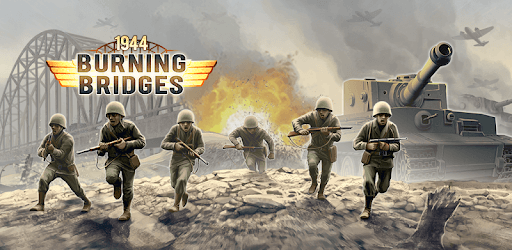
Join the war for Europe and relive the greatest military invasion of WW2: D-Day!

What's New

Version1.5.7
Size89.3 MB
What's NewRemoved ad bannerUpdated Target SDK to support newer devicesChanged ad providerImproved notch handling

1944 Burning Bridges Screenshots

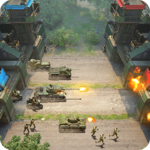
1944 Burning Bridges PC screenshot

About 1944 Burning Bridges For PC

1944 Burning Bridges is an Android app developed and published by HandyGames at Google Play Store on Nov 26, 2015 for Android users. 1944 Burning Bridges is so popular that it has gained 1000000 installs so far and growing.

Experience the Thrill of War in 1944 Burning Bridges

Step into the shoes of a commander and lead your troops to victory in the action-packed game, 1944 Burning Bridges. With its immersive gameplay and challenging missions, this mobile app is sure to keep you entertained for hours on end. Whether you're a fan of World War II games or simply enjoy strategic gameplay, 1944 Burning Bridges is a must-play.

Engaging Campaigns and Thrilling Battles

One of the standout features of 1944 Burning Bridges is its captivating campaigns. Take part in intense battles as you navigate through various missions and objectives. From leading troops to capturing strategic points, every move you make will have a significant impact on the outcome of the war.

What sets this game apart is the attention to detail in the gameplay mechanics. You'll have to carefully plan your moves, utilize different units effectively, and make strategic decisions to outsmart your opponents. The troop transports and engineers add another layer of depth to the game, allowing you to build defenses and supply systems to gain an edge over your enemies.

Unleash Your Tactical Skills

1944 Burning Bridges is not just about mindless shooting and explosions. It's a game that challenges you to think strategically and come up with the best tactics to secure victory. Every decision counts, and losing even the weakest unit can have long-term consequences.

While the game offers a high level of difficulty, the sense of accomplishment when you pull off a win is incredibly rewarding. You'll feel a rush of excitement as you outmaneuver your enemies and achieve your objectives. It's a game that keeps you on your toes and pushes you to constantly improve your skills.

Endless Possibilities for Future Updates

While some players have expressed their desire for more content and updates, it's important to note that game development is a complex process. However, the developers at Handy Games have always been attentive to their players' feedback and suggestions. They have a track record of delivering exciting updates and new features to enhance the gaming experience.

As a fan of the 1941-1944 game series, you'll be pleased to know that the developers are constantly working to improve the games. While a remaster may be on the horizon to address bugs and update textures, the core gameplay that you love will remain intact.

Frequently Asked Questions

1. Is 1944 Burning Bridges a multiplayer game?

Currently, 1944 Burning Bridges is a single-player game. However, the developers are always looking for ways to enhance the gaming experience, so keep an eye out for future updates that may include multiplayer options.

2. Are there plans to add more missions to the game?

The developers are aware of the players' desire for more missions and content. While there are no specific plans announced yet, Handy Games is known for listening to their community and delivering updates that exceed expectations.

3. Will there be a map creator in the future?

While the inclusion of a map creator is not confirmed, the developers are constantly exploring new ideas to improve the game. Your suggestion for a map creator has been noted, and who knows, it might become a reality in a future update!

4. Are there any plans for sequels focusing on other wars?

While the current game focuses on World War II, the developers are open to exploring different time periods and wars. Your suggestion for a desert storm or cold war era game has been duly noted, and it's possible that future sequels may delve into these fascinating historical periods.

5. Are there any plans to reduce the number of ads in the game?

The developers understand that ads can sometimes disrupt the gaming experience. They are constantly working to strike a balance between providing a free game and minimizing interruptions. Rest assured that your feedback regarding the number of ads has been taken into consideration.

Overall, 1944 Burning Bridges is a thrilling and immersive game that offers a unique strategic experience. With its challenging campaigns, engaging gameplay, and the potential for future updates, it's no wonder that players are hooked on this mobile app. So, gear up, commander, and get ready to lead your troops to victory in 1944 Burning Bridges!

Can I run 1944 Burning Bridges on PC?

Yes, you can run 1944 Burning Bridges on PC, but first, you will need emulator software installed on your Windows or MAC, which you can download for free. In the below video, you will find 1944 Burning Bridges in action. Before you install the emulator, check out the minimum and recommended system requirements to run it seamlessly. They may change depending on which version of the emulator you choose. Therefore, we recommend you download the latest version of the emulator. Below you will find three free Android emulators that we have shortlisted based on their popularity:

How to Install 1944 Burning Bridges on Windows PC

BlueStacks

Minimum
  • OS: Microsoft Windows 7 and above.
  • Processor: Intel or AMD Processor.
  • RAM: Your PC must have at least 4GB of RAM. (Note that having 4GB or more disk space is not a substitute for RAM)
  • Storage: 5GB Free Disk Space.
  • You must be an Administrator on your PC.
Recommended:
  • OS: Microsoft Windows 10
  • Processor: Intel or AMD Multi-Core Processor with Single Thread benchmark score > 1000.
  • Graphics: Intel/Nvidia/ATI, Onboard or Discrete controller with benchmark score >= 750.
  • Please ensure Virtualization is enabled on your PC/Laptop.
  • RAM: 8GB or higher
  • Storage: SSD (or Fusion/Hybrid Drives)
  • Internet: Broadband connection to access games, accounts and related content.

Up to date graphics drivers from Microsoft or the chipset vendor.

  • To start with, download Bluestacks from its official website. The latest version of BluesStacks is v 5, and it is around 400 MB.
  • Once the download is done, click on the Bluestacks set up file to install it on your Windows PC. Follow the on-screen instructions and install it accordingly.
  • The next step is to launch the emulator using the desktop shortcut and sign in using your Google account.
  • Now, head over to Bluestacks home screen and click on the Google Play Store icon.
  • Hit the search bar in Google Play and search for 1944 Burning Bridges.
  • Install 1944 Burning Bridges from the Play Store by clicking the Install option, which completes downloading of 1944 Burning Bridges on PC.

NoxPlayer

Minimum
  • Operating System: Windows XP SP3, Windows Vista, Windows 7, Windows 8, Windows 10, and DirectX 9.0c
  • Processor: At least dual-core processor, both Intel, and AMD are OK
  • Video: Supports Open GL 2.0 or above
  • Memory: 1.5 GB RAM
Recommended
  • Operating System: Windows 7, Windows 8, Windows 10
  • Processor: Multiple core processors which support VT-x or AMB-V Virtualization Technology, better performance with this function enabled
  • Video: The higher performance, the better
  • Memory: 4 GB RAM

Storage: 1 GB available under installation path, 1.5GB available hard drive space

Internet: Broadband Internet connection

  • Download NoxPlayer from the official website. The latest version of NoxPlayer is v 3, and it is around 600 MB.
  • Now install the emulator using the downloaded setup file. Just go through the on-screen instructions and install NoxPlayer on your computer or laptop.
  • After the installation process, launch the Nox Android emulator and log in using your Google account when it asks you.
  • Click on the Google Play Store icon and head over to the search bar to search 1944 Burning Bridges. Once found, click on the Install button to install 1944 Burning Bridges for PC.
  • If you do not find 1944 Burning Bridges on Google Play Store or if you want to skip logging in to Google, you can sideload APK (download the .APK file from this page and open it with NoxPlayer).
  • Launch 1944 Burning Bridges from home-screen and start playing it on PC right away!

MEmu

Minimum
  • 2 cores x86/x86_64 Processor (Intel or AMD CPU)
  • WinXP SP3 / Win7 / Win8 / Win10 (Not recommended to run on Server/Enterprise)
  • Latest Windows DirectX 11 / Graphics driver with OpenGL 2.0
  • Hardware Virtualization Technology (Intel VT-x/AMD-V) shall be enabled in BIOS
  • 2GB of RAM (4GB for x64 system)
  • 5GB of hard disk free space
Recommended
  • OS: Microsoft Windows 10 with VT Enabled
  • CPU: Single Thread PassMark score > 1500 (Intel/AMD Multi-Core).
  • Graphics: Intel/Nvidia/ATI, Onboard or Discrete controller with PassMark score > 750.
  • Latest Windows DirectX 11 / Graphics driver with OpenGL 4.5 or higher
  • RAM: 8GB or higher
  • HDD: SSD, 10GB of hard disk free space
  • Internet: Broadband connection with low latency for FPS games
  • Download MEmu Play from the official website. The latest version of NoxPlayer is v 7.5.
  • When the download is completed, install the MEmu emulator on your PC. Follow the on-screen instructions and keep on clicking the Next button until the final step.
  • Now, using the desktop shortcut, look for the MEmu Play emulator and launch it. Once done, it will ask you to log in using your Google account, proceed with the same.
  • MEmu Play will ask you to log in using your Google account. When you log in, it will sync your Google account to MEmu Play. Launch the Google Play Store by clicking on the icon and search for 1944 Burning Bridges.
  • Click on the Install button once you find 1944 Burning Bridges from the search results. You can also sideload APK (download the .APK file from this page and open it with MEmu) if you want to skip above step.
  • After the installation of 1944 Burning Bridges, you're all set to use the app on PC!

Regardless of which Android emulator you install, the steps to install, configure, and running the 1944 Burning Bridges app on PC are the same.
Download 1944 Burning Bridges For PC