Published by ELECTRONIC ARTS
Updated October 26, 2025
Take your driving skills to the next level with the #1 mobile racing experience.
| Version | 14.0.1 |
| Size | 100.3 MB |
| What's New | In this update we've made some behind-the-scenes improvements to keep everything running smoothly, including regular bug fixes. |
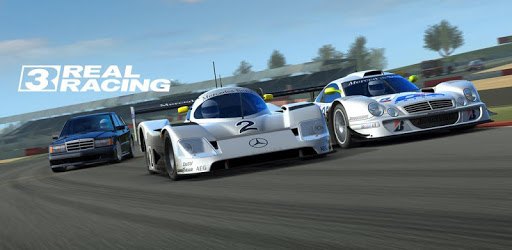
Real Racing 3 is an Android app developed and published by ELECTRONIC ARTS at Google Play Store on Feb 27, 2013 for Android users. Real Racing 3 is so popular that it has gained 10000000 installs so far and growing.
Real Racing 3 is a thrilling mobile game that brings high-octane racing action right to your fingertips. With its stunning graphics and realistic gameplay, Real Racing 3 offers an immersive experience for gamers of all ages. The game features a vast array of cars, tracks, and races, ensuring that every race is unique and engaging.
One of the standout features of Real Racing 3 is its exceptional graphics. The game offers a level of visual detail that rivals many console games. From the shine of the car exteriors to the intricacies of the race tracks, every element is beautifully rendered, making you feel like you're truly in the driver's seat.
The realism extends beyond the graphics, with cars behaving in a way that closely mimics real-life physics. Each car handles differently, meaning players must master the intricacies of each vehicle to succeed on the track. This attention to detail makes Real Racing 3 not just a game, but a tool for refining driving skills.
Real Racing 3 boasts an impressive collection of cars from various manufacturers. Players can get behind the wheel of everything from classic muscle cars to the latest high-performance supercars. This wide selection means there's a car for every taste and style of racing.
It's worth noting that while some vehicles can be earned through gameplay, others may require in-game purchases. This can make acquiring some of the more exotic models a bit pricey, but the game does offer plenty of opportunities to race and earn the currency needed for upgrades and new cars.
The game's multiple tracks and race formats keep the experience fresh and exciting. Whether you're racing on world-famous circuits or city streets, each track offers its own unique challenges. Real Racing 3 includes over 22,000 different races, ensuring that there's always a new challenge waiting for you.
Additionally, the game offers special events and limited-time challenges, which provide opportunities to earn exclusive cars and rewards. These events often require a high level of skill and strategy, adding an extra layer of excitement to the gameplay.
While Real Racing 3 offers a robust free-to-play experience, there are elements of the game that require in-app purchases. Some levels and cars are only accessible through spending real money, which can be frustrating for some players. However, it's still possible to progress and enjoy the game without spending, though it may take longer to achieve certain milestones.
For those willing to invest a bit in the game, the opportunity to upgrade cars quicker and access exclusive content can enhance the overall experience. It's a balance between time and money, and players can choose their preferred path based on their individual circumstances.
The developers of Real Racing 3 are committed to keeping the game fresh and engaging. Regular updates introduce new cars, tracks, and features, ensuring there's always something new for players to explore. The game also allows you to connect with a community of fellow racers, offering a social aspect that enhances the overall experience.
You can find tutorials and gameplay videos on platforms like YouTube, providing tips and strategies to help you advance in the game. Engaging with the community can make the game even more enjoyable, as you share experiences and compete with other racing enthusiasts.
Real Racing 3 is a standout racing game that offers endless fun and challenges. With its realistic graphics, diverse car selection, and numerous tracks, it provides an engaging experience that keeps players coming back for more. Whether you're a casual gamer or a serious racing fan, Real Racing 3 has something to offer everyone.
Yes, you can run Real Racing 3 on PC, but first, you will need emulator software installed on your Windows or MAC, which you can download for free. In the below video, you will find Real Racing 3 in action. Before you install the emulator, check out the minimum and recommended system requirements to run it seamlessly. They may change depending on which version of the emulator you choose. Therefore, we recommend you download the latest version of the emulator. Below you will find three free Android emulators that we have shortlisted based on their popularity:
Up to date graphics drivers from Microsoft or the chipset vendor.
Storage: 1 GB available under installation path, 1.5GB available hard drive space
Internet: Broadband Internet connection
Regardless of which Android emulator you install, the steps to install, configure, and running the Real Racing 3 app on PC are the same.