Published by SUD Inc.
Updated September 23, 2025
New! Dr. Driving 2 is released!
| Version | 1.30 |
| Size | 22.7 MB |
| What's New | Minor bug fixes and improvements. Install or update to the newest version to check it out! |
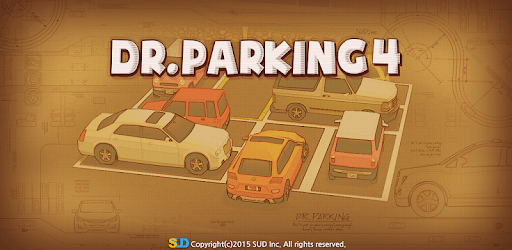
Dr. Parking 4 is an Android app developed and published by SUD Inc. at Google Play Store on Sep 11, 2015 for Android users. Dr. Parking 4 is so popular that it has gained 196385949 installs so far and growing.
Dr. Parking 4 brings a wonderful mix of fun and learning to the world of mobile driving simulators. This game stands out for its engaging content and practical skills development. Simple yet captivating, it is designed to make players better drivers in real life while keeping them entertained.
Though recommended for children ages 8 to 9, Dr. Parking 4 is truly a game that anyone can enjoy. It offers a unique learning experience that benefits both young and adult players. Adults looking to polish their driving skills or simply spend some quality leisure time will find this game particularly rewarding.
Dr. Parking 4 sets itself apart from other parking games with its distinctive features and realistic driving mechanics. This game is not just another parking simulator. It offers an authentic experience that enhances your driving skills. Whether you’re practicing reverse parking or learning to control the steering wheel better, you will find this game incredibly useful.
One fantastic aspect of Dr. Parking 4 is its offline practice mode. This feature makes it easy for players to enjoy the game anytime, anywhere, without being dependent on an internet connection. Dive in and play whenever you want, whether you're at home or on the go.
Dr. Parking 4 keeps players engaged with its interesting gameplay. The game is so captivating that many players find themselves playing for hours on end. Whether you are looking to kill time or learn something new, this game offers a delightful way to do both.
While Dr. Parking 4 already provides a great experience, there are always calls for more challenging levels and additional features. This craving for more indicates just how enjoyable the game is. Players often wish for upgraded difficulty levels to keep the experience fresh and intriguing.
One of the best parts of Dr. Parking 4 is its focus on realistic driving scenarios. Using the back mirror for reverse parking and controlling the steering wheel from inside the car are just a couple of the ways this game helps improve real-world driving skills. These practical exercises make it an excellent tool for those learning to drive or seeking to enhance their abilities.
Beyond driving skills, Dr. Parking 4 is simply a fun game to play. It's not about stunts or farming but about mastering the everyday act of parking. The game’s balance of fun and learning makes it an enjoyable pastime for players of all types, whether you aim to improve your driving or just have a bit of fun.
In summary, Dr. Parking 4 is a remarkable driving simulator that stands out for its practical skills and engaging gameplay. Suitable for players of all ages, it offers a unique experience that’s both fun and educational. Enhance your driving skills or simply enjoy a great game with Dr. Parking 4.
Yes, you can run Dr. Parking 4 on PC, but first, you will need emulator software installed on your Windows or MAC, which you can download for free. In the below video, you will find Dr. Parking 4 in action. Before you install the emulator, check out the minimum and recommended system requirements to run it seamlessly. They may change depending on which version of the emulator you choose. Therefore, we recommend you download the latest version of the emulator. Below you will find three free Android emulators that we have shortlisted based on their popularity:
Up to date graphics drivers from Microsoft or the chipset vendor.
Storage: 1 GB available under installation path, 1.5GB available hard drive space
Internet: Broadband Internet connection
Regardless of which Android emulator you install, the steps to install, configure, and running the Dr. Parking 4 app on PC are the same.