Published by Draw apps for free
Updated October 16, 2025
🔥Amazing glow doodle game for all adults and kids! Get more joy !😉
Doodle Master - Glow Art is an Android app developed and published by Draw apps for free at Google Play Store on May 31, 2019 for Android users. Doodle Master - Glow Art is so popular that it has gained 10000 installs so far and growing.
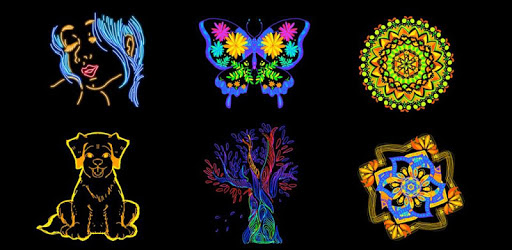
Doodle Master - Glow Art provides a delightful experience, allowing users to unleash their creativity with ease. The shimmering lines and vibrant colors capture your attention, making doodling an enjoyable and immersive activity. The app is designed to be simple yet captivating, creating a perfect blend of fun and artistry.
One of the standout features of Doodle Master - Glow Art is the variety of drawing tools and colors available. Users can select different pens and colors to create unique designs. Additionally, the app offers multiple modes. For instance, some modes let you draw double lines simultaneously, while others allow more freeform doodling. This variety ensures that every doodle is a new and exciting experience.
Doodle Master - Glow Art is not just about drawing; it's also about relaxation. The app offers a therapeutic escape, allowing users to unwind while they create intricate and beautiful designs. Watching the glowing lines unfold can be incredibly satisfying, providing a calming effect that helps users take a break from their daily routine.
While the basic version of Doodle Master - Glow Art is free to download, there's also a VIP option available. For a reasonable price of $5, users can upgrade to VIP status, which removes ads and unlocks additional features, enhancing the overall experience. The investment is well worth it for those who want uninterrupted creativity and access to more fun tools.
Doodle Master - Glow Art is loved by people of all ages. It's particularly popular among children, helping to instill a love for art from an early age. Parents can let their kids play, knowing they are engaged in a creative activity that stimulates their imagination. The app is also a hit among adults who enjoy doodling as a leisurely pastime.
The simplicity of Doodle Master - Glow Art is one of its greatest strengths. It's easy to navigate and user-friendly, making it accessible to everyone. The satisfaction derived from creating glowing doodles is unmatched, making it a perfect tool for anyone looking to explore their artistic side without any complications.
Yes, you can run Doodle Master - Glow Art on PC, but first, you will need emulator software installed on your Windows or MAC, which you can download for free. In the below video, you will find Doodle Master - Glow Art in action. Before you install the emulator, check out the minimum and recommended system requirements to run it seamlessly. They may change depending on which version of the emulator you choose. Therefore, we recommend you download the latest version of the emulator. Below you will find three free Android emulators that we have shortlisted based on their popularity:
Up to date graphics drivers from Microsoft or the chipset vendor.
Storage: 1 GB available under installation path, 1.5GB available hard drive space
Internet: Broadband Internet connection
Regardless of which Android emulator you install, the steps to install, configure, and running the Doodle Master - Glow Art app on PC are the same.