Published by Colorfit
Updated November 4, 2025
PaperDraw imitating the real brush, simple painting, learn to paint.
| Version | 2.9.15 |
| Size | 61.9 MB |
| What's New | Update: Enhanced painting experience! Thank you for your support! This update focuses on improving the performance of the canvas for a smoother creative process!Highlights:🚀 Optimized layer limit! Reduce memory pressure, making creation easier and avoiding overflow issues.🎨 Performance optimization for smoother drawing! Enhance painting performance, ensuring every stroke is effortless.Update now and enjoy a delightful creative experience! 🌈✨ |
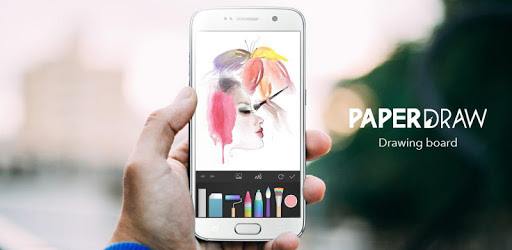
PaperColor : Paint Draw Sketchbook & PaperDraw is an Android app developed and published by Colorfit at Google Play Store on Jun 17, 2016 for Android users. PaperColor : Paint Draw Sketchbook & PaperDraw is so popular that it has gained 51698946 installs so far and growing.
PaperColor: Paint Draw Sketchbook & PaperDraw is a vibrant and user-friendly painting app that truly brings out the artist in everyone. Whether you're a seasoned artist or just starting, this platform provides a fantastic canvas to explore your creative side.
With PaperColor, you're equipped with a host of drawing tools. You can choose from various pencils, brushes, and pens to create stunning artwork. The app mimics the experience of using real-life art supplies, making it a joy to sketch and draw. Each tool can be used to achieve different textures, adding depth and detail to your creations.
PaperColor isn't just for creating art; it's also a relaxing and enjoyable experience. The simplicity of the interface ensures that you can focus on your art without distractions. This makes it a perfect app for unwinding after a long day or for indulging in creative expression whenever inspiration strikes.
One of the standout features of PaperColor is its suitability for users of all ages. It's designed to be family-friendly, ensuring that children can use it safely. Whether it's kids enjoying a fun drawing session or adults working on intricate designs, the app caters to everyone.
For those serious about digital art, PaperColor offers additional features that can be unlocked. Investing a little can give artists access to advanced tools such as the fountain pen. These tools allow for greater creativity and detail in artwork.
The app is incredibly user-friendly and intuitive. Its simplicity makes it ideal for beginners who are new to digital art. The range of tools is not overwhelming, providing just what you need to get started. For those more advanced in their art journey, the app still offers plenty to enjoy while serving as a stepping stone to more complex digital art programs.
While PaperColor excels in many areas, there are a few things to keep in mind. Some users might find it limiting when it comes to using certain colors like black or gray, which may not show up clearly. Additionally, to access certain art materials, a purchase is required. However, these minor limitations do not detract from the overall positive experience.
One of the most applauded aspects of PaperColor is how realistic the drawing experience is. Users often feel like they're using actual crayons, paintbrushes, and pencils. This realism helps in creating more authentic pieces of digital art.
PaperColor continues to evolve and improve, maintaining its appeal over the years. Even with the introduction of ads, the overall experience remains highly enjoyable. Long-time users continue to appreciate the app's stability and reliability.
The array of brushes, pens, and pencils offered by PaperColor is extensive. Coupled with a broad palette of colors, it becomes easy for users to express themselves freely and creatively. The app enables users to paint diverse and vivid paintings effortlessly, making it a favorite sketchbook among many.
PaperColor makes it easy to produce high-quality artwork, suitable for various uses, even though it sometimes falls short on pixel size for professional uses like fashion design sites. Despite this, its versatility and breadth of options make it a valuable tool for hobbyists and amateur artists alike.
In essence, PaperColor: Paint Draw Sketchbook & PaperDraw continues to be a beloved app for drawing enthusiasts around the globe. The combination of user-friendly tools, realistic drawing experience, and the ability to produce high-quality artwork ensures that it remains a top choice for digital artists.
Yes, you can run PaperColor : Paint Draw Sketchbook & PaperDraw on PC, but first, you will need emulator software installed on your Windows or MAC, which you can download for free. In the below video, you will find PaperColor : Paint Draw Sketchbook & PaperDraw in action. Before you install the emulator, check out the minimum and recommended system requirements to run it seamlessly. They may change depending on which version of the emulator you choose. Therefore, we recommend you download the latest version of the emulator. Below you will find three free Android emulators that we have shortlisted based on their popularity:
Up to date graphics drivers from Microsoft or the chipset vendor.
Storage: 1 GB available under installation path, 1.5GB available hard drive space
Internet: Broadband Internet connection
Regardless of which Android emulator you install, the steps to install, configure, and running the PaperColor : Paint Draw Sketchbook & PaperDraw app on PC are the same.