Published by Bilkon
Updated October 1, 2025
Best piano app for android. Enjoy the fun.
| Version | 1.28 |
| Size | 33.9 MB |
| What's New | Minor bug fixes and improvements. Install or update to the newest version to check it out! |
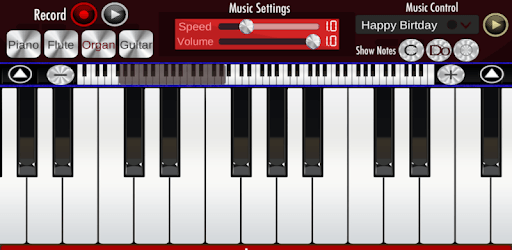
Real Piano is an Android app developed and published by Bilkon at Google Play Store on Jun 2, 2017 for Android users. Real Piano is so popular that it has gained 194748221 installs so far and growing.
Are you fascinated by the idea of playing the piano but don't have one at home? Real Piano is here to make your dreams come true. Whether you're a beginner or an experienced musician, this app offers a fun and engaging way to learn and play the piano.
Real Piano is an excellent tool for anyone looking to learn how to play piano. Kids and beginners especially will find it helpful. The app teaches you to play different songs step-by-step. Imagine practicing songs for your friends and family. The app makes learning simple, intuitive, and, most importantly, enjoyable.
One of the best things about Real Piano is that you can play it anywhere without needing an internet connection. This makes it perfect for those long trips or when you're in places with no network. Imagine sitting in a park or on a quiet beach, practicing your favorite tunes. The app brings the joy of music to your fingertips, anytime and anywhere.
Real Piano provides a realistic sound experience that closely mimics that of an actual piano. The app has received praise for its quality sound, making your practice sessions more authentic. Though some users suggest slight improvements in sound, the overall experience remains highly satisfying. The sound ranges from high to low notes, letting you play a variety of melodies effortlessly.
Beyond just practice, Real Piano brings a lot of fun to your musical journey. The game aspect of the app adds an extra layer of enjoyment. You can challenge yourself with different levels and improve your skills over time. It’s not just about learning; it's about having fun while you do it. The engaging gameplay keeps you hooked and makes learning new skills exciting.
Real Piano isn’t just for kids or beginners. Adults and experienced pianists will find the app equally enjoyable. Whether you’re brushing up on your skills or learning new songs to share with your family, the app makes it easy for everyone to dive in and start playing. Music is a universal language, and Real Piano caters to everyone who speaks it.
Have you always wanted to play your favorite songs? Real Piano lets you do just that. Its user-friendly interface and realistic sound engine make it feel like you’re playing a real piano. The app is built to help you bring your musical dreams to life, one note at a time. With continuous updates and potential sound improvements, the app strives to give you the best musical experience possible.
Whether you are playing to relax or aiming to master the piano, Real Piano is designed to make your musical journey rewarding and fun. Download the app today and bring the joy of music into your life.
Yes, you can run Real Piano on PC, but first, you will need emulator software installed on your Windows or MAC, which you can download for free. In the below video, you will find Real Piano in action. Before you install the emulator, check out the minimum and recommended system requirements to run it seamlessly. They may change depending on which version of the emulator you choose. Therefore, we recommend you download the latest version of the emulator. Below you will find three free Android emulators that we have shortlisted based on their popularity:
Up to date graphics drivers from Microsoft or the chipset vendor.
Storage: 1 GB available under installation path, 1.5GB available hard drive space
Internet: Broadband Internet connection
Regardless of which Android emulator you install, the steps to install, configure, and running the Real Piano app on PC are the same.