Published by A Trillion Games Ltd
Updated August 7, 2025
Play against the right A.I. level for you, in 3D!
| Version | 5.0.7.0 |
| Size | 11.0 MB |
| What's New | Minor bug fixes and improvements. Install or update to the newest version to check it out! |
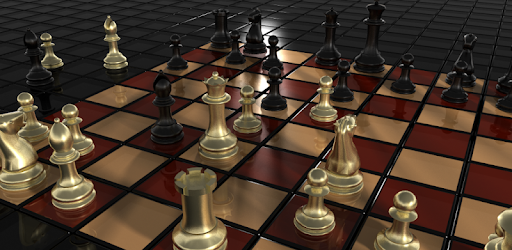
3D Chess Game is an Android app developed and published by A Trillion Games Ltd at Google Play Store on Jun 19, 2018 for Android users. 3D Chess Game is so popular that it has gained 1586766 installs so far and growing.
Step into the future of chess with 3D Chess Game, a remarkable mobile app that brings a unique and thrilling experience to the traditional game. With its stunning visuals and easy-to-navigate interface, this game is quickly becoming a favorite among chess enthusiasts.
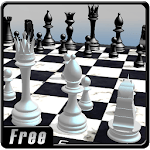
One of the standout features of 3D Chess Game is its impressive 3D graphics. The pieces and board come to life with high-detail rendering, offering a visually appealing experience that keeps you engrossed in the game. The ability to customize the colors of the chess pieces makes it even more personal and engaging.
Versatility is a strong suit of 3D Chess Game. You can tailor the level of difficulty by choosing from different AI levels. Whether you're a beginner or a seasoned grandmaster, there's a suitable challenge waiting for you. Additionally, if you are interested in analyzing strategies, you can sit back and watch AI versus AI matches and even adjust their difficulty levels.
3D Chess Game shines in the area of user-friendliness. The interface is straightforward and easy to navigate. Player moves are tracked and displayed clearly, ensuring you stay on top of your game strategy. The minimal ads contribute to an uninterrupted experience, adding to the overall enjoyment.
Play 3D Chess Game whenever and wherever you want. It works smoothly across different devices, including smartphones and PCs. Users particularly appreciate that the mobile version allows for a personalized gaming experience, such as changing the color of the pieces, making it more versatile than some PC chess apps.
While 3D Chess Game already offers a lot, there is always room for growth. Potential enhancements like integrating a custom engine and support for PGN files could elevate the game to new heights, surpassing many other chess applications available today.
3D Chess Game is a fantastic option for anyone looking to enjoy a competitive game of chess with the added flair of modern graphics. Whether you're playing on a small smartphone screen or a larger PC monitor, this game delivers a consistent and delightful experience. Immerse yourself in the world of 3D Chess Game and discover why it stands out in the crowded chess app market.
Yes, you can run 3D Chess Game on PC, but first, you will need emulator software installed on your Windows or MAC, which you can download for free. In the below video, you will find 3D Chess Game in action. Before you install the emulator, check out the minimum and recommended system requirements to run it seamlessly. They may change depending on which version of the emulator you choose. Therefore, we recommend you download the latest version of the emulator. Below you will find three free Android emulators that we have shortlisted based on their popularity:
Up to date graphics drivers from Microsoft or the chipset vendor.
Storage: 1 GB available under installation path, 1.5GB available hard drive space
Internet: Broadband Internet connection
Regardless of which Android emulator you install, the steps to install, configure, and running the 3D Chess Game app on PC are the same.