Backgammon Free for PC

Backgammon Free for PC

Published by AI Factory Limited

Updated May 3, 2026

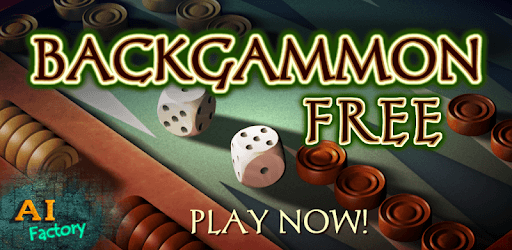
Google Play's top ranked Backgammon! Completely Free!

What's New

Version4.41
Size33.4 MB
What's NewMinor updates

Backgammon Free Screenshots

Backgammon Free PC screenshot

About Backgammon Free For PC

Backgammon Free is an Android app developed and published by AI Factory Limited at Google Play Store on Jul 26, 2010 for Android users. Backgammon Free is so popular that it has gained 10000000 installs so far and growing.

Backgammon Free: A Challenging and Strategic Game

Backgammon Free is a highly engaging and strategic game that has captivated players for years. With its complex gameplay and impressive AI, this app offers an immersive gaming experience that keeps players coming back for more. Whether you're a seasoned backgammon player or new to the game, Backgammon Free provides hours of entertainment and a chance to test your skills against a formidable opponent.

Unleash Your Strategic Skills

One of the standout features of Backgammon Free is its ability to anticipate and react to chip placement. The developers have done an excellent job in creating an AI that challenges players at every turn. As you progress through the levels, you'll find that the CPU's routine and technique become more refined, making it a worthy adversary.

Many players have praised the game's challenging nature, with some even boasting an impressive 80% win rate against the AI at level 6. This speaks volumes about the game's ability to provide a fair and balanced playing field, where victory is determined by skill and strategy.

Extensive Stats Analysis

The latest update of Backgammon Free introduces an extensive stats analysis feature, which has been met with enthusiasm by players. This addition allows you to delve deeper into your gameplay, providing valuable insights and helping you improve your strategy. With this comprehensive stats page, you can track your progress, analyze your moves, and make informed decisions to outsmart your opponent.

Players have expressed their satisfaction with this new feature, describing it as a game-changer. It not only adds depth to the gameplay experience but also offers a glimpse into the intricacies of the game.

A Game Worth Reinstalling

Backgammon Free has garnered a loyal following over the years, with players who have been using the app daily for five years or more. Some players admit to temporarily uninstalling the app due to changes in the stats view and board setup. However, after trying out other backgammon apps and realizing that none compared to the robustness of Backgammon Free, they quickly reinstalled the app.

While it may take some time to adjust to the new changes, players have found that the features they loved are still there, waiting to be rediscovered. By taking the time to explore the app's settings and customization options, players can restore their preferred board setup and access the stats they find most meaningful.

A Fair and Challenging Experience

One of the most common concerns among players is the fairness of the AI's rolls. However, many long-time players have dismissed claims of cheating, emphasizing that consistent wins on higher levels are a testament to their skill rather than any unfair advantage.

The developers have listened to player feedback and addressed these concerns in the latest update. The revised AI ensures a more even playing field, allowing players to maintain their impressive win rates while still facing a challenging opponent. With this update, the game has become not only fair but also more enjoyable for players of all skill levels.

Frequently Asked Questions

1. Can I play Backgammon Free against other people?

No, Backgammon Free is a single-player game that allows you to test your skills against the AI.

2. How can I turn off ads in Backgammon Free?

To disable ads, simply turn off WiFi and data while playing the game.

3. Are the dice rolls in Backgammon Free random?

Yes, the dice rolls in Backgammon Free are completely random. Any claims suggesting otherwise are unfounded.

4. Can I customize the game settings in Backgammon Free?

Yes, Backgammon Free offers various customization options, allowing you to tailor the game to your preferences. You can adjust settings such as screen transit, show moves, flash moves, and more.

5. Is Backgammon Free suitable for both beginners and experienced players?

Absolutely! Backgammon Free caters to players of all skill levels. Whether you're new to the game or a seasoned player, you'll find the app challenging and enjoyable.

Overall, Backgammon Free is a top-notch app that delivers an immersive and strategic gaming experience. With its challenging AI, extensive stats analysis, and customizable settings, this game is a must-have for any backgammon enthusiast. Download Backgammon Free today and put your strategic skills to the test!

Can I run Backgammon Free on PC?

Yes, you can run Backgammon Free on PC, but first, you will need emulator software installed on your Windows or MAC, which you can download for free. In the below video, you will find Backgammon Free in action. Before you install the emulator, check out the minimum and recommended system requirements to run it seamlessly. They may change depending on which version of the emulator you choose. Therefore, we recommend you download the latest version of the emulator. Below you will find three free Android emulators that we have shortlisted based on their popularity:

How to Install Backgammon Free on Windows PC

BlueStacks

Minimum
  • OS: Microsoft Windows 7 and above.
  • Processor: Intel or AMD Processor.
  • RAM: Your PC must have at least 4GB of RAM. (Note that having 4GB or more disk space is not a substitute for RAM)
  • Storage: 5GB Free Disk Space.
  • You must be an Administrator on your PC.
Recommended:
  • OS: Microsoft Windows 10
  • Processor: Intel or AMD Multi-Core Processor with Single Thread benchmark score > 1000.
  • Graphics: Intel/Nvidia/ATI, Onboard or Discrete controller with benchmark score >= 750.
  • Please ensure Virtualization is enabled on your PC/Laptop.
  • RAM: 8GB or higher
  • Storage: SSD (or Fusion/Hybrid Drives)
  • Internet: Broadband connection to access games, accounts and related content.

Up to date graphics drivers from Microsoft or the chipset vendor.

  • To start with, download Bluestacks from its official website. The latest version of BluesStacks is v 5, and it is around 400 MB.
  • Once the download is done, click on the Bluestacks set up file to install it on your Windows PC. Follow the on-screen instructions and install it accordingly.
  • The next step is to launch the emulator using the desktop shortcut and sign in using your Google account.
  • Now, head over to Bluestacks home screen and click on the Google Play Store icon.
  • Hit the search bar in Google Play and search for Backgammon Free.
  • Install Backgammon Free from the Play Store by clicking the Install option, which completes downloading of Backgammon Free on PC.

NoxPlayer

Minimum
  • Operating System: Windows XP SP3, Windows Vista, Windows 7, Windows 8, Windows 10, and DirectX 9.0c
  • Processor: At least dual-core processor, both Intel, and AMD are OK
  • Video: Supports Open GL 2.0 or above
  • Memory: 1.5 GB RAM
Recommended
  • Operating System: Windows 7, Windows 8, Windows 10
  • Processor: Multiple core processors which support VT-x or AMB-V Virtualization Technology, better performance with this function enabled
  • Video: The higher performance, the better
  • Memory: 4 GB RAM

Storage: 1 GB available under installation path, 1.5GB available hard drive space

Internet: Broadband Internet connection

  • Download NoxPlayer from the official website. The latest version of NoxPlayer is v 3, and it is around 600 MB.
  • Now install the emulator using the downloaded setup file. Just go through the on-screen instructions and install NoxPlayer on your computer or laptop.
  • After the installation process, launch the Nox Android emulator and log in using your Google account when it asks you.
  • Click on the Google Play Store icon and head over to the search bar to search Backgammon Free. Once found, click on the Install button to install Backgammon Free for PC.
  • If you do not find Backgammon Free on Google Play Store or if you want to skip logging in to Google, you can sideload APK (download the .APK file from this page and open it with NoxPlayer).
  • Launch Backgammon Free from home-screen and start playing it on PC right away!

MEmu

Minimum
  • 2 cores x86/x86_64 Processor (Intel or AMD CPU)
  • WinXP SP3 / Win7 / Win8 / Win10 (Not recommended to run on Server/Enterprise)
  • Latest Windows DirectX 11 / Graphics driver with OpenGL 2.0
  • Hardware Virtualization Technology (Intel VT-x/AMD-V) shall be enabled in BIOS
  • 2GB of RAM (4GB for x64 system)
  • 5GB of hard disk free space
Recommended
  • OS: Microsoft Windows 10 with VT Enabled
  • CPU: Single Thread PassMark score > 1500 (Intel/AMD Multi-Core).
  • Graphics: Intel/Nvidia/ATI, Onboard or Discrete controller with PassMark score > 750.
  • Latest Windows DirectX 11 / Graphics driver with OpenGL 4.5 or higher
  • RAM: 8GB or higher
  • HDD: SSD, 10GB of hard disk free space
  • Internet: Broadband connection with low latency for FPS games
  • Download MEmu Play from the official website. The latest version of NoxPlayer is v 7.5.
  • When the download is completed, install the MEmu emulator on your PC. Follow the on-screen instructions and keep on clicking the Next button until the final step.
  • Now, using the desktop shortcut, look for the MEmu Play emulator and launch it. Once done, it will ask you to log in using your Google account, proceed with the same.
  • MEmu Play will ask you to log in using your Google account. When you log in, it will sync your Google account to MEmu Play. Launch the Google Play Store by clicking on the icon and search for Backgammon Free.
  • Click on the Install button once you find Backgammon Free from the search results. You can also sideload APK (download the .APK file from this page and open it with MEmu) if you want to skip above step.
  • After the installation of Backgammon Free, you're all set to use the app on PC!

Regardless of which Android emulator you install, the steps to install, configure, and running the Backgammon Free app on PC are the same.


Download Backgammon Free For PC