War Eternal for PC

War Eternal for PC

Published by ONEMT

Updated September 28, 2025

Heroes from History / Absorb Other Kingdoms / Diplomacy / Avatar Customization

What's New

Version10.0.180
Size1.6 GB
What's New1. Winter Special Event: "Snow Adventure"2. New Hero: Ymir, a fierce ancestor of the Frost Giants and a Primordial Being in Norse Mythology. (Obtained by participating in the "Snow Adventure" event)3. New Lord Decorations: Lord of the Frozen Abyss & Lord of the Frozen Mountain

War Eternal Screenshots

War Eternal PC screenshot

About War Eternal For PC

War Eternal is an Android app developed and published by ONEMT at Google Play Store on Apr 22, 2019 for Android users. War Eternal is so popular that it has gained 100000 installs so far and growing.

Discover the Thrilling World of War Eternal

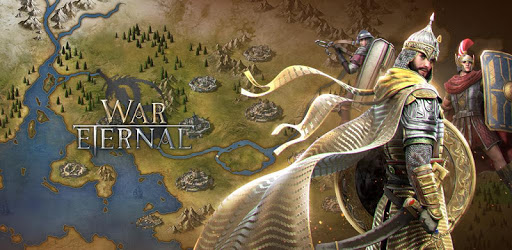
War Eternal is a captivating game that takes players on an extraordinary adventure. With its stunning graphics and immersive gameplay, it stands out as a shining example of how mobile games can offer an engaging and visually pleasing experience. The attention to detail in this game is remarkable, making it a must-try for anyone looking for a fantastic gaming experience.

Beautiful Graphics and Captivating Storyline

One of the most striking features of War Eternal is its breathtaking graphics. The developers have put significant effort into creating a beautiful game world that draws players in from the moment they start playing. The visual appeal is complemented by a well-crafted storyline that allows players to immerse themselves fully in the role of a leader, guiding their empire to greatness. The combination of these elements results in a game that is both stunning to look at and deeply engaging to play.

Join a Clan for a Richer Experience

War Eternal is not just about individual play; it also emphasizes the importance of joining a clan. Being part of a clan provides numerous bonuses and significantly enhances the gaming experience. It helps players protect their empire from attacks and offers support in critical moments. In addition to defensive benefits, being in a clan also opens up opportunities for collaborative strategies and shared rewards, making the game even more enjoyable and rewarding.

Continuous Updates and Bug Fixes

The developers of War Eternal are committed to providing a top-notch gaming experience. Regular updates and bug fixes ensure that the game runs smoothly and any issues are quickly resolved. This commitment to maintenance and improvement keeps players engaged and satisfied, knowing that their gaming experience will remain high-quality and glitch-free.

Not Pay-to-Win, Skill Matters

War Eternal stands out by not being a pay-to-win game. Players don't have to spend money to become successful. Instead, the game rewards skill and strategy. This means that with good planning and smart decisions, even new players can catch up with those who have been playing for a longer time. This approach makes the game fairer and more enjoyable for everyone.

A Diverse Cultural Experience

One of the unique aspects of War Eternal is its inclusion of various cultures and empires. The game features Muslim cultures, warriors, and leaders with authentic names and flags. This diversity adds a rich layer to the gaming experience and allows players to explore and appreciate different historical backgrounds. It makes the game feel more inclusive and educational, providing a sense of being part of a truly global empire.

Exciting Upgrades and Engaging Gameplay

War Eternal offers a well-organized upgrade system that keeps players engaged. The progression of becoming a leader is satisfying, and the game's mechanics are designed to provide a balanced and exciting experience. VIP points and other in-game rewards are structured to keep players motivated and striving for higher levels. This thoughtful design keeps the gameplay fresh and interesting over the long term.

Conclusion

In summary, War Eternal is an exceptional game that blends beautiful graphics, compelling storytelling, and strategic gameplay. Whether you're joining a clan to enhance your experience or enjoying the diverse cultural elements, there's something for everyone in this vibrant and ever-evolving game. Give it a try and immerse yourself in the thrilling world of War Eternal.

Can I run War Eternal on PC?

Yes, you can run War Eternal on PC, but first, you will need emulator software installed on your Windows or MAC, which you can download for free. In the below video, you will find War Eternal in action. Before you install the emulator, check out the minimum and recommended system requirements to run it seamlessly. They may change depending on which version of the emulator you choose. Therefore, we recommend you download the latest version of the emulator. Below you will find three free Android emulators that we have shortlisted based on their popularity:

How to Install War Eternal on Windows PC

BlueStacks

Minimum
  • OS: Microsoft Windows 7 and above.
  • Processor: Intel or AMD Processor.
  • RAM: Your PC must have at least 4GB of RAM. (Note that having 4GB or more disk space is not a substitute for RAM)
  • Storage: 5GB Free Disk Space.
  • You must be an Administrator on your PC.
Recommended:
  • OS: Microsoft Windows 10
  • Processor: Intel or AMD Multi-Core Processor with Single Thread benchmark score > 1000.
  • Graphics: Intel/Nvidia/ATI, Onboard or Discrete controller with benchmark score >= 750.
  • Please ensure Virtualization is enabled on your PC/Laptop.
  • RAM: 8GB or higher
  • Storage: SSD (or Fusion/Hybrid Drives)
  • Internet: Broadband connection to access games, accounts and related content.

Up to date graphics drivers from Microsoft or the chipset vendor.

  • To start with, download Bluestacks from its official website. The latest version of BluesStacks is v 5, and it is around 400 MB.
  • Once the download is done, click on the Bluestacks set up file to install it on your Windows PC. Follow the on-screen instructions and install it accordingly.
  • The next step is to launch the emulator using the desktop shortcut and sign in using your Google account.
  • Now, head over to Bluestacks home screen and click on the Google Play Store icon.
  • Hit the search bar in Google Play and search for War Eternal.
  • Install War Eternal from the Play Store by clicking the Install option, which completes downloading of War Eternal on PC.

NoxPlayer

Minimum
  • Operating System: Windows XP SP3, Windows Vista, Windows 7, Windows 8, Windows 10, and DirectX 9.0c
  • Processor: At least dual-core processor, both Intel, and AMD are OK
  • Video: Supports Open GL 2.0 or above
  • Memory: 1.5 GB RAM
Recommended
  • Operating System: Windows 7, Windows 8, Windows 10
  • Processor: Multiple core processors which support VT-x or AMB-V Virtualization Technology, better performance with this function enabled
  • Video: The higher performance, the better
  • Memory: 4 GB RAM

Storage: 1 GB available under installation path, 1.5GB available hard drive space

Internet: Broadband Internet connection

  • Download NoxPlayer from the official website. The latest version of NoxPlayer is v 3, and it is around 600 MB.
  • Now install the emulator using the downloaded setup file. Just go through the on-screen instructions and install NoxPlayer on your computer or laptop.
  • After the installation process, launch the Nox Android emulator and log in using your Google account when it asks you.
  • Click on the Google Play Store icon and head over to the search bar to search War Eternal. Once found, click on the Install button to install War Eternal for PC.
  • If you do not find War Eternal on Google Play Store or if you want to skip logging in to Google, you can sideload APK (download the .APK file from this page and open it with NoxPlayer).
  • Launch War Eternal from home-screen and start playing it on PC right away!

MEmu

Minimum
  • 2 cores x86/x86_64 Processor (Intel or AMD CPU)
  • WinXP SP3 / Win7 / Win8 / Win10 (Not recommended to run on Server/Enterprise)
  • Latest Windows DirectX 11 / Graphics driver with OpenGL 2.0
  • Hardware Virtualization Technology (Intel VT-x/AMD-V) shall be enabled in BIOS
  • 2GB of RAM (4GB for x64 system)
  • 5GB of hard disk free space
Recommended
  • OS: Microsoft Windows 10 with VT Enabled
  • CPU: Single Thread PassMark score > 1500 (Intel/AMD Multi-Core).
  • Graphics: Intel/Nvidia/ATI, Onboard or Discrete controller with PassMark score > 750.
  • Latest Windows DirectX 11 / Graphics driver with OpenGL 4.5 or higher
  • RAM: 8GB or higher
  • HDD: SSD, 10GB of hard disk free space
  • Internet: Broadband connection with low latency for FPS games
  • Download MEmu Play from the official website. The latest version of NoxPlayer is v 7.5.
  • When the download is completed, install the MEmu emulator on your PC. Follow the on-screen instructions and keep on clicking the Next button until the final step.
  • Now, using the desktop shortcut, look for the MEmu Play emulator and launch it. Once done, it will ask you to log in using your Google account, proceed with the same.
  • MEmu Play will ask you to log in using your Google account. When you log in, it will sync your Google account to MEmu Play. Launch the Google Play Store by clicking on the icon and search for War Eternal.
  • Click on the Install button once you find War Eternal from the search results. You can also sideload APK (download the .APK file from this page and open it with MEmu) if you want to skip above step.
  • After the installation of War Eternal, you're all set to use the app on PC!

Regardless of which Android emulator you install, the steps to install, configure, and running the War Eternal app on PC are the same.

Download War Eternal For PC