Terraria for PC

Terraria for PC

Published by 505 Games Srl

Updated September 4, 2025

DIG! FIGHT! EXPLORE! BUILD! Join the community of millions of Terrarians!

What's New

Version1.4.5
Size180.1 MB
What's NewMinor bug fixes and improvements. Install or update to the newest version to check it out!

Terraria Screenshots

Terraria PC screenshot

About Terraria For PC

Terraria is an Android app developed and published by 505 Games Srl at Google Play Store on Sep 11, 2013 for Android users. Terraria is so popular that it has gained 10000000 installs so far and growing.

Exploring Terraria: A Fun and Exciting Journey

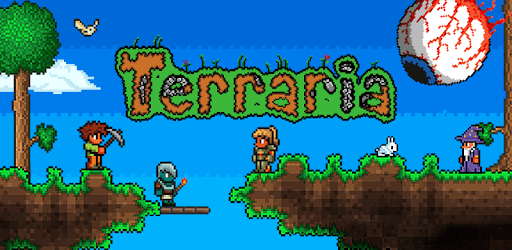
Terraria is a captivating game that transports players into a world of adventure and creativity. As you dive into its vibrant universe, you'll discover a blend of exploration, crafting, building, and combat. This game offers a wide range of experiences that keep players engaged and excited about what comes next.

Understanding the Different Versions

When you first look at Terraria, you might notice there are different versions available. It's essential to know what you're getting with each version. Some versions might be trials, which allow you to get a taste of the game before purchasing the full experience. These trial versions have unique identifiers like missing punctuation in the game title, no price, and a clear label in the description. The full versions, on the other hand, include a price and no mention of being a trial.

Diverse Gameplay Elements

Boss Battles

Terraria is renowned for its challenging boss battles. Each boss fight is a unique experience, requiring strategy and preparation to succeed. Players often seek to conquer bosses like the Golem, Moon Lord, and the Necro master. These battles are not just about brute strength but also about timing and using the right equipment.

Crafting and Building

One of the most beloved aspects of Terraria is its intricate crafting and building system. Players can create complex structures, from simple homes to magnificent castles, utilizing various materials gathered from the world. Crafting weapons, armor, and other tools is crucial to progressing and surviving in the game.

Exploration and Adventure

The vast and randomly generated worlds of Terraria encourage exploration. As you journey through different biomes, you'll encounter unique landscapes, monsters, and treasures. Exploration is rewarding as it often leads to discovering rare resources and hidden areas brimming with secrets.

Terraria on Different Platforms

Mobile Gaming

Terraria has made its way to many platforms, including mobile devices. Playing Terraria on mobile offers the same rich experience as on desktops and consoles, albeit with some differences. There are unique challenges in the mobile version, such as different boss difficulty levels, making it a thrilling experience.

Console Gaming

For those who own consoles like the Xbox One, Terraria provides an immersive experience with enhanced graphics and controls. Playing on a console can feel different from mobile or PC, with each platform offering its own set of advantages and unique gameplay experiences.

Updates and Community Wishes

The developers of Terraria frequently update the game, adding new content and fixing bugs. Players often look forward to these updates as they bring fresh challenges and features that keep the game interesting. Some common requests from the community include adding more bosses, improving online multiplayer options, and addressing specific bugs that can hinder the game experience.

Comparing Terraria to Other Popular Games

Terraria is often compared to other sandbox games like Minecraft. While both games offer vast worlds and creative freedom, Terraria stands out with its 2D graphics and extensive combat system. Each game has its strengths, and Terraria's unique content and approach to gameplay make it a favorite for many.

The Joy of Playing Terraria

Overall, Terraria is a game that's easy to fall in love with. Its combination of exploration, building, and challenging combat makes it a must-play for fans of adventure games. Whether you're tackling bosses, crafting the perfect weapon, or building a dream fortress, Terraria offers endless fun and excitement. So, grab your pickaxe and start your adventure today!

Can I run Terraria on PC?

Yes, you can run Terraria on PC, but first, you will need emulator software installed on your Windows or MAC, which you can download for free. In the below video, you will find Terraria in action. Before you install the emulator, check out the minimum and recommended system requirements to run it seamlessly. They may change depending on which version of the emulator you choose. Therefore, we recommend you download the latest version of the emulator. Below you will find three free Android emulators that we have shortlisted based on their popularity:

How to Install Terraria on Windows PC

BlueStacks

Minimum
  • OS: Microsoft Windows 7 and above.
  • Processor: Intel or AMD Processor.
  • RAM: Your PC must have at least 4GB of RAM. (Note that having 4GB or more disk space is not a substitute for RAM)
  • Storage: 5GB Free Disk Space.
  • You must be an Administrator on your PC.
Recommended:
  • OS: Microsoft Windows 10
  • Processor: Intel or AMD Multi-Core Processor with Single Thread benchmark score > 1000.
  • Graphics: Intel/Nvidia/ATI, Onboard or Discrete controller with benchmark score >= 750.
  • Please ensure Virtualization is enabled on your PC/Laptop.
  • RAM: 8GB or higher
  • Storage: SSD (or Fusion/Hybrid Drives)
  • Internet: Broadband connection to access games, accounts and related content.

Up to date graphics drivers from Microsoft or the chipset vendor.

  • To start with, download Bluestacks from its official website. The latest version of BluesStacks is v 5, and it is around 400 MB.
  • Once the download is done, click on the Bluestacks set up file to install it on your Windows PC. Follow the on-screen instructions and install it accordingly.
  • The next step is to launch the emulator using the desktop shortcut and sign in using your Google account.
  • Now, head over to Bluestacks home screen and click on the Google Play Store icon.
  • Hit the search bar in Google Play and search for Terraria.
  • Install Terraria from the Play Store by clicking the Install option, which completes downloading of Terraria on PC.

NoxPlayer

Minimum
  • Operating System: Windows XP SP3, Windows Vista, Windows 7, Windows 8, Windows 10, and DirectX 9.0c
  • Processor: At least dual-core processor, both Intel, and AMD are OK
  • Video: Supports Open GL 2.0 or above
  • Memory: 1.5 GB RAM
Recommended
  • Operating System: Windows 7, Windows 8, Windows 10
  • Processor: Multiple core processors which support VT-x or AMB-V Virtualization Technology, better performance with this function enabled
  • Video: The higher performance, the better
  • Memory: 4 GB RAM

Storage: 1 GB available under installation path, 1.5GB available hard drive space

Internet: Broadband Internet connection

  • Download NoxPlayer from the official website. The latest version of NoxPlayer is v 3, and it is around 600 MB.
  • Now install the emulator using the downloaded setup file. Just go through the on-screen instructions and install NoxPlayer on your computer or laptop.
  • After the installation process, launch the Nox Android emulator and log in using your Google account when it asks you.
  • Click on the Google Play Store icon and head over to the search bar to search Terraria. Once found, click on the Install button to install Terraria for PC.
  • If you do not find Terraria on Google Play Store or if you want to skip logging in to Google, you can sideload APK (download the .APK file from this page and open it with NoxPlayer).
  • Launch Terraria from home-screen and start playing it on PC right away!

MEmu

Minimum
  • 2 cores x86/x86_64 Processor (Intel or AMD CPU)
  • WinXP SP3 / Win7 / Win8 / Win10 (Not recommended to run on Server/Enterprise)
  • Latest Windows DirectX 11 / Graphics driver with OpenGL 2.0
  • Hardware Virtualization Technology (Intel VT-x/AMD-V) shall be enabled in BIOS
  • 2GB of RAM (4GB for x64 system)
  • 5GB of hard disk free space
Recommended
  • OS: Microsoft Windows 10 with VT Enabled
  • CPU: Single Thread PassMark score > 1500 (Intel/AMD Multi-Core).
  • Graphics: Intel/Nvidia/ATI, Onboard or Discrete controller with PassMark score > 750.
  • Latest Windows DirectX 11 / Graphics driver with OpenGL 4.5 or higher
  • RAM: 8GB or higher
  • HDD: SSD, 10GB of hard disk free space
  • Internet: Broadband connection with low latency for FPS games
  • Download MEmu Play from the official website. The latest version of NoxPlayer is v 7.5.
  • When the download is completed, install the MEmu emulator on your PC. Follow the on-screen instructions and keep on clicking the Next button until the final step.
  • Now, using the desktop shortcut, look for the MEmu Play emulator and launch it. Once done, it will ask you to log in using your Google account, proceed with the same.
  • MEmu Play will ask you to log in using your Google account. When you log in, it will sync your Google account to MEmu Play. Launch the Google Play Store by clicking on the icon and search for Terraria.
  • Click on the Install button once you find Terraria from the search results. You can also sideload APK (download the .APK file from this page and open it with MEmu) if you want to skip above step.
  • After the installation of Terraria, you're all set to use the app on PC!

Regardless of which Android emulator you install, the steps to install, configure, and running the Terraria app on PC are the same.


Download Terraria For PC