Published by ChaloApps
Updated November 19, 2025
Memes wars - multiplayer sandbox, do what you want!
| Version | 4.9.992 |
| Size | 242.3 MB |
| What's New | New map |
Memes Wars is an Android app developed and published by ChaloApps at Google Play Store on Nov 8, 2016 for Android users. Memes Wars is so popular that it has gained 22883790 installs so far and growing.
Looking for a game that’s loads of fun with a dash of humor? Memes Wars could be just what you need! This game is all about explosive fun and silly antics that keep players coming back for more. Let’s dive into what makes Memes Wars so intriguing and enjoyable to play.
Explosions are a big part of what makes Memes Wars exciting. Players can use a variety of powerful weapons, like the new bomb weapon, laser guns, and rocket launchers. These weapons not only pack a punch but add a thrilling element of strategy and chaos to the game.
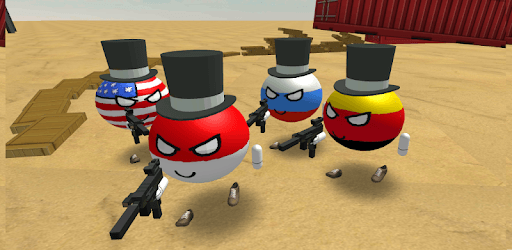
One unique feature is the enjoyment of finding puppies in the game, adding a touch of cuteness to the battlegrounds. Additionally, Memes Wars offers various skins, including the added countryballs skin, allowing players to personalize their characters.
One of the best features of Memes Wars is the multiplayer mode. It runs smoothly without needing high-speed Wi-Fi, making it accessible to more players. You can easily join in on the fun and battle with friends or other players from around the world.
With nine different maps and 190 ammo options, there's no shortage of places to explore and ways to take down opponents in Memes Wars. Players can choose their characters and jump into various settings, keeping the gameplay fresh and engaging.
For many players, Memes Wars is not just a game but a collection of cherished memories and funny moments. The game’s silly memes and humorous aspects create a light-hearted and enjoyable atmosphere, perfect for unwinding and having a laugh.
Memes Wars also offers an abundance of elements to interact with, including up to 100 cars and meme blocks. Players can drive around, crash, and enjoy the chaos that ensues. The sandbox-like environment adds creativity and freedom to the gameplay.
The developers continuously work on improving Memes Wars with updates. New maps and skins are often added, keeping the game fresh and exciting. The anticipation of new additions keeps players engaged and eager to return.
Some players might find the option for teammates to kill each other frustrating. However, it adds a layer of strategy and unpredictability to the game. Removing this option could enhance teamwork and create a more cooperative gaming experience.
Although ads appear frequently, they don’t significantly detract from the overall fun of Memes Wars. For many, the entertainment value and laughter derived from playing far outweigh the minor inconvenience of ads.
All things considered, Memes Wars stands out as a fun and engaging game that offers plenty of explosions, humor, and customization. Whether you’re into tactical shooters or just want to laugh with friends, Memes Wars provides a great platform for both.
Yes, you can run Memes Wars on PC, but first, you will need emulator software installed on your Windows or MAC, which you can download for free. In the below video, you will find Memes Wars in action. Before you install the emulator, check out the minimum and recommended system requirements to run it seamlessly. They may change depending on which version of the emulator you choose. Therefore, we recommend you download the latest version of the emulator. Below you will find three free Android emulators that we have shortlisted based on their popularity:
Up to date graphics drivers from Microsoft or the chipset vendor.
Storage: 1 GB available under installation path, 1.5GB available hard drive space
Internet: Broadband Internet connection
Regardless of which Android emulator you install, the steps to install, configure, and running the Memes Wars app on PC are the same.