Published by Weather Widget Theme Dev Team
Updated March 28, 2026
Try the latest launcher galaxy S10 interface
| Version | 16.6.0.709_53000 |
| Size | 45.5 MB |
| What's New | Minor bug fixes and improvements. Install or update to the newest version to check it out! |
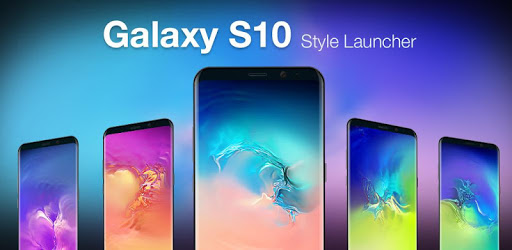
Galaxy S10 Launcher for Samsung is an Android app developed and published by Weather Widget Theme Dev Team at Google Play Store on Mar 20, 2019 for Android users. Galaxy S10 Launcher for Samsung is so popular that it has gained 10000 installs so far and growing.
The Galaxy S10 Launcher for Samsung is a popular choice for those looking to customize their Samsung smartphone. Let's dive into what makes this launcher so appealing and what you can expect when using it on your device.
One of the standout features of the Galaxy S10 Launcher for Samsung is its seamless functionality. It works great, ensuring that the core performance of the app remains smooth and responsive. You won't experience any major disruptions, making it a reliable option for day-to-day use. While there may be some advertisements, they do not hinder the overall functionality of the launcher.
The design of the Galaxy S10 Launcher for Samsung is sleek and modern. It offers a visually appealing interface that enhances the user experience. Users will appreciate the clean look and feel of the launcher, which can make your device look even more stylish.
The Galaxy S10 Launcher for Samsung provides several additional features that can be quite handy. Although there are extra apps included that you might not need, the launcher itself remains highly functional. This means you get more than just a basic launcher; you get added tools and features that might come in handy from time to time.
While the Galaxy S10 Launcher for Samsung is highly functional, it does include ads. Some users find these ads a bit annoying. The good news is that the ads do not stop the app from working at its best. If you can overlook the occasional advertisement, you'll find that the launcher delivers a solid performance. However, it would be even better if an ad-free version was available.
One aspect to be mindful of is the uninstallation process. Some users might find it a bit tricky to remove the Galaxy S10 Launcher for Samsung. However, with a bit of patience and following the correct steps, you can successfully uninstall it when needed.
The Galaxy S10 Launcher for Samsung is a solid option for those looking to enhance their Samsung smartphone experience. Despite some minor drawbacks, such as the presence of ads and occasional uninstallation issues, the launcher offers seamless functionality and valuable additional features. Give it a try to see how it can elevate your device's interface.
Yes, you can run Galaxy S10 Launcher for Samsung on PC, but first, you will need emulator software installed on your Windows or MAC, which you can download for free. In the below video, you will find Galaxy S10 Launcher for Samsung in action. Before you install the emulator, check out the minimum and recommended system requirements to run it seamlessly. They may change depending on which version of the emulator you choose. Therefore, we recommend you download the latest version of the emulator. Below you will find three free Android emulators that we have shortlisted based on their popularity:
Up to date graphics drivers from Microsoft or the chipset vendor.
Storage: 1 GB available under installation path, 1.5GB available hard drive space
Internet: Broadband Internet connection
Regardless of which Android emulator you install, the steps to install, configure, and running the Galaxy S10 Launcher for Samsung app on PC are the same.