Published by Fonts Keyboard
Updated December 11, 2025
#1 Fonts Keyboard
| Version | 5.0.81.51948 |
| Size | 32.6 MB |
| What's New | Bug fixes and performance improvements. |
Fonts - Emojis & Fonts Keyboard is an Android app developed and published by Fonts Keyboard at Google Play Store on Aug 21, 2019 for Android users. Fonts - Emojis & Fonts Keyboard is so popular that it has gained 40356473 installs so far and growing.
Are you tired of using the same old boring fonts on your phone? Do you want to add a touch of creativity and style to your messages and social media posts? Look no further, because Fonts - Emojis & Fonts Keyboard is here to revolutionize the way you communicate!
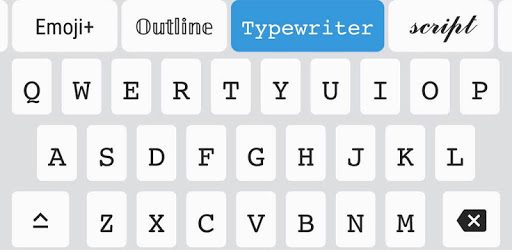
With Fonts - Emojis & Fonts Keyboard, you can say goodbye to plain and dull texts. This incredible app offers a wide variety of unique and eye-catching fonts that will make your messages stand out from the crowd. Whether you're writing an email, composing a tweet, or sending a text to a friend, this app has got you covered.
Fonts - Emojis & Fonts Keyboard is the perfect tool for unleashing your creativity. With its vast collection of fonts, you can express yourself in ways you never thought possible. From elegant and sophisticated styles to fun and playful ones, there's a font for every occasion.
Imagine sending a birthday message to your loved ones in a beautiful handwritten font, or adding a touch of elegance to your Instagram captions with a stylish cursive font. With Fonts - Emojis & Fonts Keyboard, the possibilities are endless.
Gone are the days of copying and pasting fonts from different sources. Fonts - Emojis & Fonts Keyboard makes it incredibly easy to use its wide range of fonts. Simply install the app, enable the keyboard, and start typing. It's that simple!
No more hassle, no more wasting time. With Fonts - Emojis & Fonts Keyboard, you can access all the fonts directly from your keyboard, making it convenient and efficient. Say goodbye to the tedious process of switching between apps or websites just to find the right font.
One of the best features of Fonts - Emojis & Fonts Keyboard is its ad-free experience. Unlike other similar apps, this app understands the importance of a seamless user experience. You can enjoy all the amazing fonts without any interruptions or distractions.
Fonts - Emojis & Fonts Keyboard values your time and ensures that your focus remains on creating stunning texts, rather than dealing with annoying ads. It's a breath of fresh air in the world of font apps.
Yes, absolutely! Fonts - Emojis & Fonts Keyboard is compatible with all popular messaging apps, including WhatsApp, Messenger, and more. You can use the app to enhance your texts in any platform you prefer.
Fonts - Emojis & Fonts Keyboard offers a vast collection of fonts, ranging from classic to modern styles. You'll find over 100 unique fonts to choose from, ensuring that you'll never run out of options.
Yes, Fonts - Emojis & Fonts Keyboard is available for both iOS and Android devices. Whether you're using an iPhone or an Android phone, you can enjoy the app's incredible features and transform your texts.
Currently, Fonts - Emojis & Fonts Keyboard offers a wide variety of font styles, but customization options for size and color are not available. However, the app's diverse range of fonts ensures that you'll find the perfect style to suit your needs.
Fonts - Emojis & Fonts Keyboard is a game-changer when it comes to expressing yourself through texts. With its extensive collection of fonts, easy-to-use interface, and ad-free experience, this app is a must-have for anyone who wants to add a touch of creativity to their messages. Download Fonts - Emojis & Fonts Keyboard now and let your texts come to life!
Yes, you can run Fonts - Emojis & Fonts Keyboard on PC, but first, you will need emulator software installed on your Windows or MAC, which you can download for free. In the below video, you will find Fonts - Emojis & Fonts Keyboard in action. Before you install the emulator, check out the minimum and recommended system requirements to run it seamlessly. They may change depending on which version of the emulator you choose. Therefore, we recommend you download the latest version of the emulator. Below you will find three free Android emulators that we have shortlisted based on their popularity:
Up to date graphics drivers from Microsoft or the chipset vendor.
Storage: 1 GB available under installation path, 1.5GB available hard drive space
Internet: Broadband Internet connection
Regardless of which Android emulator you install, the steps to install, configure, and running the Fonts - Emojis & Fonts Keyboard app on PC are the same.