Published by B77 Entertainment
Updated September 11, 2026
The funniest Android music game
| Version | 4.0.5 |
| Size | 10.7 MB |
| What's New | Minor bug fixes and improvements. Install or update to the newest version to check it out! |
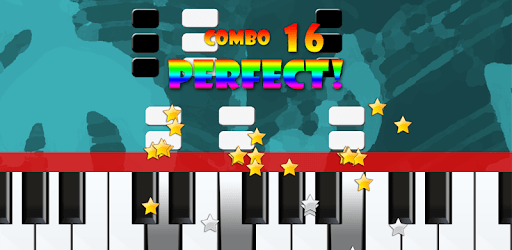
Piano Master 2 is an Android app developed and published by B77 Entertainment at Google Play Store on Nov 25, 2011 for Android users. Piano Master 2 is so popular that it has gained 14474381 installs so far and growing.
Are you looking for an exciting and interactive way to learn piano? Piano Master 2 is a fantastic game that lets you play music and improve your piano skills at the same time. This game provides hours of entertainment and educational value, making it perfect for both beginners and those with some piano experience.
Piano Master 2 is designed to be a joy to play. The intuitive interface makes it easy to get started right away. With 10 songs available in the free version, you can immediately dive into playing some beautiful melodies. For those who want more, the full version unlocks the entire song library, allowing you to continue your musical journey.
Whether you are a beginner or an expert, Piano Master 2 has something for everyone. The game offers different difficulty levels: Beginner, Intermediate, and Expert. This ensures that players of all skill levels can enjoy and challenge themselves accordingly. Additionally, there is a custom setting option for those who want to fine-tune their learning experience.
Piano Master 2 is not just a game; it’s also a wonderful learning tool. Many players have found that their piano skills have improved significantly after playing. The game helps in coordinating both hands, making it easier to transition to real piano playing. It’s a convenient way to practice and learn new techniques, all while having a lot of fun.
Piano Master 2 is highly addictive and guarantees to keep you hooked for hours. The game’s engaging melodies and interactive interface make it hard to put down. If you love music and enjoy playing games, this is an app that you will keep coming back to. The excitement does not fade, making it a perfect companion for those moments of spare time.
One of the best things about Piano Master 2 is that you can enjoy it on the go. Whether you are at home or out and about, you can take your piano lessons with you. It is available on multiple devices, including phones and tablets, ensuring that your practice does not get interrupted. This flexibility makes it an ideal app for busy individuals who want to incorporate music into their daily routine.
The selection of songs in Piano Master 2 is perfect for piano enthusiasts. Each melody is chosen to provide a fulfilling experience, whether you are practicing simple tunes or challenging pieces. Playing well-known classics like “Dance of the Sugar Plum Fairy” can be a delightful way to explore your musical talents.
Technical performance is a crucial aspect, and Piano Master 2 excels in this regard. The game runs smoothly without freezing, allowing for uninterrupted play. The reliable performance enhances the overall user experience, ensuring that technical glitches do not hamper your musical journey.
For those who cannot get enough of Piano Master 2, expansion packs provide even more content. Once you have explored the free version, upgrading to the full version or purchasing expansion packs will open up a whole new range of possibilities. This ensures that the fun never ends, and you always have new songs and challenges to look forward to.
Piano Master 2 is a wonderful blend of fun, learning, and music. With its engaging gameplay, varying difficulty levels, and perfect song choices, it promises an enjoyable experience for all piano lovers. Start your musical adventure today and see how much you can achieve!
Yes, you can run Piano Master 2 on PC, but first, you will need emulator software installed on your Windows or MAC, which you can download for free. In the below video, you will find Piano Master 2 in action. Before you install the emulator, check out the minimum and recommended system requirements to run it seamlessly. They may change depending on which version of the emulator you choose. Therefore, we recommend you download the latest version of the emulator. Below you will find three free Android emulators that we have shortlisted based on their popularity:
Up to date graphics drivers from Microsoft or the chipset vendor.
Storage: 1 GB available under installation path, 1.5GB available hard drive space
Internet: Broadband Internet connection
Regardless of which Android emulator you install, the steps to install, configure, and running the Piano Master 2 app on PC are the same.