BanG Dream! Girls Band Party! for PC

BanG Dream! Girls Band Party! for PC

Published by Bushiroad International Pte Ltd_

Updated November 19, 2025

An anime rhythm game with simple controls! Now available worldwide!
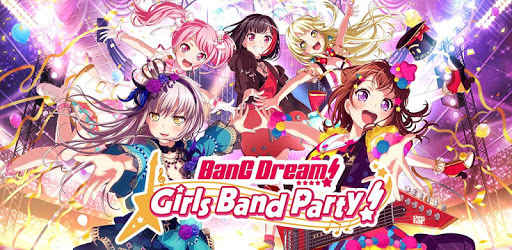
BanG Dream! Girls Band Party! Screenshots

BanG Dream! Girls Band Party! PC screenshot

About BanG Dream! Girls Band Party! For PC

BanG Dream! Girls Band Party! is an Android app developed and published by Bushiroad International Pte Ltd_ at Google Play Store on Apr 3, 2018 for Android users. BanG Dream! Girls Band Party! is so popular that it has gained 1000000 installs so far and growing.

Introduction to BanG Dream! Girls Band Party!

BanG Dream! Girls Band Party! is an engaging rhythm game known for its vibrant anime art style and dynamic musical gameplay. Players can immerse themselves in the world of bands, interacting with a variety of characters and enjoying a broad range of songs, including both original tracks and popular covers.

Gameplay Experience

The main attraction of BanG Dream! Girls Band Party! is its rhythm-based gameplay. Players tap, slide, and hold notes in time with the music, which is accompanied by beautifully animated character performances. The game offers both single-player and multiplayer modes, catering to different play styles and preferences.

Single-Player Mode

The single-player mode allows users to explore the story of each band and its members. Each band has unique characters and songs, providing a rich and diverse narrative experience. As players progress, they unlock new songs and story chapters, which add depth to the gameplay.

Multiplayer Mode

In the multiplayer mode, users can join live rooms to play songs with other players. This mode is particularly exciting due to the cooperative gameplay, where each player’s performance contributes to the overall success. However, some users have noticed occasional lag and connectivity issues during multiplayer sessions.

Features and Updates

BanG Dream! Girls Band Party! frequently updates with new features, songs, and events. The updates help keep the game fresh and exciting for long-term players. Recent updates have introduced 3D models for more immersive performances and enhanced the gameplay experience with autoplay options for convenience.

3D Model Performances

The introduction of 3D models has added a new layer of visual appeal to the game. Players can watch their favorite bands perform in fully animated 3D, bringing the characters to life in a whole new way. This feature is particularly appreciated during autoplay, where users can enjoy the performance without actively playing.

Autoplay Feature

The autoplay feature is handy for players who are pressed for time or want to watch performances without the stress of hitting notes. It maintains the game’s momentum, allowing players to enjoy the music and animations at their own pace.

Technical Aspects

Despite its many strengths, BanG Dream! Girls Band Party! has faced some technical challenges. Users have reported bugs and crashes, particularly after recent updates. Some common issues include the game crashing during loading screens and gameplay, network errors, and occasional unresponsive notes.

Common Issues and Bugs

The most common technical problems include:

  • Game crashes during gameplay or while browsing the menu.
  • Network errors despite having a stable internet connection.
  • Unresponsive notes, especially flick notes, which can disrupt the rhythm.
  • Lag and connectivity issues in multiplayer mode.

Visuals and Art Style

BanG Dream! Girls Band Party! is renowned for its charming and cute art style. The 2D models and card illustrations are beautifully crafted, adding to the game's overall aesthetic appeal. The visual design complements the energetic and upbeat nature of the gameplay, making it visually pleasing for users of all ages.

Character Art and Design

The characters are well-developed, each with unique personalities and backstories. The 2D models are detailed and expressive, adding a lot of character to the game. The art for the cards, which players can collect, is particularly noted for its quality and beauty.

Music and Sound

Music is at the heart of BanG Dream! Girls Band Party! The game features an extensive library of songs ranging from original tracks to popular anime covers. The sound quality is excellent, and the performances are well-synchronized with the gameplay.

Song Selection

The song selection is diverse, ensuring that players can find music that suits their tastes. New songs are regularly added, keeping the playlist exciting and fresh. Whether you’re a fan of high-energy rock, soothing ballads, or classic anime hits, BanG Dream! Girls Band Party! has something for everyone.

Final Words

BanG Dream! Girls Band Party! offers a comprehensive and enjoyable experience for rhythm game enthusiasts and anime fans alike. With its engaging gameplay, appealing visuals, and diverse music selection, it continues to be a favorite in the rhythm game community despite some technical hiccups.

Can I run BanG Dream! Girls Band Party! on PC?

Yes, you can run BanG Dream! Girls Band Party! on PC, but first, you will need emulator software installed on your Windows or MAC, which you can download for free. In the below video, you will find BanG Dream! Girls Band Party! in action. Before you install the emulator, check out the minimum and recommended system requirements to run it seamlessly. They may change depending on which version of the emulator you choose. Therefore, we recommend you download the latest version of the emulator. Below you will find three free Android emulators that we have shortlisted based on their popularity:

How to Install BanG Dream! Girls Band Party! on Windows PC

BlueStacks

Minimum
  • OS: Microsoft Windows 7 and above.
  • Processor: Intel or AMD Processor.
  • RAM: Your PC must have at least 4GB of RAM. (Note that having 4GB or more disk space is not a substitute for RAM)
  • Storage: 5GB Free Disk Space.
  • You must be an Administrator on your PC.
Recommended:
  • OS: Microsoft Windows 10
  • Processor: Intel or AMD Multi-Core Processor with Single Thread benchmark score > 1000.
  • Graphics: Intel/Nvidia/ATI, Onboard or Discrete controller with benchmark score >= 750.
  • Please ensure Virtualization is enabled on your PC/Laptop.
  • RAM: 8GB or higher
  • Storage: SSD (or Fusion/Hybrid Drives)
  • Internet: Broadband connection to access games, accounts and related content.

Up to date graphics drivers from Microsoft or the chipset vendor.

  • To start with, download Bluestacks from its official website. The latest version of BluesStacks is v 5, and it is around 400 MB.
  • Once the download is done, click on the Bluestacks set up file to install it on your Windows PC. Follow the on-screen instructions and install it accordingly.
  • The next step is to launch the emulator using the desktop shortcut and sign in using your Google account.
  • Now, head over to Bluestacks home screen and click on the Google Play Store icon.
  • Hit the search bar in Google Play and search for BanG Dream! Girls Band Party!.
  • Install BanG Dream! Girls Band Party! from the Play Store by clicking the Install option, which completes downloading of BanG Dream! Girls Band Party! on PC.

NoxPlayer

Minimum
  • Operating System: Windows XP SP3, Windows Vista, Windows 7, Windows 8, Windows 10, and DirectX 9.0c
  • Processor: At least dual-core processor, both Intel, and AMD are OK
  • Video: Supports Open GL 2.0 or above
  • Memory: 1.5 GB RAM
Recommended
  • Operating System: Windows 7, Windows 8, Windows 10
  • Processor: Multiple core processors which support VT-x or AMB-V Virtualization Technology, better performance with this function enabled
  • Video: The higher performance, the better
  • Memory: 4 GB RAM

Storage: 1 GB available under installation path, 1.5GB available hard drive space

Internet: Broadband Internet connection

  • Download NoxPlayer from the official website. The latest version of NoxPlayer is v 3, and it is around 600 MB.
  • Now install the emulator using the downloaded setup file. Just go through the on-screen instructions and install NoxPlayer on your computer or laptop.
  • After the installation process, launch the Nox Android emulator and log in using your Google account when it asks you.
  • Click on the Google Play Store icon and head over to the search bar to search BanG Dream! Girls Band Party!. Once found, click on the Install button to install BanG Dream! Girls Band Party! for PC.
  • If you do not find BanG Dream! Girls Band Party! on Google Play Store or if you want to skip logging in to Google, you can sideload APK (download the .APK file from this page and open it with NoxPlayer).
  • Launch BanG Dream! Girls Band Party! from home-screen and start playing it on PC right away!

MEmu

Minimum
  • 2 cores x86/x86_64 Processor (Intel or AMD CPU)
  • WinXP SP3 / Win7 / Win8 / Win10 (Not recommended to run on Server/Enterprise)
  • Latest Windows DirectX 11 / Graphics driver with OpenGL 2.0
  • Hardware Virtualization Technology (Intel VT-x/AMD-V) shall be enabled in BIOS
  • 2GB of RAM (4GB for x64 system)
  • 5GB of hard disk free space
Recommended
  • OS: Microsoft Windows 10 with VT Enabled
  • CPU: Single Thread PassMark score > 1500 (Intel/AMD Multi-Core).
  • Graphics: Intel/Nvidia/ATI, Onboard or Discrete controller with PassMark score > 750.
  • Latest Windows DirectX 11 / Graphics driver with OpenGL 4.5 or higher
  • RAM: 8GB or higher
  • HDD: SSD, 10GB of hard disk free space
  • Internet: Broadband connection with low latency for FPS games
  • Download MEmu Play from the official website. The latest version of NoxPlayer is v 7.5.
  • When the download is completed, install the MEmu emulator on your PC. Follow the on-screen instructions and keep on clicking the Next button until the final step.
  • Now, using the desktop shortcut, look for the MEmu Play emulator and launch it. Once done, it will ask you to log in using your Google account, proceed with the same.
  • MEmu Play will ask you to log in using your Google account. When you log in, it will sync your Google account to MEmu Play. Launch the Google Play Store by clicking on the icon and search for BanG Dream! Girls Band Party!.
  • Click on the Install button once you find BanG Dream! Girls Band Party! from the search results. You can also sideload APK (download the .APK file from this page and open it with MEmu) if you want to skip above step.
  • After the installation of BanG Dream! Girls Band Party!, you're all set to use the app on PC!

Regardless of which Android emulator you install, the steps to install, configure, and running the BanG Dream! Girls Band Party! app on PC are the same.
Download BanG Dream! Girls Band Party! For PC