
Published by Ivan Volosyuk.
Updated October 8, 2026
Use your computer as wireless keyboard for your android device.
| Version | 2.3.5 |
| Size | 91.1 KB |
| What's New | 2.3.5:- Enter should work fine again. If it still broken, I'll disable submit on enter for single-line inputs.2.3.4:- Disable full screen mode in landscape- New key combinations supported: Ctrl-Del, Ctrl-Backspace.- No need to press "submit" button anymore. Enter will submit single-line messages, Ctrl-Enter will submit multiline messages.(Thanks Daniel Sim for the patch)Check out "AOSP WiFi Keyboard" if you want this keyboard combined with the standard one (thanks to Marcos Diez). |
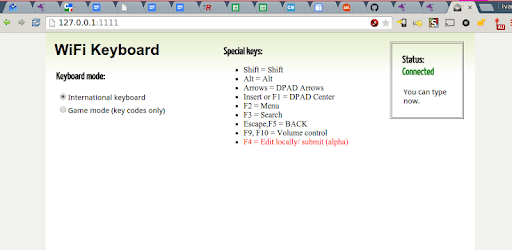
WiFi Keyboard is an Android app developed and published by Ivan Volosyuk. at Google Play Store on May 18, 2010 for Android users. WiFi Keyboard is so popular that it has gained 500000 installs so far and growing.
Are you tired of dealing with a slow and inefficient on-screen keyboard on your Android device? Look no further than WiFi Keyboard, the app that will revolutionize your typing experience. With its lightning-fast speed and seamless functionality, WiFi Keyboard is the ultimate tool for efficient typing and navigation on your Android device.
One of the standout features of WiFi Keyboard is its ability to effortlessly copy and paste text from your computer to your phone. Whether you're working on a document or simply want to transfer information, WiFi Keyboard makes it incredibly easy. With just a few clicks, you can copy and paste text from your KeePass key safe or any other source directly into your phone. Say goodbye to the hassle of manually typing out lengthy paragraphs - WiFi Keyboard has got you covered.
WiFi Keyboard takes convenience to the next level by allowing you to seamlessly integrate your phone with your PC. With the press of a button, you can transfer the entire input field from your phone to your browser for editing. This feature is perfect for those moments when you need to make quick edits or access information on your computer without any hassle. WiFi Keyboard truly bridges the gap between your phone and PC, making your workflow smoother than ever before.
One of the standout qualities of WiFi Keyboard is its reliability. Even without regular updates, this app continues to work flawlessly on various Android devices. Users have reported that WiFi Keyboard works seamlessly on their OnePlus 5T running Android 9, proving its longevity and compatibility. Whether you're a long-time user or new to WiFi Keyboard, you can trust that this app will consistently deliver outstanding performance.
WiFi Keyboard is not just a simple typing tool - it's a game-changer for productivity. With this app, you can easily edit existing text in textboxes, allowing for effortless collaboration and seamless communication. Whether you're working on a project or simply need to pass text back and forth, WiFi Keyboard has got you covered. Say goodbye to the frustration of limited editing options - WiFi Keyboard empowers you to make changes on the go.
For visually impaired users, finding a fast and efficient keyboard on Android can be a challenge. However, WiFi Keyboard steps in to fill this gap. With its intuitive design and lightning-fast speed, this app has become a lifeline for visually impaired users. WiFi Keyboard enables them to type faster and more accurately on their Android devices, enhancing their overall experience and productivity. We're committed to making technology accessible to all, and WiFi Keyboard is a testament to that commitment.
Yes, WiFi Keyboard supports multiple languages, allowing you to type in various languages with ease. Whether you're communicating in English, Spanish, or any other language, WiFi Keyboard has you covered.
WiFi Keyboard is compatible with a wide range of Android devices. From OnePlus 5T to Lenovo Yoga Tab, this app works seamlessly across different devices, ensuring a consistent and reliable typing experience.
Rest assured, WiFi Keyboard respects your privacy. While Samsung may issue warnings about keyboard recording, WiFi Keyboard does not record any of your typing activities. Your privacy and security are of utmost importance to us.
Absolutely! WiFi Keyboard allows you to navigate the Android UI using your keyboard's arrow and Esc keys. Say goodbye to tedious touchscreen navigation and embrace the efficiency of WiFi Keyboard.
Yes, WiFi Keyboard is available for free, allowing you to enjoy its incredible features without any cost. Upgrade your typing experience today with WiFi Keyboard.
Experience the power of WiFi Keyboard and revolutionize your typing and navigation on Android. Download the app today and unlock a new level of productivity and convenience.
Yes, you can run WiFi Keyboard on PC, but first, you will need emulator software installed on your Windows or MAC, which you can download for free. In the below video, you will find WiFi Keyboard in action. Before you install the emulator, check out the minimum and recommended system requirements to run it seamlessly. They may change depending on which version of the emulator you choose. Therefore, we recommend you download the latest version of the emulator. Below you will find three free Android emulators that we have shortlisted based on their popularity:
Up to date graphics drivers from Microsoft or the chipset vendor.
Storage: 1 GB available under installation path, 1.5GB available hard drive space
Internet: Broadband Internet connection
Regardless of which Android emulator you install, the steps to install, configure, and running the WiFi Keyboard app on PC are the same.