Published by Victron Energy BV
Updated October 10, 2025
Get live status info and configure Victron products via bluetooth or USB
| Version | 6.24 |
| Size | 85.8 MB |
| What's New | - Orion XS 1400: Add firmware v1.13- SolarSense: Small fixes and improvements- Fix issues with the remote products discovery- Fix BMW-600S not being shown through MQTT Connections- Fix back button behaviour on certain Android versions |
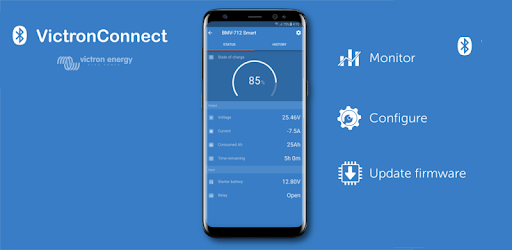
VictronConnect is an Android app developed and published by Victron Energy BV at Google Play Store on Nov 27, 2015 for Android users. VictronConnect is so popular that it has gained 2194646 installs so far and growing.
VictronConnect is a remarkable tool designed to streamline the monitoring and management of Victron products. With its intuitive interface and comprehensive features, it is an ideal companion for anyone using solar power solutions, battery monitoring systems, or any other Victron equipment.
The setup of VictronConnect is straightforward. When you first open the app, it automatically detects your Victron device and its firmware version. If there's an update available, the app will alert you and guide you through the update process within seconds. This ensures your device always runs the latest software, which enhances performance and reliability.
VictronConnect shines with its simple, polished user interface. The data is presented neatly, which makes it easy to access and interpret. Whether connecting to a solar charger or a power shunt, the app consistently delivers a seamless experience. The clear and organized design helps even beginners navigate through their devices’ settings and information effortlessly.
Connectivity is another strong suit of VictronConnect. The app connects reliably over Bluetooth, allowing you to manage your devices wirelessly. There may be instances where the connection might get disrupted if the app loses focus, but it reconnects when necessary, ensuring you stay updated with minimal hassle. This connectivity stability has proven beneficial for users who rely on it for critical monitoring, such as those with boat house banks or off-grid solar systems.
Once connected, VictronConnect offers extensive monitoring and configuration options for your Victron devices. You can access crucial information about your battery’s charging and load performance, making it an invaluable tool for maintaining life-saving lithium batteries. For instance, users can check whether the solar charger is functioning correctly or if there's an issue like inverted polarity, which the app will promptly flag for correction.
Moreover, advanced users can benefit from detailed logging and data recovery features. The app recovers stored trend data, enabling you to analyze battery usage and charging patterns over different periods—whether it's daily, weekly, or monthly. These features provide insights into your power systems, aiding in better management and efficiency.
VictronConnect continually evolves, with regular updates bringing new features and improvements. The app supports various Victron products, from smart chargers to MPPT solar charge controllers. With each update, users notice improvements in the app’s performance and additional capabilities, demonstrating Victron’s commitment to user satisfaction.
One particularly loved feature is the ability to export data in excel format. This is especially useful for those integrating the data with other systems, such as home automation setups. Additionally, the request for a widget on the main page and auto-connect functionality are welcomed, showing users’ engagement and Victron's responsiveness to feedback.
Addressing privacy concerns, VictronConnect ensures that permissions are managed appropriately. As with any modern app, it requests the necessary permissions to function correctly. Understanding these requirements and performing due diligence on privacy aspects enhances user confidence in the app’s security standards.
In summary, VictronConnect is an essential tool for anyone using Victron devices. Its ease of setup, reliable performance, detailed monitoring, and user-friendly design make it a standout app. With regular updates and excellent support, it is a robust solution for managing and configuring your Victron products efficiently.
Yes, you can run VictronConnect on PC, but first, you will need emulator software installed on your Windows or MAC, which you can download for free. In the below video, you will find VictronConnect in action. Before you install the emulator, check out the minimum and recommended system requirements to run it seamlessly. They may change depending on which version of the emulator you choose. Therefore, we recommend you download the latest version of the emulator. Below you will find three free Android emulators that we have shortlisted based on their popularity:
Up to date graphics drivers from Microsoft or the chipset vendor.
Storage: 1 GB available under installation path, 1.5GB available hard drive space
Internet: Broadband Internet connection
Regardless of which Android emulator you install, the steps to install, configure, and running the VictronConnect app on PC are the same.