Published by Biz Solution Co., Ltd.
Updated May 7, 2026
Khmer Unicode keyboard for Android
| Version | 5.0.1 |
| Size | 9.5 MB |
| What's New | minor bug fixes and improvements |
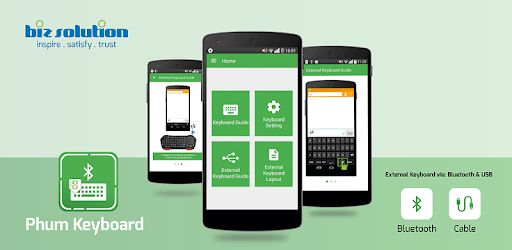
Phum Keyboard is an Android app developed and published by Biz Solution Co., Ltd. at Google Play Store on Jan 19, 2012 for Android users. Phum Keyboard is so popular that it has gained 5392626 installs so far and growing.
Phum Keyboard is a delightful typing tool, designed to enrich your typing experience. Think of it as your personal helper for writing, particularly if you are fond of enhancing communications with vibrant emojis or engaging in multilingual conversations. It's a keyboard that brings ease, fun, and efficiency to your fingertips.
If you're an enthusiast of texting on platforms like SMS and Facebook, Phum Keyboard has got you covered! Ensuring compatibility with modern phones, it elevates your texting game by providing a seamless experience. You can swiftly switch between languages, which is perfect for those who often communicate in both English and Khmer.
Although Phum Keyboard shines with many features, some users have encountered challenges when using it on older models like the SAMSUNG GALAXY S3. These users may find that the app doesn't work as efficiently. Installation issues with the Khmer Unicode standard are also mentioned occasionally. Despite these hurdles, if you face similar issues, the developers are consistently working to enhance compatibility and provide detailed guidance.
One of the standout features of Phum Keyboard is its Khmer typing capability. It's a game-changer for those learning the Khmer language. You not only type in Khmer effortlessly but also benefit from the predictive text function, though it can sometimes miss the mark in English. The keyboard makes learning a new language interactive and engaging.
While using Phum Keyboard, you'll notice the absence of stickers, a feature present in other keyboards like the Samsung keyboard. However, this hasn't stopped users from loving its many visual offerings. The app is adorned with an array of emojis and icons, making every message vibrant and expressive. From animals and food to weather icons, there's something for everyone to enjoy.
Phum Keyboard has undergone significant improvements, enhancing its usability and stability. However, some users have reported occasional force closes, particularly when accessing certain features. The developers continuously work on these issues, aiming to provide a smooth experience to all users. Their commitment to "making it very better and easy to use," as expressed by passionate fans, is palpable.
A noteworthy feature many users appreciate is the shift layout for Khmer words. If you switch between English and Khmer, you'll love the ease with which Phum Keyboard allows this transition. One minor tweak currently under request is for the keyboard to automatically revert after pressing a single letter, enhancing the typing flow.
The team behind Phum Keyboard is dedicated to crafting a stellar typing experience. They are very responsive to feedback, constantly working on updates and improvements. From guiding users through setup processes to adding new and requested features, their dedication ensures Phum Keyboard continues to evolve.
Phum Keyboard is more than just an app; it's a community of users eager for an efficient and enjoyable typing experience. Each update is a step towards perfection, making it a beloved tool for many. Whether you're typing in English, Khmer, or using a mix of emojis, Phum Keyboard is there to support you.
With Phum Keyboard, every keystroke brings you joy and efficiency, making your communication vibrant and effortless. Dive into the world of Phum Keyboard today and elevate your typing adventure!
Yes, you can run Phum Keyboard on PC, but first, you will need emulator software installed on your Windows or MAC, which you can download for free. In the below video, you will find Phum Keyboard in action. Before you install the emulator, check out the minimum and recommended system requirements to run it seamlessly. They may change depending on which version of the emulator you choose. Therefore, we recommend you download the latest version of the emulator. Below you will find three free Android emulators that we have shortlisted based on their popularity:
Up to date graphics drivers from Microsoft or the chipset vendor.
Storage: 1 GB available under installation path, 1.5GB available hard drive space
Internet: Broadband Internet connection
Regardless of which Android emulator you install, the steps to install, configure, and running the Phum Keyboard app on PC are the same.