Dragons World for PC

Dragons World for PC

Published by Social Quantum Ltd

Updated March 31, 2026

Want to raise your very own dragon? Then come play Dragons World!

What's New

Version1.98713
Size52.3 MB
What's New***LIBRARY*** Soon you'll be able to access the Library! In it you can buy valuable books and use them to upgrade your pets' skills. It's a great way to make your dragons healthier, better and stronger! What's new: New building – Library 3 types of rare Books New options for quality upgrades for your dragon!

Dragons World Screenshots

Dragons World PC screenshot

About Dragons World For PC

Dragons World is an Android app developed and published by Social Quantum Ltd at Google Play Store on Dec 16, 2013 for Android users. Dragons World is so popular that it has gained 10000000 installs so far and growing.

Explore the Enchantment of Dragons World

Welcome to the Magical Realm

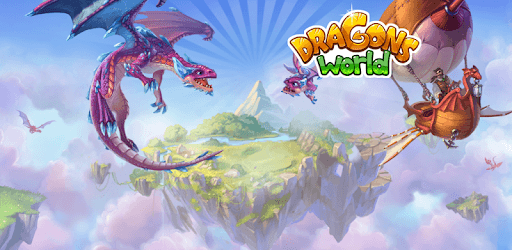
Step into **Dragons World**, a fairytale universe teeming with flying islands, magical creatures, and endless adventure. Here, you can collect a variety of dragon breeds and even create new ones! Whether you're a casual player or a dedicated dragon keeper, this game offers a captivating 3D experience that promises hours of fun and fascination.

Create and Collect

The game's main allure lies in its unique and mystical dragons. Each dragon has its own set of characteristics and designs, making the collecting and breeding aspect endlessly engaging. You can raise your dragons from baby to adult, watching them grow as you feed them. Imagine a dragon that looks a bit like a horse, complete with a pastel blue underbelly, deep purple wings, and orange-brown eyes—a truly mesmerizing sight.

Engage in Exciting Battles

Are you ready to prove you’re the best dragon keeper? Participate in thrilling tournaments against other players. The competitions add an extra layer of excitement, testing your skills and strategies. While some players have noted issues with rewards and updates in the tournament mode, the battles remain an integral and exhilarating part of the game.

A Fully 3D World

Dragons World boasts impressive 3D graphics, providing complete freedom of movement. The visual appeal is one of its standout features, making the game world feel alive and immersive. Whether you’re exploring flying islands or navigating through magical landscapes, the detailed graphics ensure that each moment is visually stunning.

A Relaxing Adventure

Sometimes, all you need is a peaceful game to unwind. Dragons World offers a relaxing escape. It’s one of those games you can enjoy at your own pace, making it perfect for when you want to play peacefully. The game’s gentle pace and enchanting environments make it an ideal choice for casual players looking to relax.

The Call for Updates

The passion for this game is undeniable, and many players are calling for updates and new features. The desire for new dragons, islands, and battle modes is strong, highlighting the community’s eagerness for fresh content. Updates could revitalize the game, attracting new players and rekindling the excitement for long-time fans.

The Joy of Discovery

One of the joys of Dragons World is the thrill of discovering new dragons and habitats. Though some players find certain elements like food, diamonds, and coins challenging to obtain, the satisfaction of progress and discovery keeps them coming back. The game is a testament to the magic that comes from overcoming challenges and achieving goals.

A Community of Dragon Keepers

Dragons World has built a community of dedicated players who cherish the game despite its lack of recent updates. The sense of belonging and shared love for dragons creates a unique bond among players. Whether it's reminiscing about favorite dragons or sharing breeding tips, the community spirit adds an extra layer of enjoyment.

Conclusion

**Dragons World** is a game that captivates the imagination and offers a delightful escape into a magical universe. From its 3D graphics to the joy of breeding and raising dragons, it provides a rich and engaging experience. While there are calls for updates to keep the adventure fresh, the beauty and charm of the game continue to enchant players of all ages.

Can I run Dragons World on PC?

Yes, you can run Dragons World on PC, but first, you will need emulator software installed on your Windows or MAC, which you can download for free. In the below video, you will find Dragons World in action. Before you install the emulator, check out the minimum and recommended system requirements to run it seamlessly. They may change depending on which version of the emulator you choose. Therefore, we recommend you download the latest version of the emulator. Below you will find three free Android emulators that we have shortlisted based on their popularity:

How to Install Dragons World on Windows PC

BlueStacks

Minimum
  • OS: Microsoft Windows 7 and above.
  • Processor: Intel or AMD Processor.
  • RAM: Your PC must have at least 4GB of RAM. (Note that having 4GB or more disk space is not a substitute for RAM)
  • Storage: 5GB Free Disk Space.
  • You must be an Administrator on your PC.
Recommended:
  • OS: Microsoft Windows 10
  • Processor: Intel or AMD Multi-Core Processor with Single Thread benchmark score > 1000.
  • Graphics: Intel/Nvidia/ATI, Onboard or Discrete controller with benchmark score >= 750.
  • Please ensure Virtualization is enabled on your PC/Laptop.
  • RAM: 8GB or higher
  • Storage: SSD (or Fusion/Hybrid Drives)
  • Internet: Broadband connection to access games, accounts and related content.

Up to date graphics drivers from Microsoft or the chipset vendor.

  • To start with, download Bluestacks from its official website. The latest version of BluesStacks is v 5, and it is around 400 MB.
  • Once the download is done, click on the Bluestacks set up file to install it on your Windows PC. Follow the on-screen instructions and install it accordingly.
  • The next step is to launch the emulator using the desktop shortcut and sign in using your Google account.
  • Now, head over to Bluestacks home screen and click on the Google Play Store icon.
  • Hit the search bar in Google Play and search for Dragons World.
  • Install Dragons World from the Play Store by clicking the Install option, which completes downloading of Dragons World on PC.

NoxPlayer

Minimum
  • Operating System: Windows XP SP3, Windows Vista, Windows 7, Windows 8, Windows 10, and DirectX 9.0c
  • Processor: At least dual-core processor, both Intel, and AMD are OK
  • Video: Supports Open GL 2.0 or above
  • Memory: 1.5 GB RAM
Recommended
  • Operating System: Windows 7, Windows 8, Windows 10
  • Processor: Multiple core processors which support VT-x or AMB-V Virtualization Technology, better performance with this function enabled
  • Video: The higher performance, the better
  • Memory: 4 GB RAM

Storage: 1 GB available under installation path, 1.5GB available hard drive space

Internet: Broadband Internet connection

  • Download NoxPlayer from the official website. The latest version of NoxPlayer is v 3, and it is around 600 MB.
  • Now install the emulator using the downloaded setup file. Just go through the on-screen instructions and install NoxPlayer on your computer or laptop.
  • After the installation process, launch the Nox Android emulator and log in using your Google account when it asks you.
  • Click on the Google Play Store icon and head over to the search bar to search Dragons World. Once found, click on the Install button to install Dragons World for PC.
  • If you do not find Dragons World on Google Play Store or if you want to skip logging in to Google, you can sideload APK (download the .APK file from this page and open it with NoxPlayer).
  • Launch Dragons World from home-screen and start playing it on PC right away!

MEmu

Minimum
  • 2 cores x86/x86_64 Processor (Intel or AMD CPU)
  • WinXP SP3 / Win7 / Win8 / Win10 (Not recommended to run on Server/Enterprise)
  • Latest Windows DirectX 11 / Graphics driver with OpenGL 2.0
  • Hardware Virtualization Technology (Intel VT-x/AMD-V) shall be enabled in BIOS
  • 2GB of RAM (4GB for x64 system)
  • 5GB of hard disk free space
Recommended
  • OS: Microsoft Windows 10 with VT Enabled
  • CPU: Single Thread PassMark score > 1500 (Intel/AMD Multi-Core).
  • Graphics: Intel/Nvidia/ATI, Onboard or Discrete controller with PassMark score > 750.
  • Latest Windows DirectX 11 / Graphics driver with OpenGL 4.5 or higher
  • RAM: 8GB or higher
  • HDD: SSD, 10GB of hard disk free space
  • Internet: Broadband connection with low latency for FPS games
  • Download MEmu Play from the official website. The latest version of NoxPlayer is v 7.5.
  • When the download is completed, install the MEmu emulator on your PC. Follow the on-screen instructions and keep on clicking the Next button until the final step.
  • Now, using the desktop shortcut, look for the MEmu Play emulator and launch it. Once done, it will ask you to log in using your Google account, proceed with the same.
  • MEmu Play will ask you to log in using your Google account. When you log in, it will sync your Google account to MEmu Play. Launch the Google Play Store by clicking on the icon and search for Dragons World.
  • Click on the Install button once you find Dragons World from the search results. You can also sideload APK (download the .APK file from this page and open it with MEmu) if you want to skip above step.
  • After the installation of Dragons World, you're all set to use the app on PC!

Regardless of which Android emulator you install, the steps to install, configure, and running the Dragons World app on PC are the same.


Download Dragons World For PC