
Published by ryzenrise
Updated September 14, 2025
Create custom video thumbnails for YouTube Videos.
| Version | 2.2.7 |
| Size | 22.0 MB |
| What's New | - Bug fixed and improve the stability.- Compatible with the latest Android version.- Update the Terms of Use and Privacy Policy. |
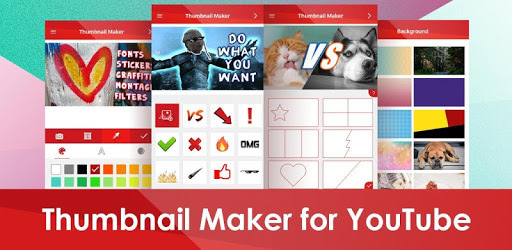
Thumbnail Maker for YouTube Videos is an Android app developed and published by ryzenrise at Google Play Store on Apr 1, 2017 for Android users. Thumbnail Maker for YouTube Videos is so popular that it has gained 500000 installs so far and growing.
Are you looking to enhance your YouTube video's visual appeal with stunning thumbnails? Look no further than Thumbnail Maker for YouTube Videos. This user-friendly app is perfect for both beginners and pros. It offers numerous features to help you create eye-catching thumbnails with ease.
Thumbnail Maker for YouTube Videos is incredibly simple to use. Its intuitive interface ensures that even those new to thumbnail creation can dive in without trouble. The app guides you through the process, step by step, allowing you to create captivating thumbnails in minutes. This simplicity is a huge advantage for beginners who may find other apps too complicated.
One of the great features of Thumbnail Maker for YouTube Videos is its customizable templates. You do not need to start from scratch. Select a template that fits the style and theme of your video, then personalize it with your own images, text, and colors. This not only saves time but also ensures consistency in your branding.
With a variety of tools at your disposal, you have the creative flexibility to make your thumbnails stand out. The app includes options for adding text, shapes, and stickers, allowing for a high degree of customization. The variety of fonts and styles means you can match your thumbnails to the tone of your videos easily.
Sometimes, you need to create or tweak a thumbnail while you're on the move. Thumbnail Maker for YouTube Videos makes this possible. The app is designed to be used on mobile devices, giving you the flexibility to edit thumbnails anywhere, anytime. This is perfect for busy content creators who need to make quick adjustments.
Thumbnail Maker for YouTube Videos isn't just for thumbnails. You can also create channel art, such as banners. This app's versatile tools can help you maintain a cohesive look across your entire YouTube channel. Achieving a professional look for your channel has never been easier.
Once your thumbnail is ready, Thumbnail Maker for YouTube Videos makes it easy to post it to your YouTube video. With just a few clicks, your new and improved thumbnail can be live on your channel, drawing viewers in. This ease of posting ensures that you can focus more on creating great content.
One of the best aspects of Thumbnail Maker for YouTube Videos is that it is free to use. You do not need to spend money to access high-quality tools for your thumbnails. While there are premium features available, the free version is more than capable of helping you create stunning visuals for your channel.
If you're aiming to improve your YouTube channel's visual appeal, Thumbnail Maker for YouTube Videos is an excellent tool. With its user-friendly interface, customizable templates, creative flexibility, and more, creating professional-quality thumbnails is a breeze.
Yes, you can run Thumbnail Maker for YouTube Videos on PC, but first, you will need emulator software installed on your Windows or MAC, which you can download for free. In the below video, you will find Thumbnail Maker for YouTube Videos in action. Before you install the emulator, check out the minimum and recommended system requirements to run it seamlessly. They may change depending on which version of the emulator you choose. Therefore, we recommend you download the latest version of the emulator. Below you will find three free Android emulators that we have shortlisted based on their popularity:
Up to date graphics drivers from Microsoft or the chipset vendor.
Storage: 1 GB available under installation path, 1.5GB available hard drive space
Internet: Broadband Internet connection
Regardless of which Android emulator you install, the steps to install, configure, and running the Thumbnail Maker for YouTube Videos app on PC are the same.