Published by Rhapsody International, Inc.
Updated April 23, 2026
| Version | 10.1.0 |
| Size | 78.4 MB |
| What's New | Redesigned music generation UI for a better experience 🎵Performance improvements for faster and smoother usageBug fixes and stability enhancements |
Napster is an Android app developed and published by Rhapsody International, Inc. at Google Play Store on for Android users. Napster is so popular that it has gained 16655476 installs so far and growing.
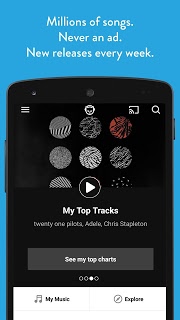
Are you tired of searching for the perfect music streaming app that meets all your needs? Look no further because Napster is here to revolutionize your music experience. With its wide range of features and user-friendly interface, Napster has become the go-to app for music lovers around the world.
One of the standout features of Napster is its vast library of songs. Whether you're a fan of the latest chart-toppers or prefer to explore more obscure genres, Napster has got you covered. With just a few taps, you can access all the tracks and artists you love, making it the ultimate streaming service for music enthusiasts.
Napster understands the importance of convenience when it comes to enjoying your favorite tunes. That's why the app offers a range of features to enhance your listening experience. The auto mode feature makes it easier than ever to navigate through the app, especially when you're on the move. And with the kids mode option, you can have peace of mind knowing that your little ones are listening to age-appropriate songs.
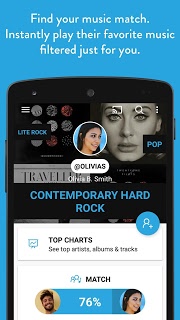
What sets Napster apart from other streaming services is its innovative earprint feature. This cutting-edge technology analyzes your music preferences and creates personalized playlists tailored to your taste. It's like having a personal DJ who knows exactly what songs will get you grooving. Prepare to be amazed as Napster plays music that resonates with your soul.
Supporting artists is at the core of Napster's mission. Unlike other streaming services, Napster pays artists 3 to 4 times more for their content. By using Napster, you can rest assured that your favorite musicians are being fairly compensated for their hard work. It's a win-win situation for both music lovers and artists.
Yes, Napster offers an offline mode that allows you to save your favorite songs and listen to them even without an internet connection. It's perfect for those long flights or road trips where connectivity may be limited.
Absolutely! Napster integrates seamlessly with Sonos, providing you with a superior listening experience. Say goodbye to complicated setups and enjoy your music in every corner of your home with just a few taps.
Unfortunately, Napster does not currently have a dedicated client for Mac. However, you can still enjoy all the features of Napster through their web player on your Mac.
Napster stands out from the crowd by offering a larger payout to artists, ensuring that they receive fair compensation for their work. Additionally, Napster's personalized recommendations and user-friendly interface make it a top choice for music lovers.
In conclusion, Napster is more than just a music streaming app. It's a gateway to a world of unlimited music, personalized recommendations, and fair compensation for artists. Experience the future of music streaming with Napster and elevate your listening journey to new heights.
Yes, you can run Napster on PC, but first, you will need emulator software installed on your Windows or MAC, which you can download for free. In the below video, you will find Napster in action. Before you install the emulator, check out the minimum and recommended system requirements to run it seamlessly. They may change depending on which version of the emulator you choose. Therefore, we recommend you download the latest version of the emulator. Below you will find three free Android emulators that we have shortlisted based on their popularity:
Up to date graphics drivers from Microsoft or the chipset vendor.
Storage: 1 GB available under installation path, 1.5GB available hard drive space
Internet: Broadband Internet connection
Regardless of which Android emulator you install, the steps to install, configure, and running the Napster app on PC are the same.