Published by Lakshmanan Anbalagan
Updated November 4, 2026
Mp3 Cutter and Ringtone Maker is a Music Editor/Alarm Tone maker/Ringtone maker.
| Version | 2.5 |
| Size | 3.0 MB |
| What's New | Android 10 crashes fixedAndroid 9 crashes fixed |
MP3 Cutter and Ringtone Maker is an Android app developed and published by Lakshmanan Anbalagan at Google Play Store on May 11, 2014 for Android users. MP3 Cutter and Ringtone Maker is so popular that it has gained 10000000 installs so far and growing.
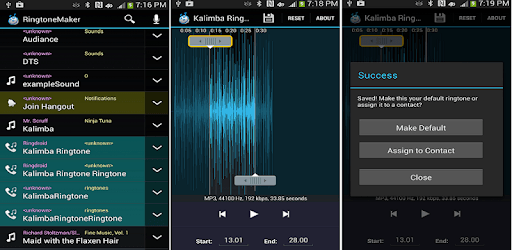
MP3 Cutter and Ringtone Maker is a fantastically simple app that allows you to create your own ringtones and notifications. Tired of the same old default tones that come pre-installed on your phone? This app is here to help!
One of the key features of MP3 Cutter and Ringtone Maker is its ease of use. You can easily find any song stored on your device and select the precise clip you want to use as your ringtone or notification tone. The app makes it effortlessly simple to start and stop at any particular part of the song. This means you can customize the sound exactly to your liking.
The beauty of MP3 Cutter and Ringtone Maker is in its flexibility. You can cut any part of a song, which means your ringtone can be truly unique. Imagine having a specific part of your favorite song play every time your phone rings. It's more than just about individualism; it’s about personalizing your experience.
Another impressive feature of MP3 Cutter and Ringtone Maker is the ability to mix songs. This feature allows you to blend different parts of various songs together to create something completely new. Maybe you want a ringtone that starts with a slow intro and bursts into an upbeat chorus; with this app, you can do that seamlessly.
MP3 Cutter and Ringtone Maker stands out with its speed and efficiency. You can create a ringtone literally in seconds. The interface is user-friendly and doesn't require a lot of technical know-how. Simply choose a song, select the part you want, and save it as your ringtone. It’s that straightforward.
While the app is free, it also impresses with its minimal ad usage. This ensures that while you are creating your ringtone, you are not bombarded with ads, making the experience more enjoyable. This lean ad model makes many users more willing to keep the app installed and even engage with the occasional ad they do see.
MP3 Cutter and Ringtone Maker has been a go-to app for many users for years, providing a reliable service that never disappoints. It maintains a high level of performance, enabling you to create perfect ringtones every time. The app’s consistent quality keeps users coming back, always satisfied with their custom tones.
In a crowded room, ever struggle to figure out if it's your phone ringing? With MP3 Cutter and Ringtone Maker, you can easily recognize your phone's ringtone. This distinct feature sets it apart from the mundane standardized tones, adding that personal touch that makes your phone uniquely yours.
In summary, MP3 Cutter and Ringtone Maker is an excellent tool for anyone looking to customize their phone’s ringtone and notification sounds. It’s easy to use, efficient, ad-light, and packed with features that allow for endless customization. If you love changing your ringtones and want your phone to reflect your personal taste, this app is a must-have.
Yes, you can run MP3 Cutter and Ringtone Maker on PC, but first, you will need emulator software installed on your Windows or MAC, which you can download for free. In the below video, you will find MP3 Cutter and Ringtone Maker in action. Before you install the emulator, check out the minimum and recommended system requirements to run it seamlessly. They may change depending on which version of the emulator you choose. Therefore, we recommend you download the latest version of the emulator. Below you will find three free Android emulators that we have shortlisted based on their popularity:
Up to date graphics drivers from Microsoft or the chipset vendor.
Storage: 1 GB available under installation path, 1.5GB available hard drive space
Internet: Broadband Internet connection
Regardless of which Android emulator you install, the steps to install, configure, and running the MP3 Cutter and Ringtone Maker app on PC are the same.