Published by Plickers
Updated December 7, 2025
Real-time classrom data without the need for student devices
| Version | 4.5.8 |
| Size | 14.8 MB |
| What's New | - fixes a bug causing questions to appear to be missing/duplicated in the queue |
Plickers is an Android app developed and published by Plickers at Google Play Store on Feb 8, 2013 for Android users. Plickers is so popular that it has gained 1674825 installs so far and growing.
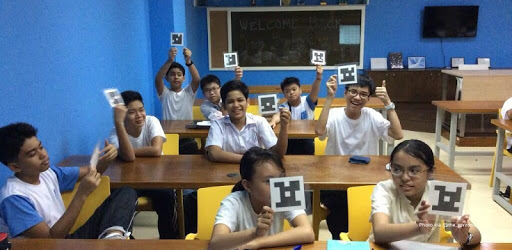
Are you a teacher looking for a quick and effective way to assess your students' understanding? Look no further than Plickers, a wonderful application that allows for quick assessment and provides you and your students with immediate feedback. With its user-friendly interface and innovative features, Plickers is a game-changer in the world of classroom assessment.
One of the standout features of Plickers is its ability to provide instant feedback. Gone are the days of waiting for papers to be graded or manually inputting data into spreadsheets. With Plickers, you can easily see your students' results in real-time, allowing you to make timely adjustments to your teaching strategies.
Furthermore, Plickers offers a spreadsheet option that simplifies the process of analyzing and sorting data. This feature is a great tool for teachers who want to delve deeper into their students' performance and identify areas for improvement.
One of the reasons why Plickers is loved by both teachers and students is its engaging quiz feature. Students love the interactive nature of Plickers quizzes, making learning fun and exciting. As a teacher, you can create quizzes on various topics and assess your students' knowledge in a way that captivates their attention.
Moreover, Plickers allows you to customize quizzes based on specific topics or standards. This flexibility ensures that you can tailor your assessments to meet the unique needs of your classroom.
Plickers is a great addition to any teacher's toolbox, especially in classrooms with limited Wi-Fi access or when students don't have mobile devices. Unlike some other assessment apps, Plickers can be used offline, ensuring that you can seamlessly integrate it into your teaching regardless of your technological constraints.
Setting up and using Plickers is a breeze. The intuitive interface makes it easy for both tech-savvy and tech-challenged teachers to navigate the app effortlessly. Additionally, the customer service provided by Plickers is exceptional, ensuring that any issues or concerns you may have are promptly addressed.
Currently, Plickers does not have a feature that allows users to share and search for questions by topic or standard. However, the app's developers are constantly working on updates and improvements, so this may be a feature to look forward to in the future.
While the iPhone version of Plickers allows users to take a picture of questions, this feature is not available on all devices. It's always a good idea to check for updates and new features regularly to see if this functionality becomes available on your device.
Using any app for an extended period of time can drain your device's battery. It's recommended to keep a power cord close by when using Plickers to ensure that your device remains charged throughout your teaching sessions.
Plickers is not limited to just quizzes and assessments. Many teachers have found creative ways to utilize the app for concept review and class reminders. For example, you can create Plickers questions that serve as reminders for upcoming assignments or clarify directions for certain tasks. The possibilities are endless!
In conclusion, Plickers is a valuable tool for teachers seeking a convenient and engaging way to assess their students' understanding. With its instant feedback, customizable quizzes, and offline accessibility, Plickers is a game-changer in the world of classroom assessment. Try it out today and revolutionize your teaching experience!
Yes, you can run Plickers on PC, but first, you will need emulator software installed on your Windows or MAC, which you can download for free. In the below video, you will find Plickers in action. Before you install the emulator, check out the minimum and recommended system requirements to run it seamlessly. They may change depending on which version of the emulator you choose. Therefore, we recommend you download the latest version of the emulator. Below you will find three free Android emulators that we have shortlisted based on their popularity:
Up to date graphics drivers from Microsoft or the chipset vendor.
Storage: 1 GB available under installation path, 1.5GB available hard drive space
Internet: Broadband Internet connection
Regardless of which Android emulator you install, the steps to install, configure, and running the Plickers app on PC are the same.