Published by Paul Lipnyagov
Updated September 20, 2025
Must have for every beatmaker: try our 2800+ sounds or create own sound pack
| Version | 3.8.16 |
| Size | 34.5 MB |
| What's New | Hey beatmakers,This update brings improvements and fixes some instabilities.Questions? Suggestions? Write to us 24/7 at [email protected] Pads 24 Team |
Drum Pads 24 - Music Maker is an Android app developed and published by Paul Lipnyagov at Google Play Store on Jun 20, 2013 for Android users. Drum Pads 24 - Music Maker is so popular that it has gained 21466553 installs so far and growing.
Are you ready to dive into the exciting world of music creation? Drum Pads 24 - Music Maker is the perfect app to unleash your inner musician, whether you're a seasoned DJ or a hobbyist looking for a fun way to make beats. With Drum Pads 24, you can create stunning music pieces without needing an expensive setup. This friendly and creative app is perfect for every music enthusiast, regardless of skill level.
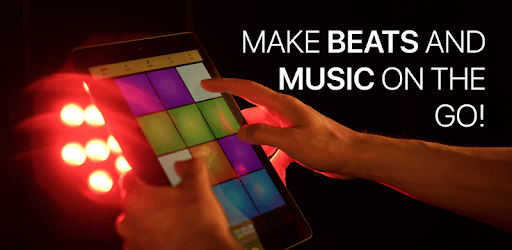
Drum Pads 24 - Music Maker is incredibly user-friendly. Even if you've never played a note before, you can tap into your creativity easily. The app features programmable sounds and live pads that allow you to make music effortlessly. Each pad lights up with different sounds, giving you an interactive and enjoyable experience as you explore different beat combinations.
One of the standout features of Drum Pads 24 is its compatibility with various devices. No matter if you're on your phone, tablet, or laptop, this app works smoothly and integrates well. Just a quick install and you're ready to either start a new musical journey or continue from where you left off on another device.
Drum Pads 24 boasts high-quality sound samples that can rival even the paid apps in this category. The clarity and fidelity of these sounds ensure that your music projects are top-notch. Whether you're making beats for YouTube, crafting an intro video, or experimenting with new tracks, the app provides a sound quality that will make your creations stand out.
If you’re looking to enhance your musical toolkit further, Drum Pads 24 offers yearly and monthly subscription options. These plans are reasonably priced and provide additional features that elevate your beat-making experience. It’s worth it to invest in these plans to access exclusive sounds and tools, making your music even more extraordinary.
One of the features that set Drum Pads 24 apart is its responsiveness. The app is designed to be quick and nimble, ensuring it keeps pace with your creative flow. It’s great for live performances in world events or just a jam session at home. This swift response makes it feel like an extension of your music-making intuition.
Drum Pads 24 also comes with strong community support. The developers are proactive and responsive, ensuring that any issues are promptly addressed. This community-focused approach makes using the app more enjoyable, knowing there is always help available if needed. Additionally, the app provides a platform where you can share your creations and get feedback, fostering a sense of belonging and collaboration.
Customization is key, and Drum Pads 24 does not disappoint. You can edit beats, rearrange sounds, and customize your music to fit your style perfectly. This versatility allows you to explore different musical paths and create unique compositions that are true to your creative vision.
Drum Pads 24 offers both a free version and a premium version with additional features. The free version provides plenty of tools and sounds to kickstart your music-making adventure. The premium version unlocks extra features and more high-quality samples, giving you an even richer palette to work with.
Overall, Drum Pads 24 - Music Maker is an exceptional app for anyone interested in creating music. It combines ease of use, high-quality sounds, and strong community support to provide a seamless and enjoyable music-making experience. Why wait? Dive into the world of music with Drum Pads 24 and let your creativity soar!
Yes, you can run Drum Pads 24 - Music Maker on PC, but first, you will need emulator software installed on your Windows or MAC, which you can download for free. In the below video, you will find Drum Pads 24 - Music Maker in action. Before you install the emulator, check out the minimum and recommended system requirements to run it seamlessly. They may change depending on which version of the emulator you choose. Therefore, we recommend you download the latest version of the emulator. Below you will find three free Android emulators that we have shortlisted based on their popularity:
Up to date graphics drivers from Microsoft or the chipset vendor.
Storage: 1 GB available under installation path, 1.5GB available hard drive space
Internet: Broadband Internet connection
Regardless of which Android emulator you install, the steps to install, configure, and running the Drum Pads 24 - Music Maker app on PC are the same.