Mandrasoft Manga//Light-novel Reader for PC

Mandrasoft Manga//Light-novel Reader for PC

Published by Mandrasoft

Updated October 6, 2025

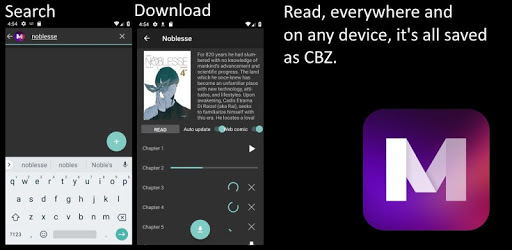
Browse or search through thousands of mangas and light-novels Read online or off

What's New

Version1.6.3
Size8.5 MB
What's New- Fixes for french mangas that stopped working.

Mandrasoft Manga//Light-novel Reader Screenshots

Mandrasoft Manga//Light-novel Reader PC screenshot

About Mandrasoft Manga//Light-novel Reader For PC

Mandrasoft Manga//Light-novel Reader is an Android app developed and published by Mandrasoft at Google Play Store on Nov 13, 2018 for Android users. Mandrasoft Manga//Light-novel Reader is so popular that it has gained 10000 installs so far and growing.

Mandrasoft Manga//Light-novel Reader: Your Ultimate Guide to Manga and Light Novels

If you love manga and light novels, Mandrasoft Manga//Light-novel Reader is the perfect companion for your reading adventures. This app provides a rich and immersive experience for all fans, young and old. Discover why Mandrasoft Manga//Light-novel Reader stands out as an outstanding choice for reading your favorite stories.

Constant Updates Show Devs Care

One of the unique aspects of Mandrasoft Manga//Light-novel Reader is its continuous improvements. Frequent updates ensure that users get the best possible reading experience. This consistent attention to enhancing the app reflects the developers' commitment to their community.

Minimal Intrusive Ads

Ads are often a necessary inconvenience with free apps. However, Mandrasoft Manga//Light-novel Reader manages to keep them minimal and non-intrusive. You can easily scroll past them, and they do not interrupt your reading flow. This thoughtful design choice ensures a smooth and pleasurable experience for users.

Fast Download Speeds

Nobody likes to wait for downloads. Mandrasoft Manga//Light-novel Reader boasts phenomenal download speeds, allowing you to quickly access your desired content. Whether you are downloading manga or light novels, the app ensures that you have your reading material ready in no time.

Excellent Reader with Customizable Features

Mandrasoft Manga//Light-novel Reader offers several customization options to tailor the app to your preferences. For example, while reading vertically, you can opt for a page-by-page view instead of a continuous scroll. This flexibility enhances your reading comfort and enjoyment.

SD Card Storage Option

Storage can be a concern, especially for those with limited internal memory. Mandrasoft Manga//Light-novel Reader provides a solution. By creating a specific folder path on your SD card, you can transfer your downloaded content there. This feature ensures you always have space for more manga and light novels.

Extensive Library with a Wide Range of Titles

Mandrasoft Manga//Light-novel Reader offers a vast library, featuring a diverse range of manga and light novels. From popular titles like "JoJo's Bizarre Adventure" to "The Rising of the Shield Hero," the selection caters to various tastes. The app also supports updates for new chapters, making it easy to stay current with your favorite series.

Offline Reading Capabilities

One of the standout features is the ability to download manga and read them offline. This advantage is particularly useful for those who travel or have limited internet access. You can enjoy your stories anytime, anywhere without worrying about connectivity.

Convenient Organization

Efficient organization is key to a great reading experience. Mandrasoft Manga//Light-novel Reader allows you to classify manga as complete or ongoing, making it easier to manage your reading list. This feature is especially beneficial for users who prefer to read completed series without interruptions.

Easy Navigation and User Interface

The app's user interface is intuitive and user-friendly. It's easy to find what you're looking for, and navigating through the app is straightforward. The option to unmark "Horizontal Reader" in settings allows you to scroll up and down, enhancing your reading comfort.

Enhancing Reader Enjoyment

Additional thoughtful features, such as bookmarking where you left off in a chapter, make Mandrasoft Manga//Light-novel Reader a delightful tool for manga enthusiasts. Though some areas might need tweaks, the overall experience is highly enjoyable, ensuring readers can immerse themselves fully in their favorite stories.

Mandrasoft Manga//Light-novel Reader is truly a gem for anyone passionate about manga and light novels. With its rich features, constant updates, and user-friendly design, it's no wonder many consider it the best reading app available. Dive into your next adventure with Mandrasoft Manga//Light-novel Reader today!

Can I run Mandrasoft Manga//Light-novel Reader on PC?

Yes, you can run Mandrasoft Manga//Light-novel Reader on PC, but first, you will need emulator software installed on your Windows or MAC, which you can download for free. In the below video, you will find Mandrasoft Manga//Light-novel Reader in action. Before you install the emulator, check out the minimum and recommended system requirements to run it seamlessly. They may change depending on which version of the emulator you choose. Therefore, we recommend you download the latest version of the emulator. Below you will find three free Android emulators that we have shortlisted based on their popularity:

How to Install Mandrasoft Manga//Light-novel Reader on Windows PC

BlueStacks

Minimum
  • OS: Microsoft Windows 7 and above.
  • Processor: Intel or AMD Processor.
  • RAM: Your PC must have at least 4GB of RAM. (Note that having 4GB or more disk space is not a substitute for RAM)
  • Storage: 5GB Free Disk Space.
  • You must be an Administrator on your PC.
Recommended:
  • OS: Microsoft Windows 10
  • Processor: Intel or AMD Multi-Core Processor with Single Thread benchmark score > 1000.
  • Graphics: Intel/Nvidia/ATI, Onboard or Discrete controller with benchmark score >= 750.
  • Please ensure Virtualization is enabled on your PC/Laptop.
  • RAM: 8GB or higher
  • Storage: SSD (or Fusion/Hybrid Drives)
  • Internet: Broadband connection to access games, accounts and related content.

Up to date graphics drivers from Microsoft or the chipset vendor.

  • To start with, download Bluestacks from its official website. The latest version of BluesStacks is v 5, and it is around 400 MB.
  • Once the download is done, click on the Bluestacks set up file to install it on your Windows PC. Follow the on-screen instructions and install it accordingly.
  • The next step is to launch the emulator using the desktop shortcut and sign in using your Google account.
  • Now, head over to Bluestacks home screen and click on the Google Play Store icon.
  • Hit the search bar in Google Play and search for Mandrasoft Manga//Light-novel Reader.
  • Install Mandrasoft Manga//Light-novel Reader from the Play Store by clicking the Install option, which completes downloading of Mandrasoft Manga//Light-novel Reader on PC.

NoxPlayer

Minimum
  • Operating System: Windows XP SP3, Windows Vista, Windows 7, Windows 8, Windows 10, and DirectX 9.0c
  • Processor: At least dual-core processor, both Intel, and AMD are OK
  • Video: Supports Open GL 2.0 or above
  • Memory: 1.5 GB RAM
Recommended
  • Operating System: Windows 7, Windows 8, Windows 10
  • Processor: Multiple core processors which support VT-x or AMB-V Virtualization Technology, better performance with this function enabled
  • Video: The higher performance, the better
  • Memory: 4 GB RAM

Storage: 1 GB available under installation path, 1.5GB available hard drive space

Internet: Broadband Internet connection

  • Download NoxPlayer from the official website. The latest version of NoxPlayer is v 3, and it is around 600 MB.
  • Now install the emulator using the downloaded setup file. Just go through the on-screen instructions and install NoxPlayer on your computer or laptop.
  • After the installation process, launch the Nox Android emulator and log in using your Google account when it asks you.
  • Click on the Google Play Store icon and head over to the search bar to search Mandrasoft Manga//Light-novel Reader. Once found, click on the Install button to install Mandrasoft Manga//Light-novel Reader for PC.
  • If you do not find Mandrasoft Manga//Light-novel Reader on Google Play Store or if you want to skip logging in to Google, you can sideload APK (download the .APK file from this page and open it with NoxPlayer).
  • Launch Mandrasoft Manga//Light-novel Reader from home-screen and start playing it on PC right away!

MEmu

Minimum
  • 2 cores x86/x86_64 Processor (Intel or AMD CPU)
  • WinXP SP3 / Win7 / Win8 / Win10 (Not recommended to run on Server/Enterprise)
  • Latest Windows DirectX 11 / Graphics driver with OpenGL 2.0
  • Hardware Virtualization Technology (Intel VT-x/AMD-V) shall be enabled in BIOS
  • 2GB of RAM (4GB for x64 system)
  • 5GB of hard disk free space
Recommended
  • OS: Microsoft Windows 10 with VT Enabled
  • CPU: Single Thread PassMark score > 1500 (Intel/AMD Multi-Core).
  • Graphics: Intel/Nvidia/ATI, Onboard or Discrete controller with PassMark score > 750.
  • Latest Windows DirectX 11 / Graphics driver with OpenGL 4.5 or higher
  • RAM: 8GB or higher
  • HDD: SSD, 10GB of hard disk free space
  • Internet: Broadband connection with low latency for FPS games
  • Download MEmu Play from the official website. The latest version of NoxPlayer is v 7.5.
  • When the download is completed, install the MEmu emulator on your PC. Follow the on-screen instructions and keep on clicking the Next button until the final step.
  • Now, using the desktop shortcut, look for the MEmu Play emulator and launch it. Once done, it will ask you to log in using your Google account, proceed with the same.
  • MEmu Play will ask you to log in using your Google account. When you log in, it will sync your Google account to MEmu Play. Launch the Google Play Store by clicking on the icon and search for Mandrasoft Manga//Light-novel Reader.
  • Click on the Install button once you find Mandrasoft Manga//Light-novel Reader from the search results. You can also sideload APK (download the .APK file from this page and open it with MEmu) if you want to skip above step.
  • After the installation of Mandrasoft Manga//Light-novel Reader, you're all set to use the app on PC!

Regardless of which Android emulator you install, the steps to install, configure, and running the Mandrasoft Manga//Light-novel Reader app on PC are the same.

Download Mandrasoft Manga//Light-novel Reader For PC