Published by jolt
Updated March 27, 2026
Jolt scheduling and roster app for time off, trades, availability, and more.
| Version | 3.0.5 |
| Size | 25.8 MB |
| What's New | Compatibility with store requirements |
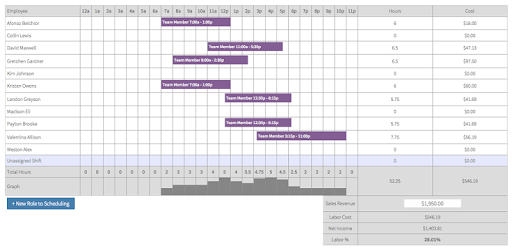
Jolt Lite is an Android app developed and published by jolt at Google Play Store on Oct 13, 2015 for Android users. Jolt Lite is so popular that it has gained 50000 installs so far and growing.
Running a business can be a challenging task, especially when it comes to managing schedules and keeping track of employee shifts. But fear not, because Jolt Lite is here to revolutionize the way you handle your business operations. With its versatile functions and exceptional customer service, this app is a game-changer for any business owner.
Jolt Lite is designed to make your life easier by providing you with all the necessary information about your workdays. From the moment you start your day to the time you finish, this app keeps you informed about your schedule, ensuring that you never miss a beat. Say goodbye to the days of confusion and hello to streamlined business management.
One of the standout features of Jolt Lite is its commitment to customer satisfaction. The company behind the app goes above and beyond to ensure that their users are happy and their needs are met. In fact, they actively reach out to their customers to inquire about any additional features they would like to see in the software. This level of dedication is truly commendable and sets Jolt Lite apart from its competitors.
Jolt Lite is not just a static app; it constantly evolves to meet the changing needs of its users. When customers requested labor reports, the company listened and added a beta version of this feature a few months later. This commitment to improvement demonstrates the app's dedication to providing the best possible user experience.
While some users have reported issues with the app after a recent update, the company swiftly resolved these problems within a couple of weeks. This level of responsiveness shows the company's commitment to ensuring that their app functions smoothly and efficiently. The inconvenience caused during this period was unfortunate, but it is worth acknowledging the company's efforts to rectify the situation in a timely manner.
Jolt Lite is truly an amazing app that simplifies the process of managing shifts and keeping track of schedules. Its effectiveness and ease of use make it one of the most useful apps available for business owners. The app's intuitive interface allows for seamless navigation, ensuring that even those who are not tech-savvy can easily adapt to its features.
While Jolt Lite is already an exceptional app, there are a few areas where it could be further enhanced. Some users have expressed the desire for faster loading times and the ability to view their schedule on a daily, weekly, and monthly basis. These additions would make it even easier to manage busy periods and plan ahead. However, these minor suggestions do not overshadow the overall excellence of the app.
Recently, some users have encountered a blank white screen when trying to access the app. This problem has affected users with the Samsung Galaxy S8. Rest assured, the company is aware of this issue and is working diligently to resolve it. We appreciate your patience as they work towards a solution.
Jolt Lite is a remarkable app that simplifies business management and streamlines employee scheduling. With its exceptional customer service, continuous improvement, and user-friendly experience, it is no wonder that this app has garnered such positive feedback. Despite minor suggestions for improvement and the recent blank screen issue, Jolt Lite remains an invaluable tool for any business owner.
Yes, Jolt Lite is compatible with both Android and iOS devices, making it accessible to a wide range of users.
Yes, Jolt Lite offers free scheduling, providing an affordable solution for businesses of all sizes.
You can reach out to Jolt Lite's customer service team through their website or within the app itself. They are known for their exceptional support and quick response times.
Yes, Jolt Lite is a versatile app that offers various features to enhance your business management, such as labor reports and customizable schedules.
Absolutely! Jolt Lite caters to businesses of all sizes, from small startups to large corporations. Its user-friendly interface and customizable features make it adaptable to any business's needs.
Yes, you can run Jolt Lite on PC, but first, you will need emulator software installed on your Windows or MAC, which you can download for free. In the below video, you will find Jolt Lite in action. Before you install the emulator, check out the minimum and recommended system requirements to run it seamlessly. They may change depending on which version of the emulator you choose. Therefore, we recommend you download the latest version of the emulator. Below you will find three free Android emulators that we have shortlisted based on their popularity:
Up to date graphics drivers from Microsoft or the chipset vendor.
Storage: 1 GB available under installation path, 1.5GB available hard drive space
Internet: Broadband Internet connection
Regardless of which Android emulator you install, the steps to install, configure, and running the Jolt Lite app on PC are the same.