Published by Words Mobile
Updated June 17, 2026
Rocket Car Ball is #1 3D sports game with rocket cars that blends soccer & cars.
| Version | 2.9 |
| Size | 44.5 MB |
| What's New | Fixed some crash issues of the game. Thanks. |
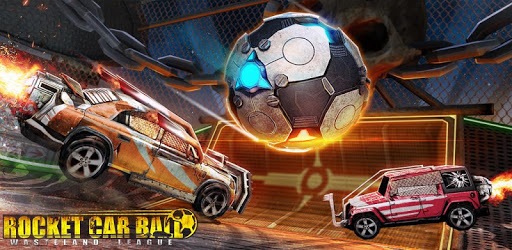
Rocket Car Ball is an Android app developed and published by Words Mobile at Google Play Store on Apr 9, 2018 for Android users. Rocket Car Ball is so popular that it has gained 63784479 installs so far and growing.
Are you ready for an adrenaline-packed gaming experience that will keep you on the edge of your seat? Look no further than Rocket Car Ball, the game that combines the excitement of rocket league with the thrill of car racing. This game has taken the gaming world by storm, and for good reason. With its addictive gameplay, stunning graphics, and endless fun, Rocket Car Ball is a must-play for gamers of all ages.
Rocket Car Ball offers an amazing gaming experience that will leave you wanting more. The developers have done an incredible job of creating a game that is not only visually stunning but also incredibly fun to play. From the moment you start the game, you'll be hooked.
One of the best things about Rocket Car Ball is its versatility. Whether you're a fan of rocket league or simply enjoy car racing games, this game has something for everyone. The gameplay is fast-paced and exhilarating, with plenty of twists and turns to keep you on your toes.
With Rocket Car Ball, the fun never ends. The game offers a wide range of levels and challenges that will test your skills and keep you entertained for hours on end. From racing against the clock to scoring goals with your rocket-powered car, there's always something new and exciting to do.
But the fun doesn't stop there. Rocket Car Ball also offers a multiplayer mode that allows you to compete against your friends or players from around the world. Show off your skills and prove that you're the ultimate Rocket Car Ball champion.
The developers of Rocket Car Ball are dedicated to providing the best gaming experience possible. They are constantly working on improving the game and adding new features to keep players engaged and entertained. From new levels and cars to improved graphics and gameplay, you can expect regular updates that will take your gaming experience to the next level.
No, Rocket Car Ball is currently only available for mobile devices. However, the game offers the same level of excitement and fun as other popular console games.
Yes, Rocket Car Ball is available for free on both iOS and Android devices. You can download it from the App Store or Google Play Store and start playing right away.
While Rocket Car Ball is free to play, it does offer in-app purchases that allow you to unlock additional cars and features. However, these purchases are optional, and you can enjoy the game without spending any money.
Yes, Rocket Car Ball can be played offline. This means that you can enjoy the game even when you don't have access to an internet connection.
Yes, Rocket Car Ball is suitable for players of all ages. However, younger players may need some assistance with the gameplay and controls.
So what are you waiting for? Download Rocket Car Ball today and embark on an unforgettable gaming adventure. Get ready to experience the thrill of rocket-powered cars and intense car battles like never before. It's time to unleash your inner racer and become the ultimate Rocket Car Ball champion!
Yes, you can run Rocket Car Ball on PC, but first, you will need emulator software installed on your Windows or MAC, which you can download for free. In the below video, you will find Rocket Car Ball in action. Before you install the emulator, check out the minimum and recommended system requirements to run it seamlessly. They may change depending on which version of the emulator you choose. Therefore, we recommend you download the latest version of the emulator. Below you will find three free Android emulators that we have shortlisted based on their popularity:
Up to date graphics drivers from Microsoft or the chipset vendor.
Storage: 1 GB available under installation path, 1.5GB available hard drive space
Internet: Broadband Internet connection
Regardless of which Android emulator you install, the steps to install, configure, and running the Rocket Car Ball app on PC are the same.