Published by Husqvarna Group
Updated August 14, 2025
Automower Connect allows you control of your Husqvarna robotic lawnmower
| Version | 2026.1.0 |
| Size | 66.8 MB |
| What's New | This release supports our new models with vision technology: Automower®405VE NERA, Automower®410VE NERA, Automower®430V NERA, Automower® 450V NERA.The update also includes important improvements and bug fixes. |
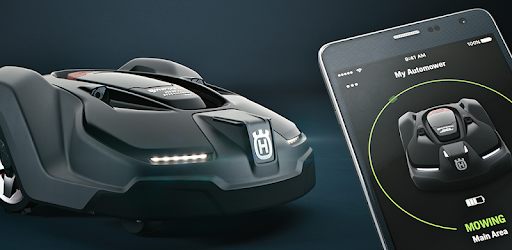
Automower Connect is an Android app developed and published by Husqvarna Group at Google Play Store on Apr 17, 2015 for Android users. Automower Connect is so popular that it has gained 1361945 installs so far and growing.
Automower Connect has quickly become a must-have for anyone looking to keep their lawn in pristine condition without the hassle. This innovative tool is truly remarkable, and those who have integrated it into their gardening routine are seeing some fantastic benefits.
One of the standout features of Automower Connect is the easy-to-use remote control functionality. Picture this: you're sitting on your couch, and it's a bit wet outside. With just a few taps on your phone, you can adjust the mowing schedule to ensure your lawn is perfectly tended to – rain or shine!
Automower Connect allows you to keep tabs on your mower’s activities in real time. The app provides live updates of where the mower is and what it's doing. You can see where it’s been and identify which areas have been cut. This level of insight ensures that no corner of your lawn is overlooked.
The design of Automower Connect is intuitive and user-friendly. It’s clear that a lot of thought has gone into making sure the app is as accessible and easy to understand as possible. It's straightforward to get everything set up and start managing your mower.
The app sends helpful notifications, so you're always in the loop. Knowing when the mower is moving, charging, or stopping makes it easy to stay connected without having to check constantly.
Automower Connect is frequently updated to meet user needs better. For example, recent adjustments have seen improvements such as fixing the dead map issue and enhancing connectivity. Users are noticing these positive changes and enjoying a more seamless experience.
There is always room for improvement, and Automower Connect is no exception. Users have suggested a few potential updates, such as the ability to restart the mower remotely after an error. Others have hinted at wanting more detailed map configuration options. It's exciting to think about how the app might evolve to include these additional features.
Automower Connect is simply essential for anyone serious about maintaining their lawn. It’s reliable, easy to use, and brings a tremendous amount of convenience and control straight to your phone. There’s joy in seeing your lawn look its best with minimal effort, knowing that you have full control at your fingertips.
Yes, you can run Automower Connect on PC, but first, you will need emulator software installed on your Windows or MAC, which you can download for free. In the below video, you will find Automower Connect in action. Before you install the emulator, check out the minimum and recommended system requirements to run it seamlessly. They may change depending on which version of the emulator you choose. Therefore, we recommend you download the latest version of the emulator. Below you will find three free Android emulators that we have shortlisted based on their popularity:
Up to date graphics drivers from Microsoft or the chipset vendor.
Storage: 1 GB available under installation path, 1.5GB available hard drive space
Internet: Broadband Internet connection
Regardless of which Android emulator you install, the steps to install, configure, and running the Automower Connect app on PC are the same.